05 · EPOS & payments

An EPOS that runs the table, the bill and the cash-up

Seat guests, ring orders, split any bill and close the day from one screen on a phone or tablet. For independent restaurants that want a till without a hardware contract or per-seat charges.

  • 0%TableSpark commission on card payments
  • ÷2 to ÷6even splits, or any amounts, across cash and card
  • 1 screenfloor, order pad, bill and payment together
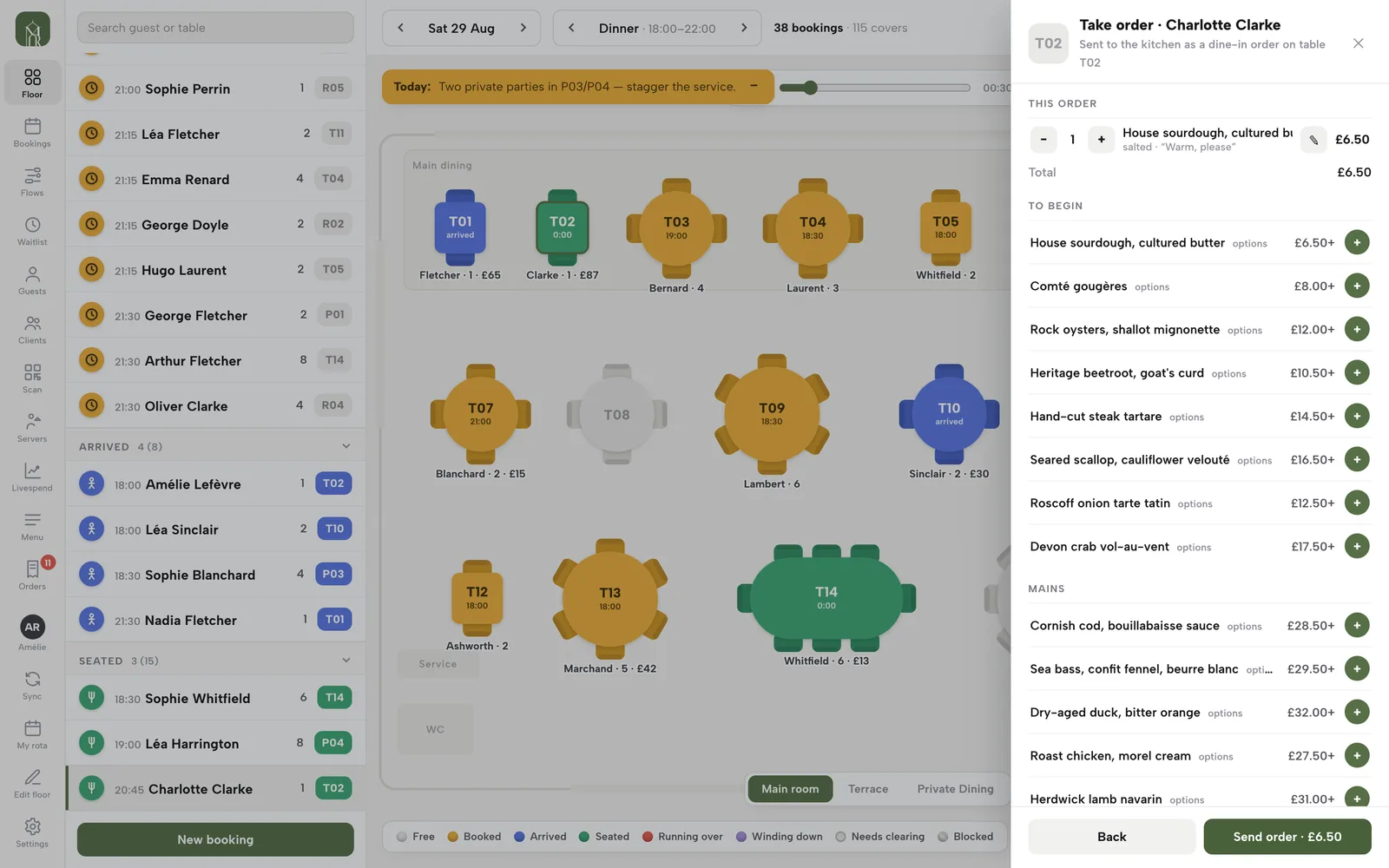
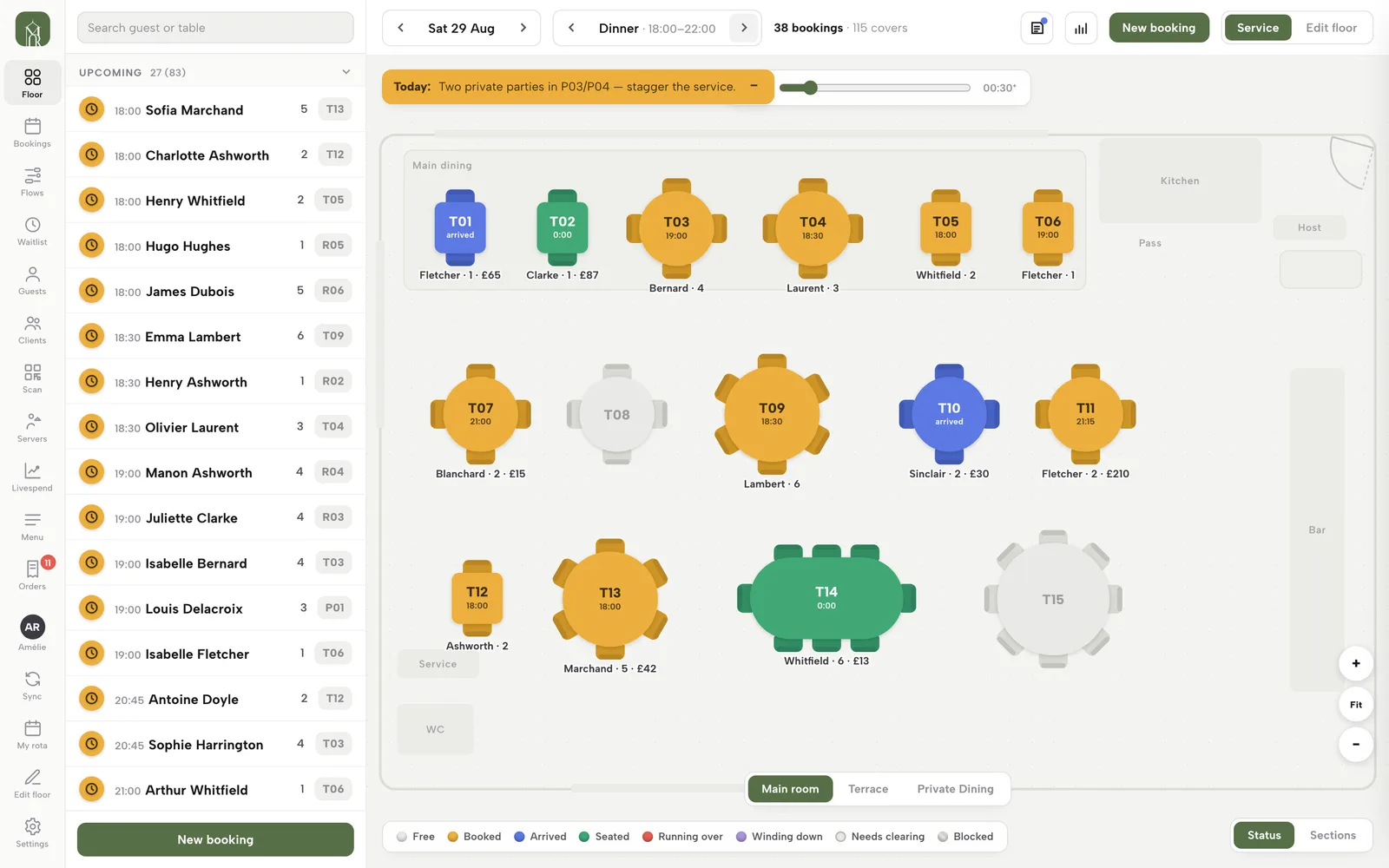
The Service floor on a Saturday dinner: tables coloured Booked, Arrived and Seated, with the booking queue on the left and what each table has spent underneath it.

The bill is where a good service goes wrong

Six friends ask to split one bill and the server is doing sums on a napkin. A card goes in on the wrong tender. A discount is typed in with no reason and nobody can say who gave it. At closing the drawer is short and the takings are spread across a card machine, a notebook and a spreadsheet.

Every one of those costs time at the table, and some of them cost money you never see.

Run the floor

Read the room and seat every party

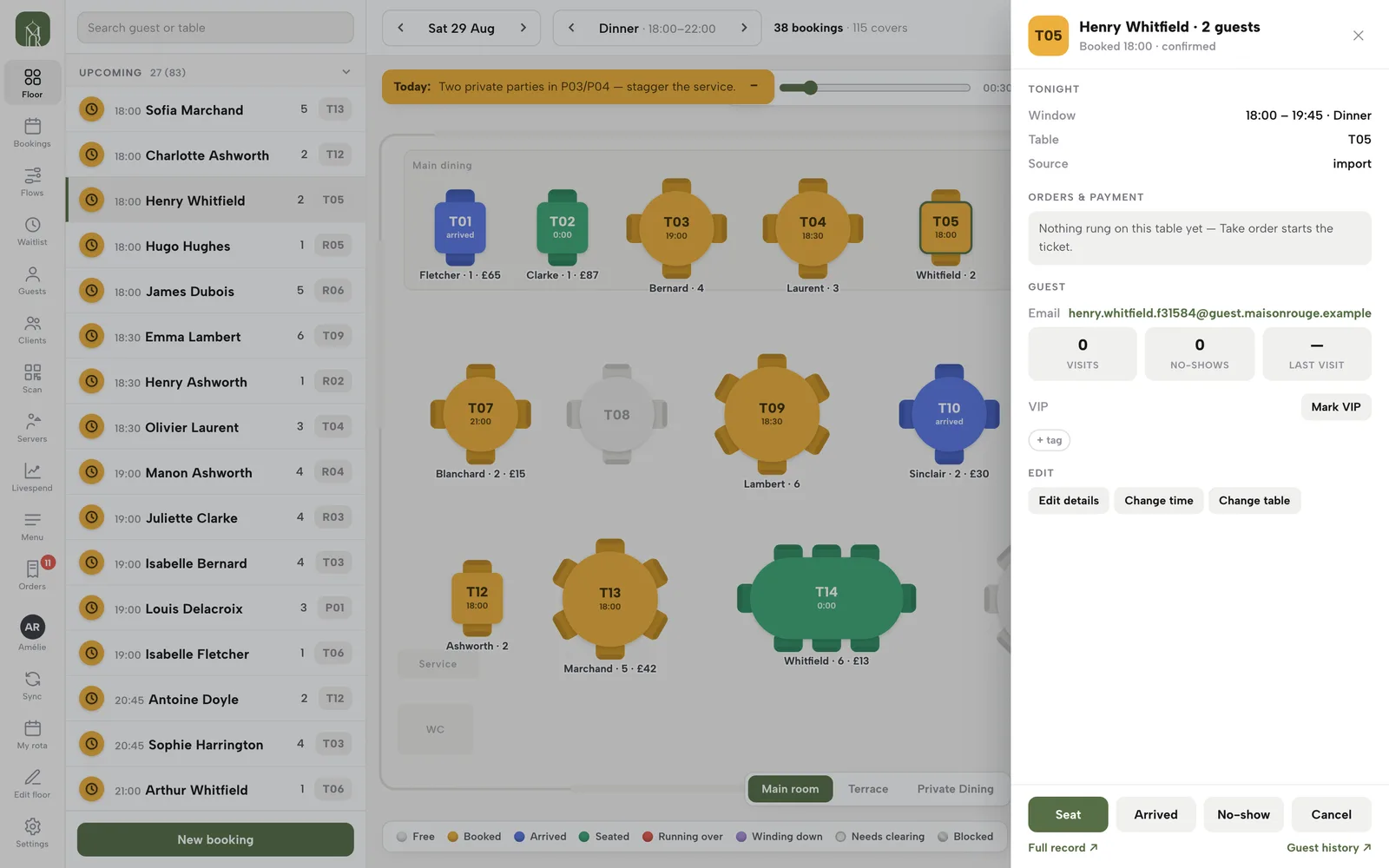
Open Service and the room is colour-coded live. Tap a booking and its sheet opens with a Seat button. A walk-in is one tap on a free table, with no email needed.

  • Eight states: Free, Booked, Arrived, Seated, Running over, Winding down, Needs clearing, Blocked
  • Seat at: up to six free tables that fit the party, smallest first
  • Status or Sections view colours tables by server
  • Day note banner for the whole team; Block table with a reason
Run service at the table, step by step
A booking sheet beside the floor plan, with the table, booked window, guest history and a Seat button.
One tap on Seat moves a booked party to Seated.

Take the order

An order pad on every table

Press Take order on a seated table. Your live menu opens on the same sheet: sold-out dishes are disabled, dishes with options ask for the required choices first, and a note goes to the kitchen with each line.

  • Running total, plus − / + and a note on every line
  • Send order saves it with the table's service charge
  • Connected kitchen printer? The ticket queues in the same action
  • No separate till login
Take an order at the table
The Take order panel for table T02: the cart with a note on the line, the live menu below and a Send order button.
The cart on top, the live menu below, Send order at the foot.

Adjust the bill

Discounts and service charge, with a trail

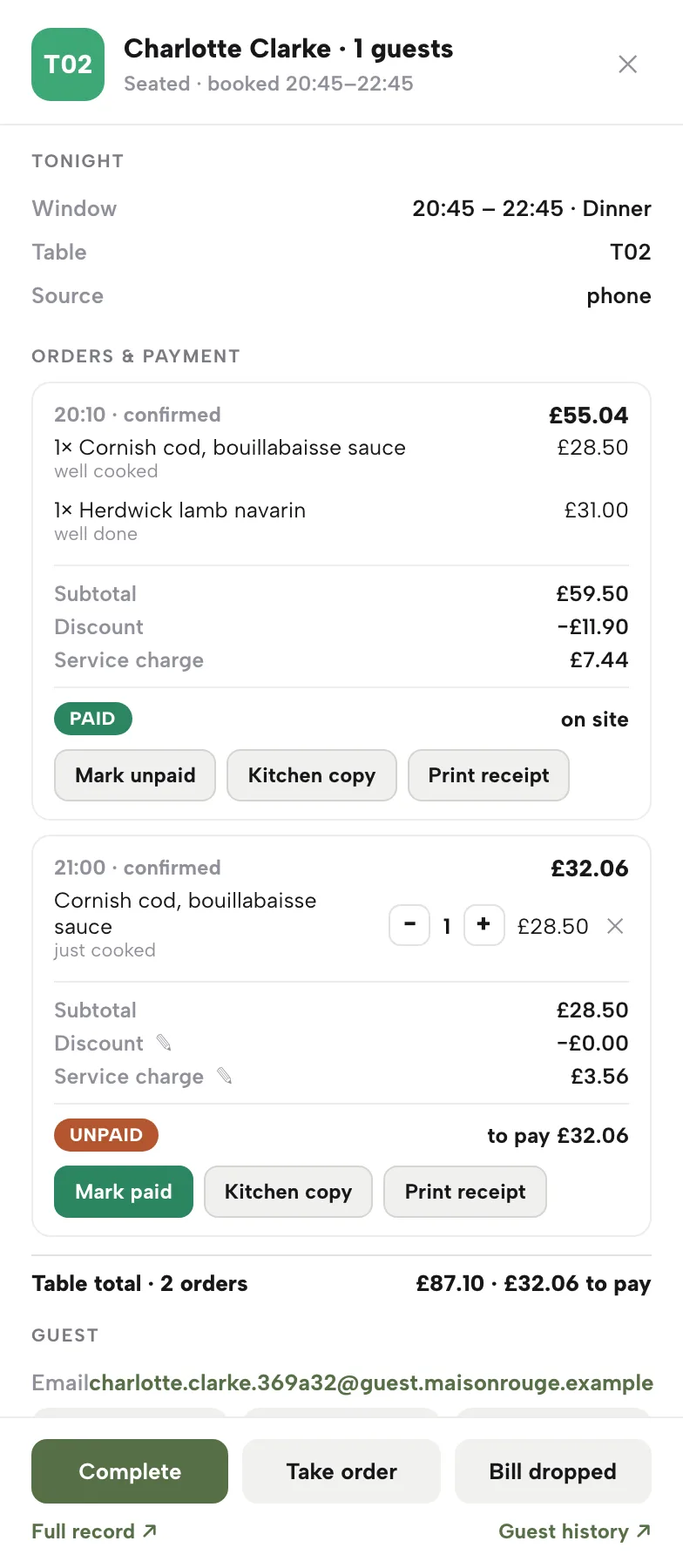
The table's till lists every order as its own bill. Change quantities, cancel a dish with a one-tap restore, and set a discount or service charge. A paid bill locks its totals.

  • Discount: 5, 10 or 20%, or a custom £ amount, with a reason saved
  • Service charge: 10%, 12.5%, none or custom
  • Settings decide which roles may discount; the owner is always allowed
  • Every discount records who applied it
Adjust the order
A table's till: one paid order with a discount and service charge, one open order with quantity steppers, and a Table total line.
One order paid and locked, one still open for changes.

Split and pay in parts

Split bills without a calculator

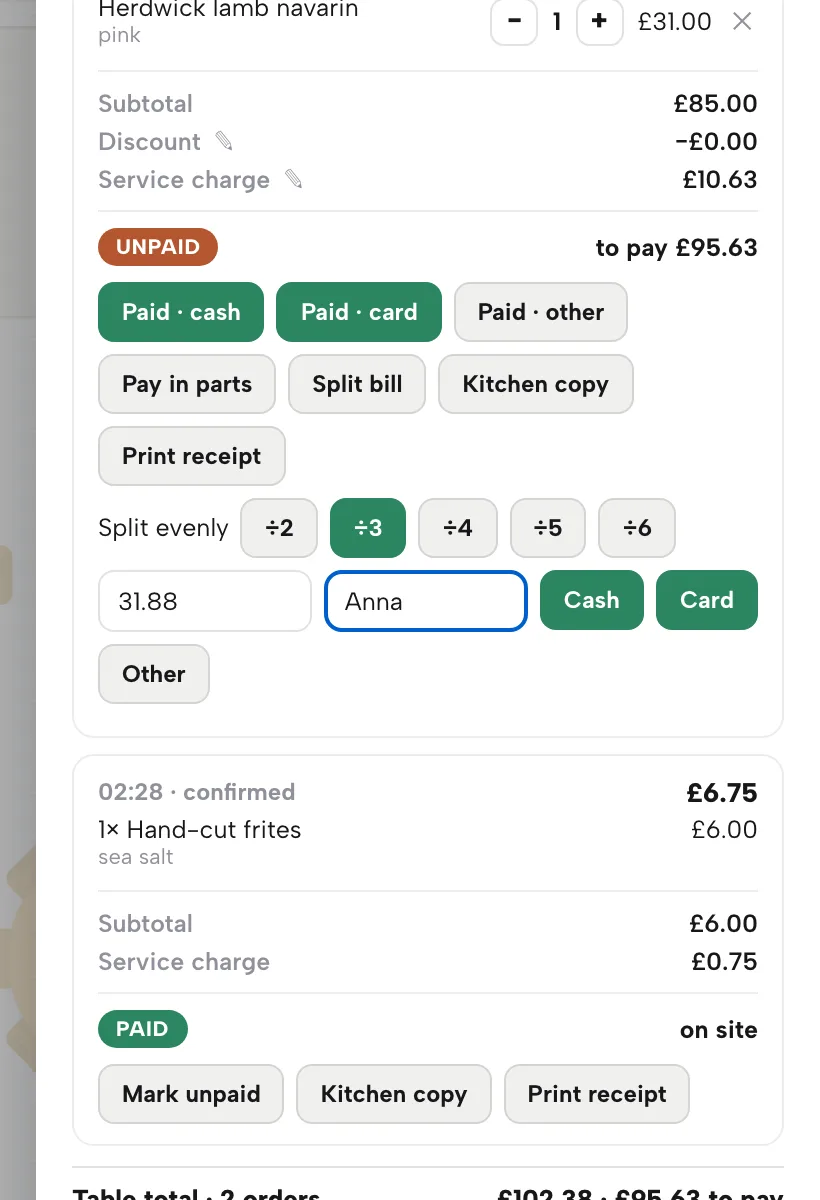
On an unpaid bill, press Pay in parts. Split evenly from ÷2 to ÷6, or type any amount. Name each payer and choose Cash, Card or Other. The last share is always exactly what is left.

  • Undo a mis-tapped part with its ✕; nothing else changes
  • Split bill moves chosen dishes to their own bill
  • Overpaying is refused and shows the balance
  • The bill closes when the parts cover it, and the table frees itself
Split bills and pay in parts
An unpaid bill with Paid cash, Paid card and Paid other buttons, Pay in parts, Split bill, and Split evenly buttons from ÷2 to ÷6 with the share and a payer name filled in.
÷3 fills a third of the bill; type a name, then Cash or Card.

When the party changes

Combine bills and move tables

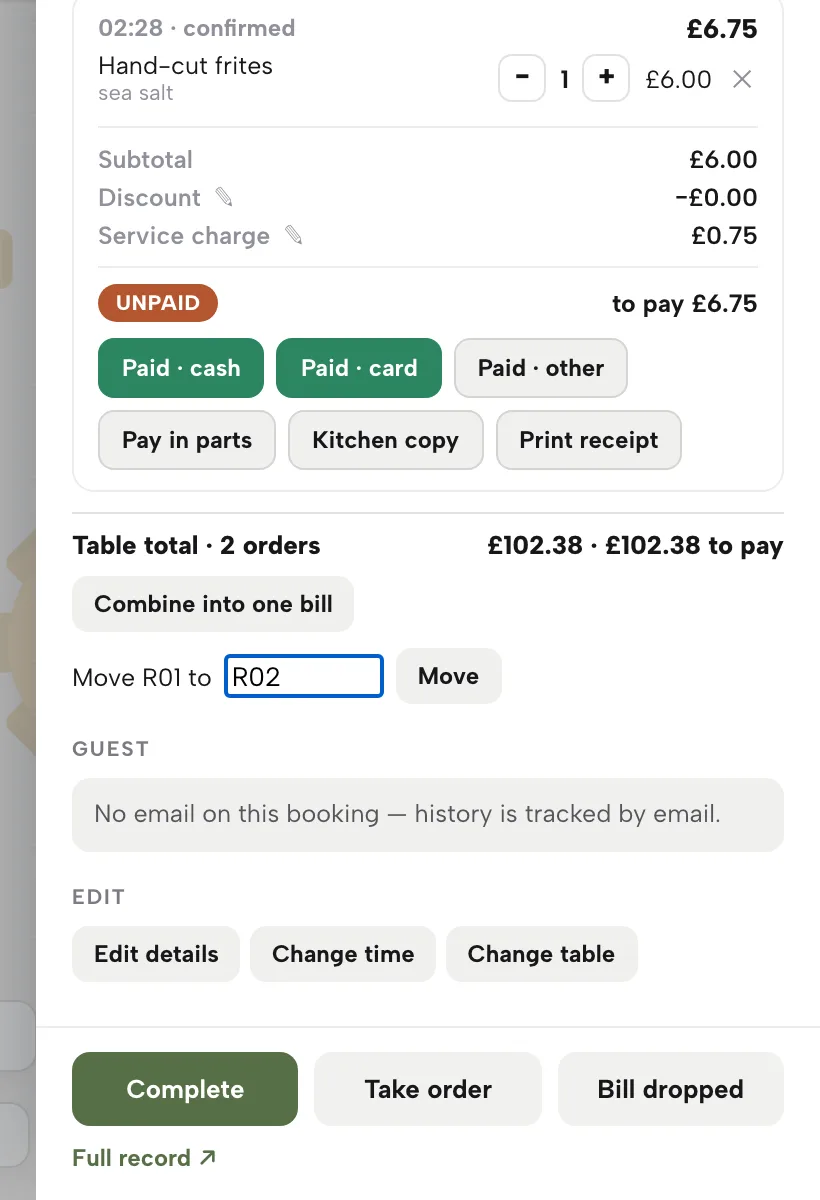
Starters and a later round of drinks are two bills. Combine into one bill merges the open ones. If the party changes tables, type the new table under Move table and the open bills follow.

  • Table total shows orders on the table and what is still owed
  • Combine only touches unpaid bills
  • Combine, split and move are all logged
  • Bill dropped tells the floor the bill is on its way
Combine and move
A table's till with Combine into one bill and a Move R01 to R02 field with a Move button.
Move R01 to R02: the open bills go with the party.

Take payment

Cash, card reader or your own machine

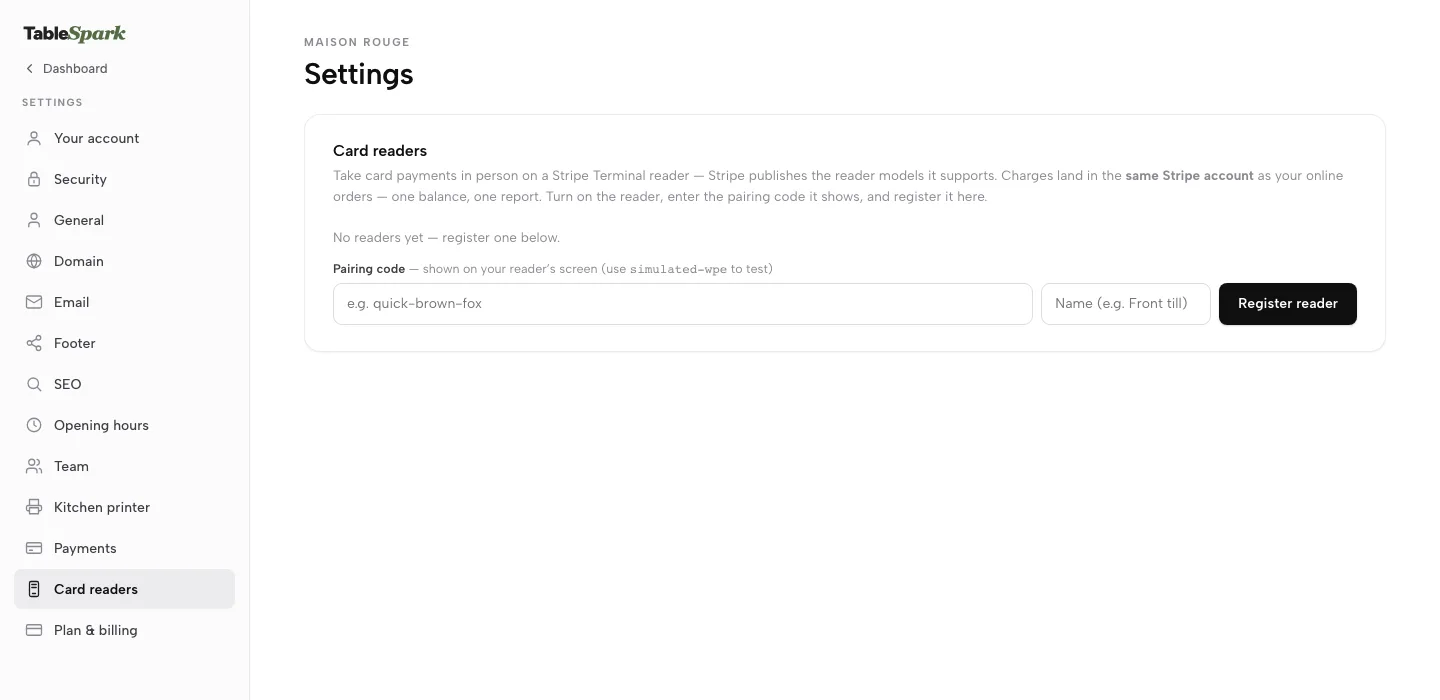
Mark a bill paid by cash, card or other. Register a Stripe Terminal reader and charge an order, or a walk-up amount, on it. Print a guest receipt, or take a gift card or a coupon at the till.

  • Register as many readers as the floor needs: front till, bar
  • Charge on card reader from any unpaid order; New card payment for a walk-up amount
  • Paid in full on the last bill completes the visit
  • Reader card payments settle into your own Stripe account
Register a card reader
Settings with the Card readers section open: pairing code and name fields with a Register reader button.
Type the pairing code the reader shows, name it, register it.

Where the money goes

One Stripe connection, 0% TableSpark commission

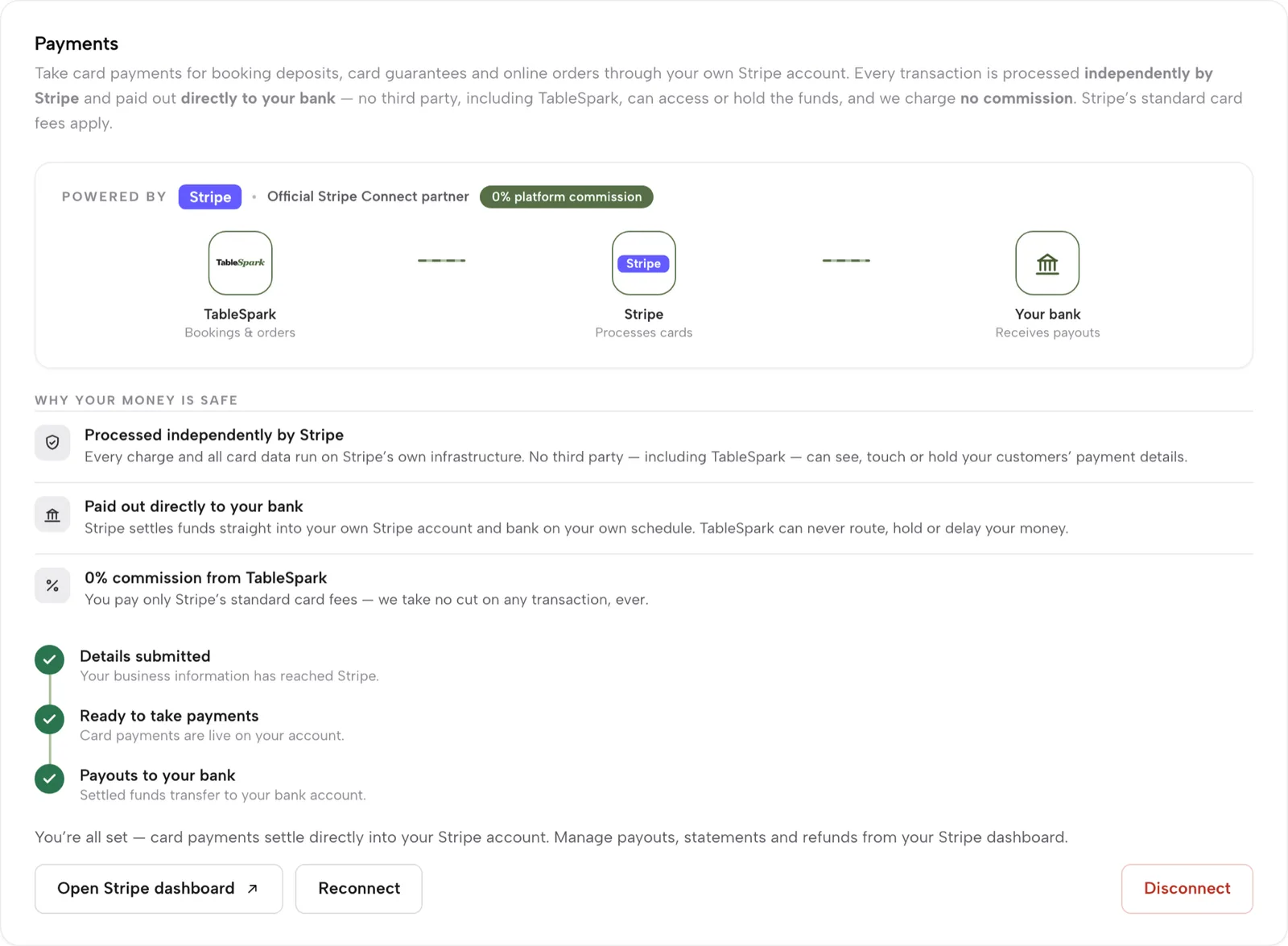
Connect Stripe once and every card payment your restaurant takes goes the same way: reader, online order, deposit, gift card. Stripe pays out to your bank. TableSpark never holds the funds.

  • Full or partial refund from the order, back to the original card
  • Stripe's standard card-processing fees apply; 0% TableSpark commission
  • Payments settings open to the owner role only
  • Reader settings open to owner, admin and editor
Connect Stripe and get paid
Settings, Payments, connected: TableSpark to Stripe to your bank, three ticks for details, payments and payouts, and a 0% platform commission badge.
Details, payments, payouts: all three ticked.

End of day

Takings by tender, VAT and exceptions

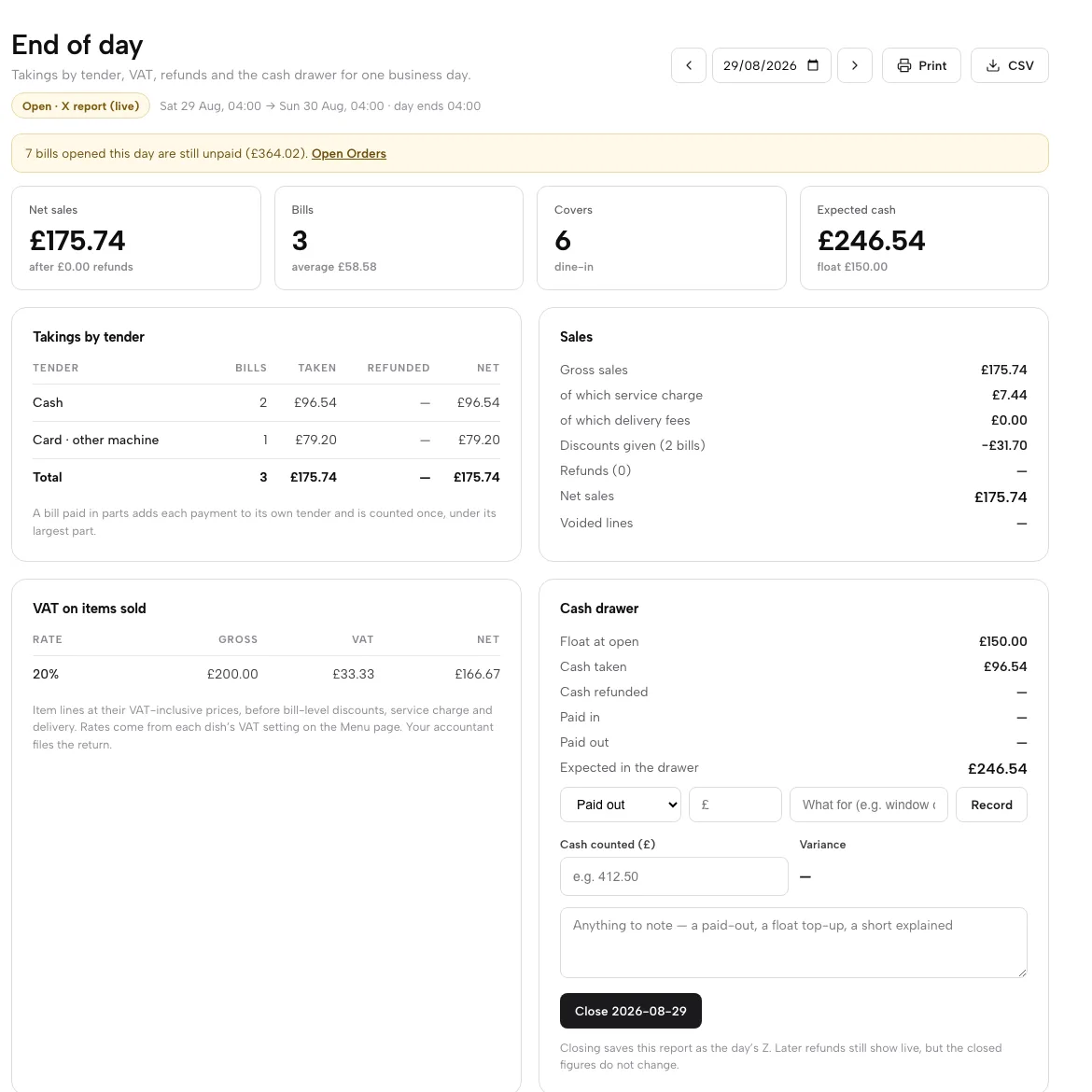
End of day is a live X report. Every bill sits under the way it was paid, part-paid bills under each tender, and VAT is grouped by rate for your accountant. Voids, discounts, reopened bills and refunds are listed with who and why.

  • Net sales, bills, covers; sales by hour, channel and top dishes
  • Business day ends at a cut-off you set, so late sales count correctly
  • Exceptions panel and day report download as CSV; Print for paper
  • Owner, admin and editor roles can read the day's takings
Close the day, step by step
End of day: net sales, bills, covers and expected cash, Takings by tender, the Sales panel, VAT on items sold and the Cash drawer.
Every pound lands against the tender that took it, with VAT by rate.

Cash-up

Count the drawer, close, keep the Z report

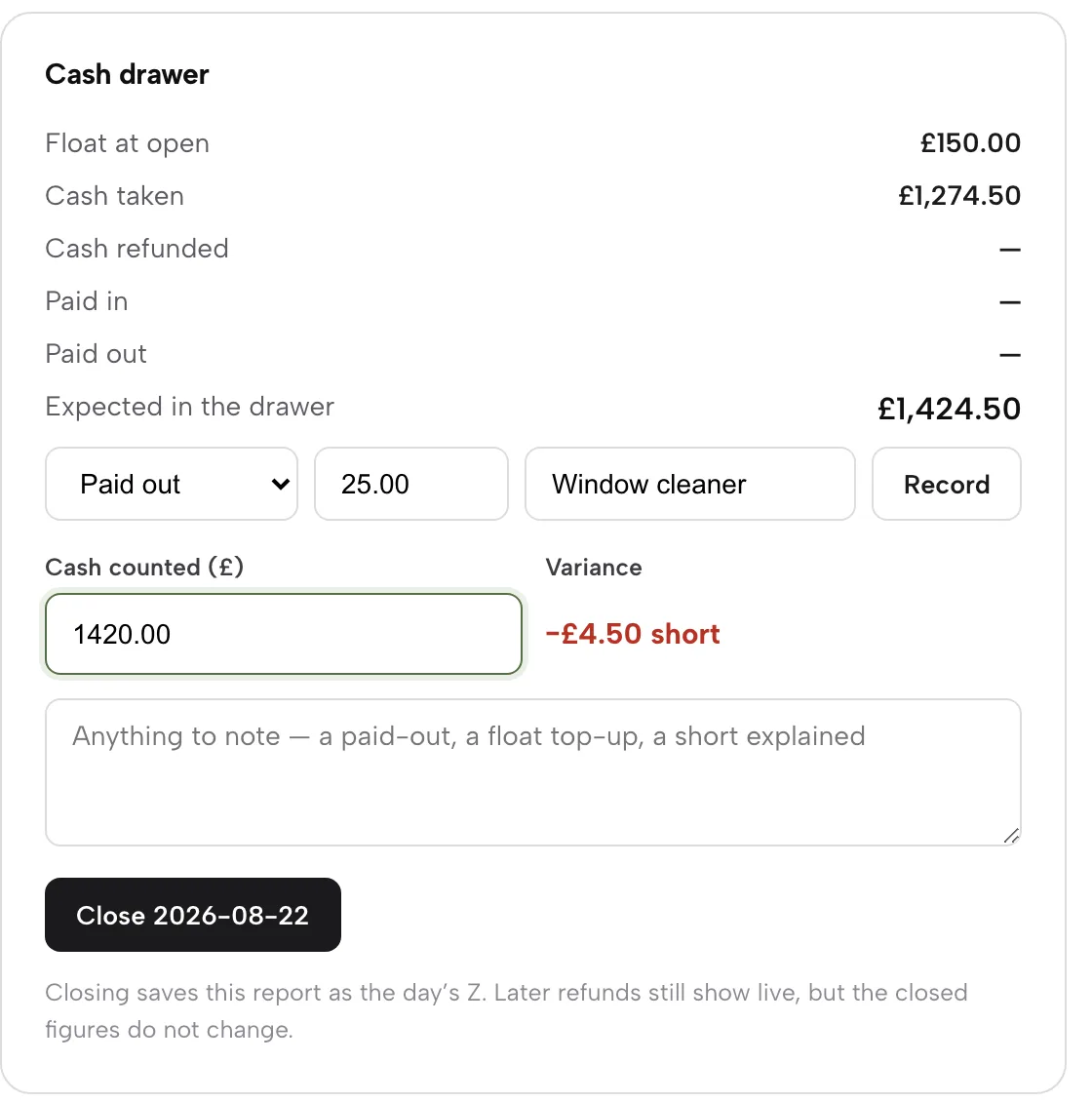
The drawer works out what it should hold: float, cash taken, less refunds, with paid in and paid out. Type what you counted and see the variance at once. Close the day and the figures are saved as the Z report.

  • Paid out or Paid in with a reason, such as the window cleaner
  • Variance reads Balanced, short or over as you type
  • Closing needs a second click to confirm
  • Recent closes lists each day, who closed it and its variance
Count the cash drawer
The Cash drawer panel: float £150, cash taken, expected £1,424.50, a paid out of £25 for a window cleaner, £1,420 counted and a £4.50 short variance.
£1,420 counted against £1,424.50 expected: £4.50 short.

Watch it

Watch a bill split three ways

A real run on the live app: ÷3, cash and card, one mis-tap undone, table freed.

Watch on YouTube

How it connects

The till is one step in the loop

Orders arrive from your site and your tables, tickets go to the kitchen, and every payment feeds the guest's record.

Plan & price

EPOS comes with Growth and Full

Growth is £39 a month and Full is £69, excluding VAT. No per-seat charges, and nothing to pay until you publish.

Prices exclude VAT. 0% TableSpark commission on the bookings and orders your plan includes. Stripe’s standard card-processing fees apply to online payments. Compare every plan.

Questions owners ask

Do I need special till hardware?

No. Service runs in the browser on a phone or tablet. For card payments in person, register a Stripe Terminal reader from Settings with its pairing code.

Can a bill be paid part cash, part card?

Yes. Each part is its own payment with an amount, a tender and an optional name. End of day counts each part under its own tender, and the drawer expects only the cash.

What if someone taps the wrong tender?

Remove a part with its ✕ and take it again. A paid bill can be reopened with Mark unpaid; the reopening is logged and appears under Exceptions.

Does TableSpark take a cut of card payments?

No. There is 0% TableSpark commission. Stripe's standard card-processing fees apply, and funds are paid to your own Stripe account and bank.

Is the Z report editable?

Closing saves the day's figures as a snapshot that does not change, though later refunds still show live. Print it or download the CSV for your accountant.

Which card readers and printers work with TableSpark?

Card payments at the till run on Stripe Terminal readers, settled into your own Stripe account. Kitchen tickets print over Star's CloudPRNT protocol, so a CloudPRNT printer connects with one pasted link, and the kitchen display runs on any tablet or TV browser.

Run your next service on one screen

Build your site free, then open Service and seat your first table.