
Contents
When the till, the booking tool, the card payout and the delivery app each report a different Saturday, a rising food or labour cost can run for a whole quarter before anyone sees it.
A restaurant sales report needs eight readings: net sales (excluding VAT, after discounts, comps and refunds), covers with average spend per head, table turn with revenue per available seat hour, food cost percentage, labour cost percentage including employer National Insurance and pension, prime cost, the no-show rate and delivery commission share. Read net sales and covers daily and the cost percentages weekly, from one set of records. Treat every benchmark as context, not a target.
Four systems, four different Saturdays
It is Monday morning, and the owner wants one answer: how did Saturday go? The till shows gross takings, with VAT inside the total and the tips on the card slips beside it. The booking tool shows covers booked, which is not the same as covers seated. The card processor shows a payout that is net of fees and arrives days after the sales it pays for. The delivery app shows what it paid out after taking its commission. Four honest systems give four different numbers, and not one of them is net sales.
The cost of that confusion rarely arrives as a single bad night; it arrives as drift. A supplier raises the price of a protein, the menu price stays where it was, and food cost creeps up by a point a week. The owner learns about it when the accountant's figures land, which for a business reviewed quarterly means about 13 weeks after the first bad week. By then the extra cost has been paid for up to thirteen weeks.
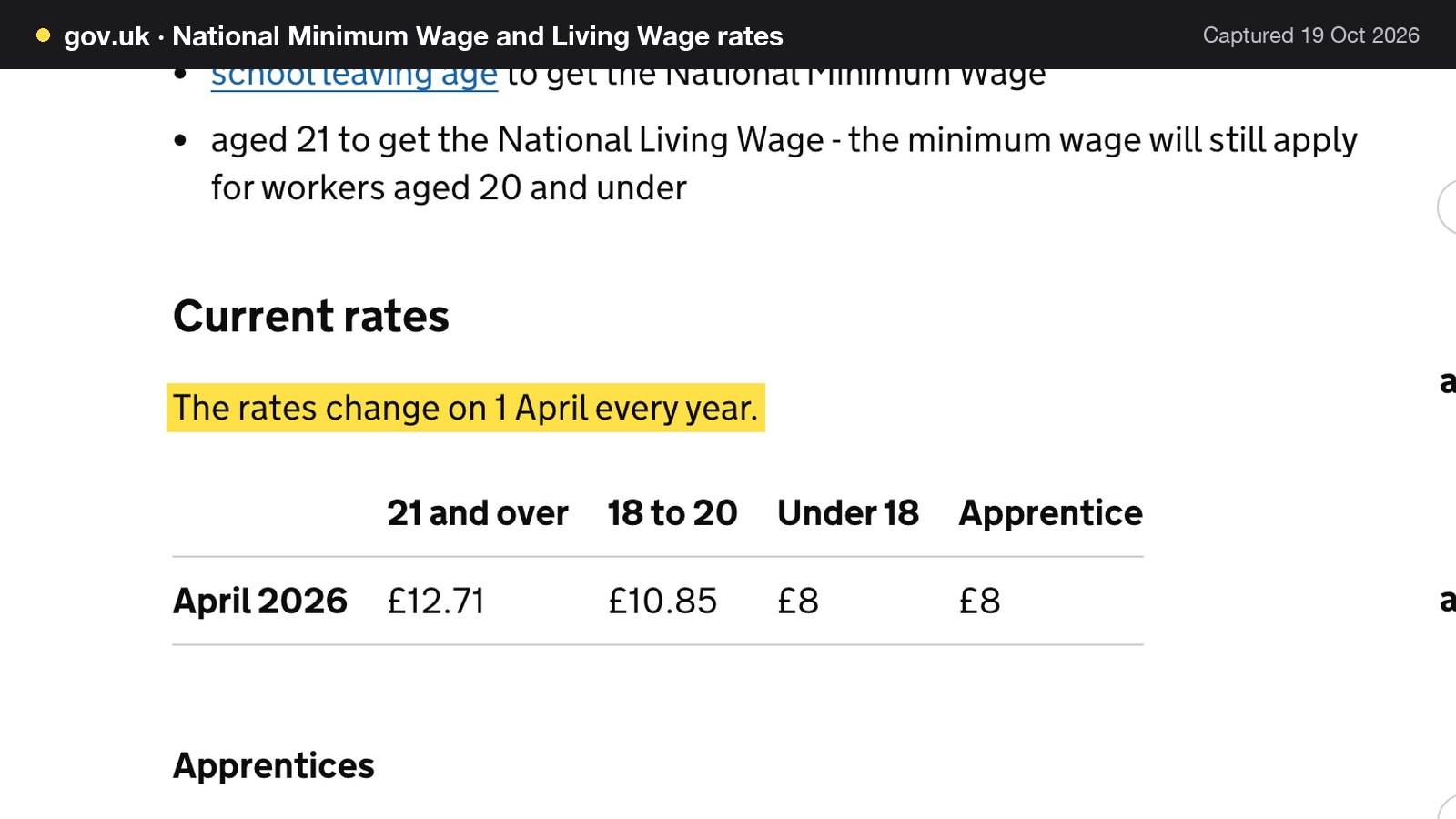
Labour is moving the same way, and from several directions at once. GOV.UK's rates table shows the National Living Wage for ages 21 and over at £12.71 from April 2026, up from £12.21 for April 2025 to March 2026, a rise of £0.50 an hour, or about 4.1%. GOV.UK states that "The rates change on 1 April every year." On top of the wage, the employer pays National Insurance at 15% on each employee's earnings above the secondary threshold, which is £96 a week for 2026 to 2027, and pays the minimum employer pension contribution of 3% on qualifying earnings. Each of those falls on a labour line that most independent kitchens and dining rooms look at monthly at best.
Trading conditions leave little room to absorb it. NIQ, the research firm formerly known as CGA, reports that like-for-like sales for managed pub, restaurant and bar groups "have hovered less than 2 percentage points either side of zero in every month of 2026 so far" (NIQ, 24 September 2026). That covers managed groups rather than independents, so it is context, not a measure of any one restaurant. NetSuite, a software vendor, cites typical net profit margins for UK full-service restaurants of around 3% to 5% (April 2026; vendor-cited, so check your own). When sales are flat and the margin is that thin, a cost line that drifts by two points is not a rounding error.
Put numbers on it with the illustrative restaurant built in full in the worked example below, which has £22,400.00 of net sales in a week. Two points of food cost on that week is £448.00. At the vendor-cited 3% to 5% net margin, the week's profit would be £672.00 to £1,120.00, so a two-point drift equals between 40% and 67% of it. Left alone for a 13-week quarter, the same drift costs £5,824.00. None of that is a prediction for any real venue. It shows why the right numbers matter on the right day.

This guide covers the numbers a UK restaurant sales report should carry, how each is calculated, why the till, bookings, card and delivery figures disagree, a full worked week with the arithmetic shown, and a daily and a weekly layout. It then compares three ways to produce the report and prices the options from their published pages.
Restaurant KPIs in the UK: the eight readings
The table below ties each reading to a formula. The formulas for table turn, food cost, labour cost and prime cost are NetSuite's; the RevPASH formula is 7shifts'; net sales, average spend per head, no-show rate and delivery commission share are standard definitions without a single source, and this guide writes them out so every figure that follows can be checked.
| Formula | Where the formula comes from | |
|---|---|---|
| Net sales | Gross takings less VAT, discounts, comps and refunds | Standard definition; VAT at 20% |
| Average spend per head | Net sales ÷ covers | Standard definition |
| Table turn | Number of parties served ÷ number of available tables | NetSuite UK |
| RevPASH | Total revenue ÷ (number of seats × hours open) | 7shifts |
| Food cost % | (COGS ÷ total food sales) × 100 | NetSuite UK |
| Labour cost % | (Total labour costs ÷ total sales) × 100 | NetSuite UK |
| Prime cost | COGS + labour costs | NetSuite UK |
| No-show rate | No-shows ÷ bookings | Standard definition |
| Delivery commission share | Commission ÷ delivery gross sales | Standard definition |
1. Net sales
Net sales is takings after the tax and the give-backs come out: gross takings, less VAT, less discounts, comps and refunds. It is the denominator for almost every other percentage in the report, so it has to be right first.
VAT is the first trap. HMRC's VAT Notice 709/1 states that "Any supply of food or drink as part of a contract for catering is standard-rated", and the standard rate is 20%. A till that adds up gross takings of £32.00 a head is therefore reporting £26.67 a head of sales and £5.33 of tax that belongs to HMRC (£32.00 ÷ 1.2 = £26.67, and £32.00 − £26.67 = £5.33).
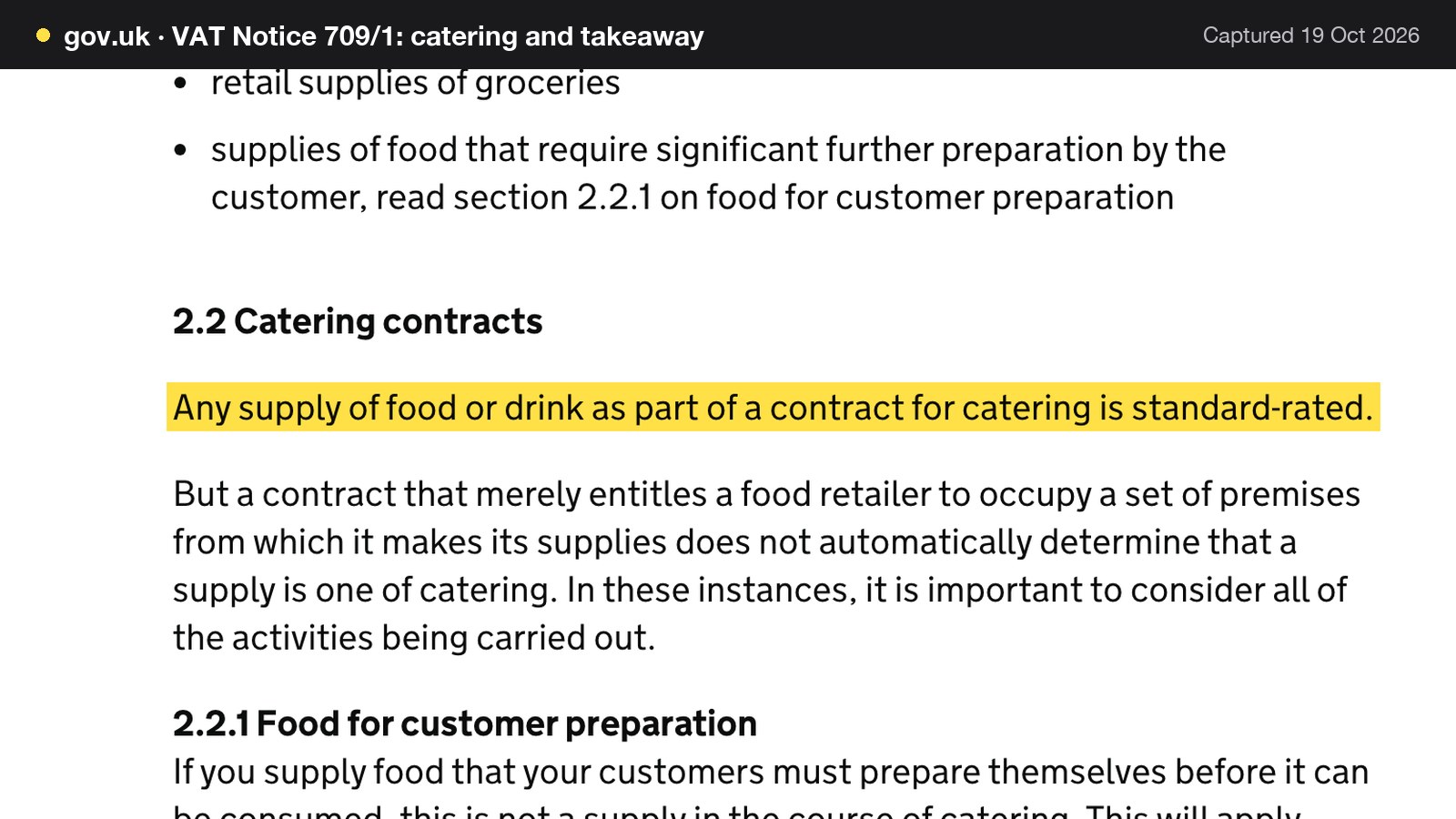
Tips and service charge are the second. The same notice says that if a restaurant makes a service charge, "it’s standard-rated", but if the customer freely gives a tip above the total charge, no VAT is due on the tip. Report net sales, the service charge and the tips as three separate lines. The worked example below leaves service charge out so the arithmetic stays clean.
2. Covers and average spend per head
Covers are guests served: people who sat down and were served, not people who were booked. Average spend per head is net sales divided by covers. NetSuite describes the measure plainly: "Per-guest average, also called average spend per head, measures how much each customer spends." It adds that targets "vary widely by concept, but tracking the trend matters more than hitting a specific number."
The illustrative week has £22,400.00 of net sales and 840 covers, so the average spend per head is £22,400.00 ÷ 840 = £26.67 net. For context, NIQ's BrandTrack consumer data puts average spend per head at £24.49 in the first half of 2026, "just 24 pence more than in the first half of 2025". That is a diner-reported figure, not a restaurant's net sales per cover, so it should not be compared line for line with the net figure above.
3. Table turn and RevPASH
Table turn shows how hard the room works. NetSuite's formula divides the number of parties served by the number of available tables. A seat-based variant, covers divided by seats, is easier to compute when tables are joined or split through the night, and this guide uses it for the worked example, labelled as a variant: 840 covers across 6 evenings is 140 covers a night, and 140 ÷ 60 seats is a seat turn of 2.33.
RevPASH, revenue per available seat hour, adds time. The 7shifts formula is "RevPASH = Total Revenue ÷ (Number of Seats × Hours Open)", which the same page also writes as seat occupancy multiplied by average check. SevenRooms publishes a variant, "RevPASH = Seat Occupancy % × Average Spend per Cover ÷ Dining Duration (hours)", which gives a different number from the same night. Pick one formula and keep it; this guide uses the 7shifts version. NetSuite's own example shows the scale: a 60-seat restaurant generating £3,600 between 18:00 and 22:00 has 240 seat-hours, so its RevPASH is £3,600 ÷ 240 = £15. 7shifts is blunt about comparisons: "There’s no universal benchmark here." Its advice is that what matters is "tracking your own numbers over time and understanding what moves them up or down."
4. Food cost percentage
Food cost percentage is the cost of the food sold as a share of food sales. NetSuite writes it as "Food cost percentage = (COGS / Total food sales) × 100", where COGS is the cost of goods sold. Use net sales as the denominator so that VAT is not counted as revenue. NetSuite notes that a spike in the percentage can point to supplier price creep, which is the drift described at the start.
NetSuite cites that "UK restaurants generally target COGS between 25% and 35% of turnover." That is a vendor-cited industry average and a wide band, so treat it as a sanity check, not a target for your menu. In the worked week below, food cost is assumed at 29% of net sales, which is £6,496.00 on £22,400.00.
5. Labour cost percentage in the UK
Labour cost percentage, in NetSuite's wording, "measures all staff costs; wages, National Insurance contributions, pensions, benefits and training, as a proportion of revenue", and the formula is "(Total labour costs / Total sales) × 100". The common UK mistake is to count gross wages only. The employer pays more than the wage: National Insurance and the pension contribution sit on top, and both move when the wage moves.
Four published inputs set the UK numbers for the 2026 to 2027 tax year.
| Input | What it means on the payroll line | |
|---|---|---|
| April 2025 to March 2026 | National Living Wage, age 21 and over, £12.21 | The rate before the April 2026 rise |
| From April 2026 | National Living Wage, age 21 and over, £12.71 | Up £0.50 an hour on the previous rate |
| 2026 to 2027 | Employer National Insurance 15% above £96 a week | Paid on each person's earnings over the secondary threshold |
| 2026 to 2027 | Employment Allowance £10,500 | A yearly reduction in employer National Insurance, if the business is eligible |
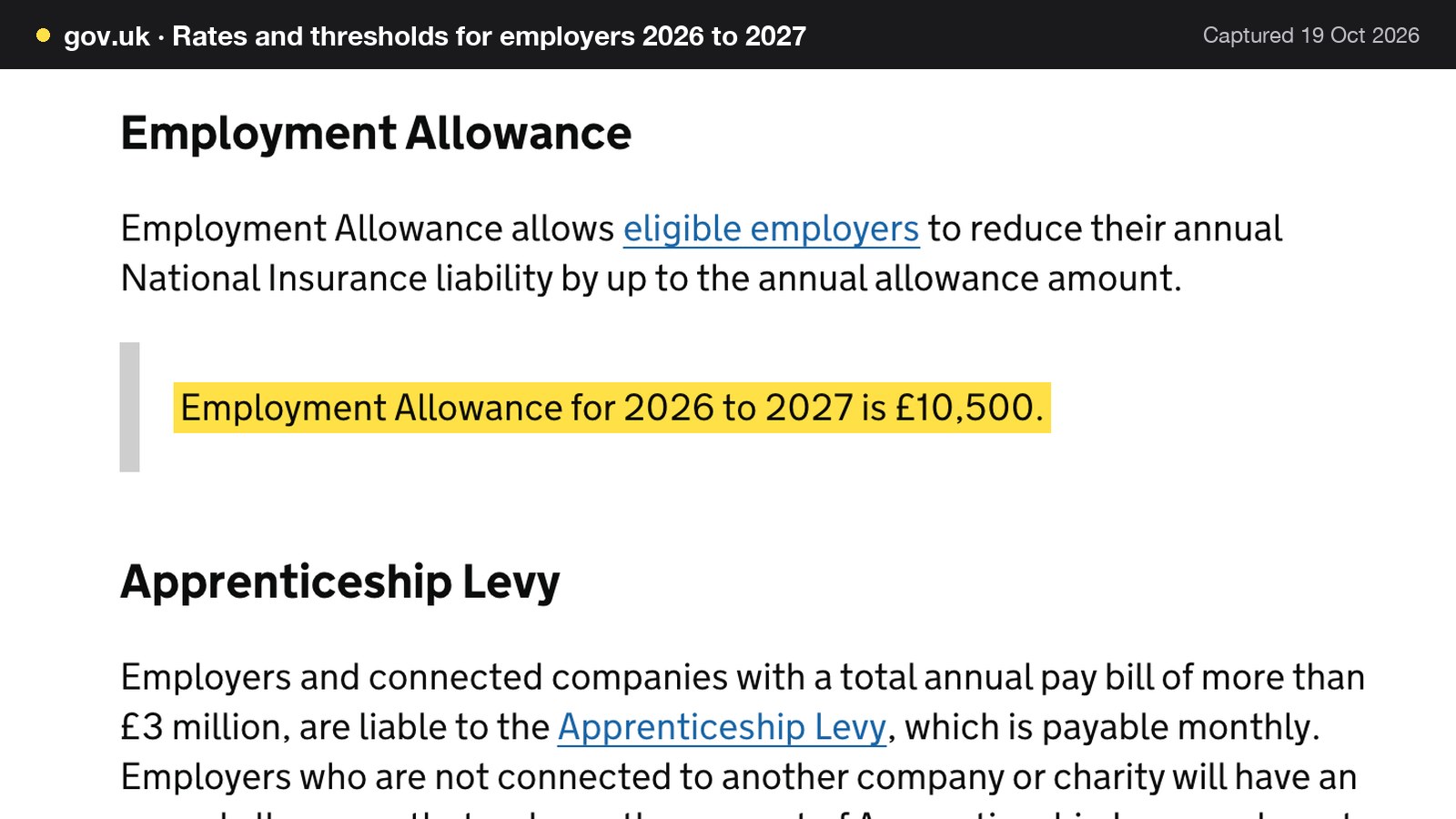
GOV.UK's employer rates page states that "Employment Allowance for 2026 to 2027 is £10,500." The allowance has eligibility conditions, which GOV.UK sets out on its claim page, including a rule for a company with only one director, so check them before counting on it. The worked example below shows the labour percentage both with and without it.
The pension contribution is the fourth input. GOV.UK's workplace pension page shows a minimum employer contribution of 3% (with 5% from the employee, 8% in total), and says that in most automatic enrolment schemes contributions are based on total earnings between £6,240 and £50,270 a year before tax. £6,240 a year is £120 a week, so the worked example takes 3% of each person's weekly pay above £120. Which workers must be enrolled depends on age and earnings triggers that this guide did not verify, so the example assumes all staff are enrolled and a payroll provider should confirm the real position.
6. Prime cost
Prime cost is food cost plus labour cost, the two biggest costs a restaurant controls week to week. NetSuite's formula is "Prime cost = COGS + Labour costs", and it says the figure "should generally fall in the 60% to 65% range, with full-service restaurants often landing toward the higher end due to heavier staffing requirements." That is a vendor-cited industry average, and it is context, not a target. NetSuite also recommends checking food cost percentage, labour cost percentage and prime cost daily or weekly, which is the rhythm the report layouts below follow.
7. No-show rate
The no-show rate is the number of no-shows divided by the number of bookings. A no-show is revenue that was planned and never arrived: the kitchen prepared, the table was held, and covers fall below the booking sheet. Read it by service, because lunch and dinner behave differently. The deposit and cancellation side is covered in the no-show policy guide; this guide only uses the rate as a reading.
8. Delivery commission share
If part of the business arrives through a delivery app, commission is a cost that never touches the till. The share is the commission divided by the delivery gross sales. Delivery-app rates are negotiated or tiered, and no current official rate card was found for this research, so the right source is the restaurant's own payout statement. For the arithmetic in this guide, an assumed commission of £100.00 on £400.00 of gross delivery orders gives a share of 25%. That 25% is an assumption chosen to make the sum visible, not a published rate for any provider.
Benchmarks: what published figures say and what they do not
A benchmark answers "is my number plausible?" It does not answer "what should my number be?" The published UK figures that were read for this research are below. All except NIQ's are vendor-cited, which means a software company quotes them in its own explainer and does not always name the underlying data.
| Published figure | Source and label | |
|---|---|---|
| Cost of goods sold | 25% to 35% of turnover | NetSuite UK, April 2026; vendor-cited; industry average; check your own |
| Prime cost | 60% to 65%, often the higher end for full-service | NetSuite UK, April 2026; vendor-cited; industry average; check your own |
| Net profit margin | Around 3% to 5% for full-service | NetSuite UK, April 2026; vendor-cited; industry average; check your own |
| Gross profit margin | Around 70% across the sales mix when drinks contribute | NetSuite UK, April 2026; vendor-cited; industry average; check your own |
| Average spend per head | £24.49, first half of 2026 | NIQ BrandTrack, 24 September 2026; diner-reported |
There are two reasons not to treat these as targets. They are averages across concepts, and a 60-seat bistro has little in common with a 20-seat counter. And the band is wide: a 10-point range on food cost is worth £2,240.00 a week on £22,400.00 of net sales. Use the published number to check that a calculation is not wildly off, and the restaurant's own trend to judge whether it is improving.
Why the systems disagree: one Tuesday, four figures
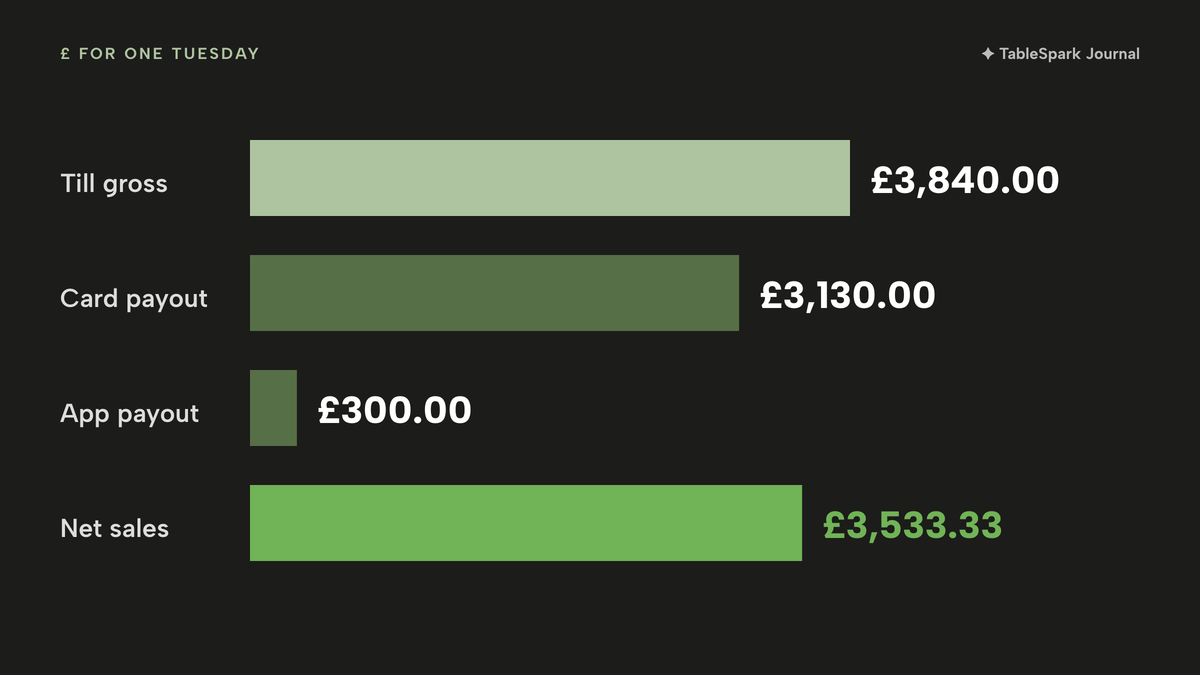
The numbers have to be reconciled to a single basis before they can be read. The table below follows one illustrative Tuesday at the 60-seat restaurant through the four systems from the opening. All figures are assumptions chosen for the arithmetic, except the VAT rate.
| What it reports | Tuesday figure | |
|---|---|---|
| Till | Gross takings including VAT, dine-in | £3,840.00 (120 covers × £32.00; £840.00 cash, £3,000.00 card) |
| Booking tool | Covers booked and bookings that did not arrive | 132 covers booked; 3 no-shows of 33 bookings, 9.1% |
| Card processor | Card money captured, less fees, paid out later | £3,130.00 (£3,000.00 card takings + £180.00 card tips − £50.00 assumed fees) |
| Delivery app | Orders net of commission | £400.00 gross orders; assumed commission £100.00; £300.00 paid out |
| Net sales | (£3,840.00 ÷ 1.2) + (£400.00 ÷ 1.2) | £3,200.00 + £333.33 = £3,533.33 |
The till figure includes VAT: £3,840.00 gross is £3,200.00 of net sales and £640.00 of VAT (£3,840.00 ÷ 1.2 = £3,200.00). The booking tool is correct about what it measures. It simply measures a promise: 33 bookings of four made 132 covers, 3 of the 33 bookings did not arrive (3 ÷ 33 = 9.1%), and 12 covers were lost, which leaves 120 seated. The card payout mixes three things that do not belong in a sales figure: £3,000.00 of card takings, £180.00 of tips that are not the restaurant's sales, and the processor's fees. It also arrives late. Stripe's documentation explains that "Payouts follow your account’s payout schedule", and gives the example that with daily payouts and a 3-business-day settlement timing, Stripe "pays out funds daily from transactions that were captured 3 business days earlier." On that example schedule, Tuesday's card money reaches the bank on Friday. Stripe's balance report adds that it "doesn’t associate payouts with payment transactions", and points to its payout reconciliation report for that job.
The delivery app is the fourth view. The restaurant's food was sold for £400.00 but the app pays out £300.00. Assuming the restaurant is the supplier of hot takeaway food, which HMRC's notice treats as standard-rated when it meets the stated tests, this illustration works out VAT on the £400.00 the guests paid rather than the £300.00 payout, so net sales are £400.00 ÷ 1.2 = £333.33. An accountant should confirm how a particular platform arrangement is treated.
Add the dine-in and delivery net sales and the Tuesday is £3,533.33. No single system reports it, and no two of the four figures reconcile without a few lines of arithmetic. The same pattern runs through every service, which is why the report needs one basis: net of VAT, before commission and fees. The detailed mechanics of matching the card total to the bank payout, and of the nightly count, are in the restaurant cash-up guide, and what the card fees themselves cost is in the card payment processing fees guide.
Worked example: one 60-seat restaurant for one week
Every input marked as an assumption below is illustrative; the wage, tax and pension rules are the cited ones. The restaurant has 60 seats and opens six evenings a week from 18:00 to 22:00, which is 24 service hours. It serves 840 covers, an average of 140 a night. Average spend per head is £32.00 including VAT, and service charge is left out. Food cost is assumed at 29% of net sales, inside the 25% to 35% band that NetSuite cites. Thirteen hourly staff work 480 paid hours in total, all aged 21 or over, and one salaried manager is paid £700.00 a week gross. The business is paid weekly and all staff are on National Insurance category A.
Sales and food cost
| Working | Result | |
|---|---|---|
| Gross takings | 840 × £32.00 | £26,880.00 |
| VAT at 20% | £26,880.00 − (£26,880.00 ÷ 1.2) | £4,480.00 |
| Net sales | £26,880.00 − £4,480.00 | £22,400.00 |
| Average spend per head, net | £22,400.00 ÷ 840 | £26.67 |
| Seat turn per night | 840 ÷ 6 nights ÷ 60 seats | 2.33 |
| RevPASH, net | £22,400.00 ÷ (60 seats × 24 hours) | £15.56 |
| Food cost at 29% | 29% × £22,400.00 | £6,496.00 |
On gross takings, the same RevPASH would read £26,880.00 ÷ 1,440 = £18.67, which is why the basis has to be written beside the number.
Labour cost with National Insurance and pension
The 480 hours at the National Living Wage of £12.71 cost £6,100.80, which is £469.29 per hourly person on average across 13 people. Add the manager's £700.00 and gross pay is £6,800.80 for 14 people.
Employer National Insurance is 15% of each person's pay above £96 a week. For 14 people the threshold is worth 14 × £96 = £1,344.00, so the National Insurance base is £6,800.80 − £1,344.00 = £5,456.80, and 15% of it is £818.52. The yearly Employment Allowance of £10,500 divides to £10,500 ÷ 52 = £201.92 a week, which brings the bill to £818.52 − £201.92 = £616.60 if the business qualifies.
For the pension, the manager's qualifying pay above £120 is £700.00 − £120.00 = £580.00. The hourly staff earn £6,100.80 − (13 × £120.00) = £4,540.80 above the line, which assumes each person earns the average. The total is £580.00 + £4,540.80 = £5,120.80, and 3% of that is £153.62.
| Working | Result | |
|---|---|---|
| Hourly pay | 480 hours × £12.71 | £6,100.80 |
| Manager pay | Assumed salary | £700.00 |
| Gross pay | £6,100.80 + £700.00 | £6,800.80 |
| Employer NIC before allowance | 15% × (£6,800.80 − 14 × £96) | £818.52 |
| Employer NIC after allowance | £818.52 − £201.92 | £616.60 |
| Employer pension at 3% | 3% × (£580.00 + £4,540.80) | £153.62 |
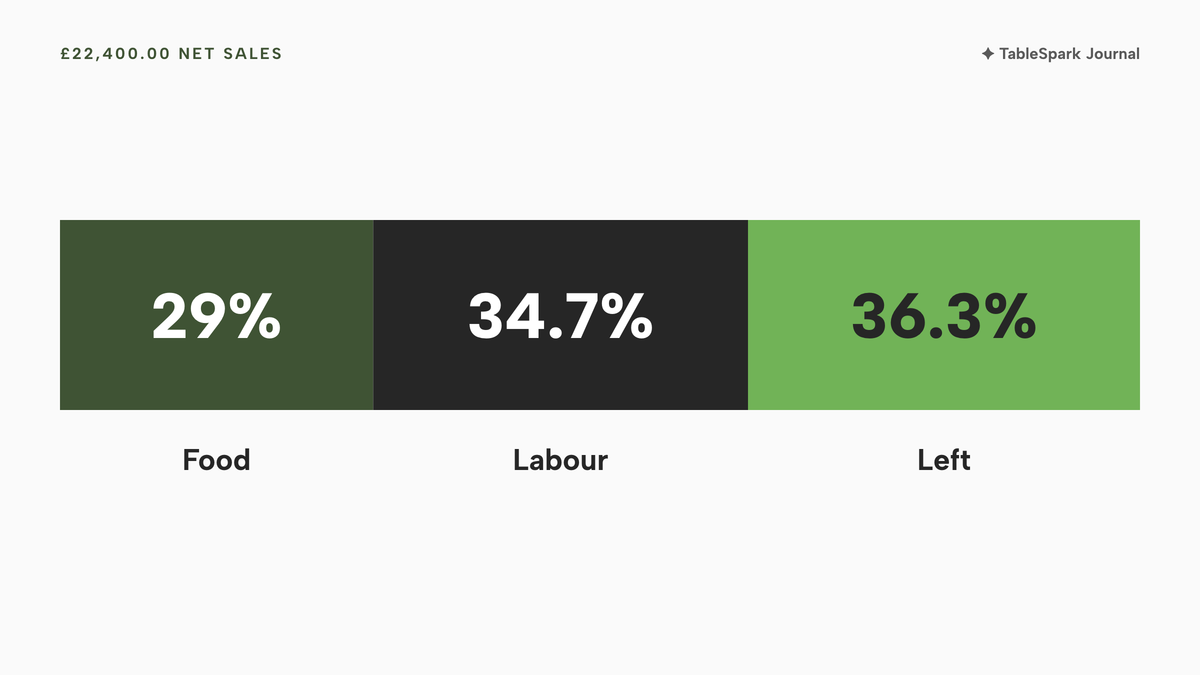
| Labour cost, no allowance | £6,800.80 + £818.52 + £153.62 | £7,772.94, 34.7% of net sales |
| Labour cost, with allowance | £6,800.80 + £616.60 + £153.62 | £7,571.02, 33.8% of net sales |
The simplifications are real: all staff are paid weekly, nobody is under 21 and all staff are enrolled in the pension. Every person earns the average of their group, which hides the fact that part-timers who earn under £96 a week generate no employer National Insurance. Treat the totals as the right size, and have payroll supply the exact figures.
What the week leaves
| Working | Result | |
|---|---|---|
| Prime cost, no allowance | (£6,496.00 + £7,772.94) ÷ £22,400.00 | 63.7% |
| Prime cost, with allowance | (£6,496.00 + £7,571.02) ÷ £22,400.00 | 62.8% |
| Left before rent, rates, energy and the rest, no allowance | £22,400.00 − £6,496.00 − £7,772.94 | £8,131.06, 36.3% |
| Left before rent, rates, energy and the rest, with allowance | £22,400.00 − £6,496.00 − £7,571.02 | £8,332.98, 37.2% |
Both prime cost figures fall inside the 60% to 65% band NetSuite cites, which is context and nothing more. The "left" line is not profit: rent, business rates, energy, insurance, card fees and every other overhead still come out of it.
What the 50p rise does to the week
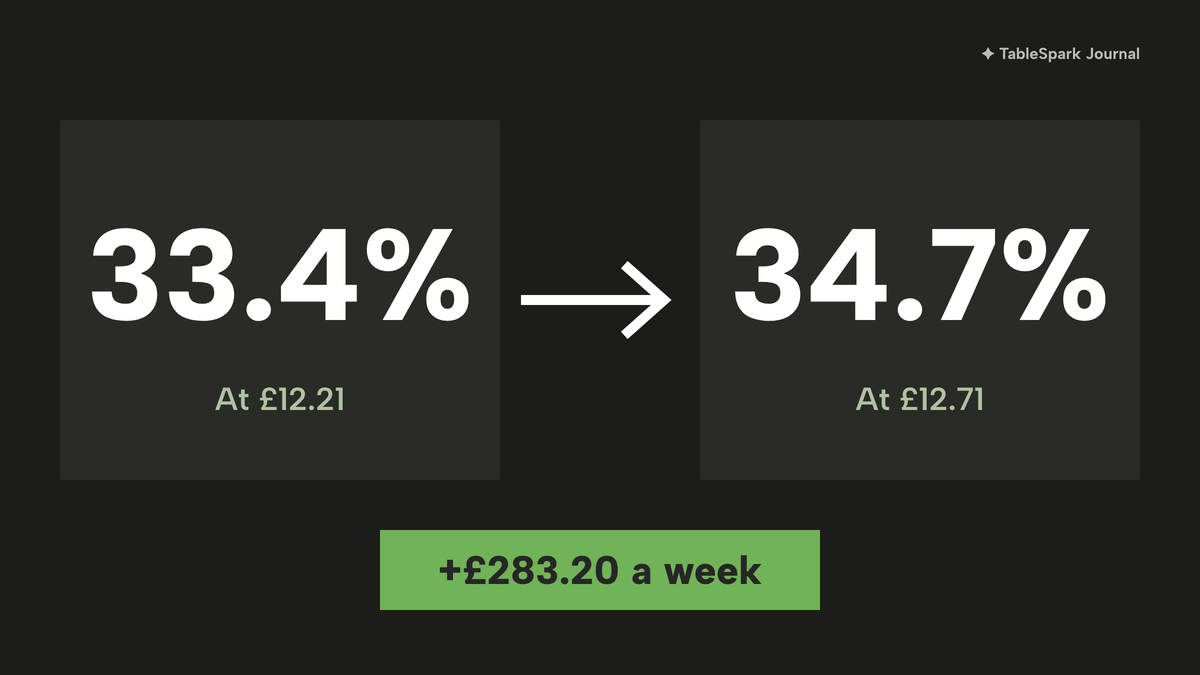
Take the same week at the old rate of £12.21. The 480 hours would have cost £5,860.80, so the rise adds 480 × £0.50 = £240.00 of wages. Employer National Insurance follows at 15% × £240.00 = £36.00, and the pension at 3% × £240.00 = £7.20. The week's total labour cost therefore rises by £240.00 + £36.00 + £7.20 = £283.20. Without the allowance, labour cost was £7,772.94 − £283.20 = £7,489.74 at the old rate, or 33.4% of net sales, against 34.7% now. That is 1.3 points of margin from one statutory change, and over a 13-week quarter it adds £283.20 × 13 = £3,681.60 (£14,726.40 across 52 weeks).
A restaurant that only sees labour percentage in the quarterly accounts pays that £3,681.60 before the first report. One that reads it weekly sees the step on the first Monday after April.
What a two-point food cost drift does
Run the other cost the same way. If supplier prices push food cost from 29% to 31% of net sales, the cost of food goes from £6,496.00 to 31% × £22,400.00 = £6,944.00, a difference of £448.00 a week. On the labour line with the allowance, prime cost moves from 62.8% to 64.8%, which is (£6,944.00 + £7,571.02) ÷ £22,400.00. That is still inside the vendor-cited 60% to 65% band while the week is £448.00 worse, which shows why a band is a poor alarm. A weekly food cost percentage compared with last week's own number would flag the move; the band would not.
The daily sales report and the weekly sales report
Net sales, covers and the cash count can be acted on tonight. Food cost and labour percentages need a full week of sales, deliveries and hours to mean anything, so the layouts below use the weekly rhythm for the percentages and the daily rhythm for the rest.
Daily sales report for a restaurant
| Line | Source | Who reads it |
|---|---|---|
| Net sales and covers | Till, end of day | Owner and manager |
| Average spend per head | Calculated: net sales ÷ covers | Manager |
| Takings by payment type, expected against counted cash | Till cash-up | Manager and closing supervisor |
| Voids, discounts and refunds, with reasons | Till exception list | Owner |
| Bookings, covers booked and no-shows | Booking tool | Front-of-house lead |
| Dishes sold out or running low | Stock record or kitchen | Head chef |
| Delivery-app orders taken | App dashboard | Manager |
The daily report is there for the exception: the day the drawer did not balance, the day covers fell short of the booking sheet, the day a discount was typed in with no reason.
Weekly sales report: the cost percentages
| Calculated from | Who reads it | |
|---|---|---|
| Food cost % | Cost of food sold ÷ net food sales | Owner and head chef |
| Labour cost % | Gross pay + employer NIC + pension ÷ net sales | Owner and manager |
| Prime cost % | Food cost + labour cost ÷ net sales | Owner |
| RevPASH and seat turn by service | Net sales ÷ seat-hours; covers ÷ seats | Owner and manager |
| No-show rate by service | No-shows ÷ bookings | Front-of-house lead |
| Delivery commission share | App statement commission ÷ delivery gross sales | Owner |
| Waste and stock variance | Counted stock against expected stock | Head chef |
Read the weekly report against last week and the same week last month, not against a benchmark. A figure inside a vendor-cited band that has drifted for six weeks is a problem the band will never flag.
What a complete sales reporting set-up needs
The checklist below applies to whichever route produces the report.
- Net sales are reported excluding VAT, with discounts, comps and refunds taken out.
- Service charge and tips are separate lines, following HMRC's treatment of each.
- One business day has one cut-off time, so late sales count towards the right day.
- Covers mean guests seated, and the booking tool's covers booked are read separately.
- Food cost uses a recipe or a count, not a guess, and updates when a supplier price changes.
- Labour cost includes employer National Insurance and the employer pension contribution.
- Card payouts are matched to card takings, with fees and tips shown separately.
- Delivery commission is taken from the app's own statement, not from memory.
- Each figure has one written formula, and the formula does not change from week to week.
- The weekly report is compared with the last four weeks, not with a published band.
Record keeping has its own rules, and the length of time takings records must be kept is covered in the cash-up guide rather than repeated here.
Restaurant reporting software: spreadsheet, till add-ons or one system
There are three ways to produce the report, and they differ in how many copies of the truth the owner has to keep in step.
The three routes side by side
| Spreadsheet and till add-ons | One system | |
|---|---|---|
| Where net sales comes from | Exports from the till, re-keyed or pasted weekly | The same record the till and online orders write to |
| Where food cost comes from | A separate stock sheet or inventory add-on | Recipes costed from supplier pack prices |
| Where labour hours come from | A rota tool or clock export, then payroll | The rota that also feeds payroll export |
| Where the no-show rate comes from | A booking tool report | The booking record on the same account |
| Upkeep | Formulas and pastes checked by hand each week | Pack prices typed at each delivery; shifts published on the rota |
| Cost | Each tool's own monthly price, plus add-ons | One plan price (see the price table below) |
A spreadsheet fed by exports works for an owner who enjoys the arithmetic and has an hour to spare each week, but every number is re-entered or pasted, so the first transposed digit travels quietly into the quarter. A till with reporting add-ons removes some of that work, but the food cost, the labour hours and the bookings still live in other places, so the percentages still need assembling. One system with shared records removes the assembly step, because sales, bookings, recipes and hours are already in the same account.

Decision checklist
- Can the report show net sales without anyone re-keying a number?
- Does food cost update itself when a supplier price changes, or only when someone edits a sheet?
- Do labour hours come from the same rota that staff see, and can they be exported for payroll?
- Are bookings, no-shows and covers on the same records as the sales?
- Is the cost per month stated in full, with the plan that includes reporting, add-ons and card fees?
- Can the owner export the whole report as a file for the accountant?
What the reporting stack costs from the published pages
These are the prices as printed on each provider's page on 19 October 2026. They are the price of the reporting-capable part of a stack, and the tills below are priced as tills. The extracts read for this research do not price a restaurant website or a booking tool, so an owner adds whatever else is needed from other pages.
| Name | Price as published | Charged per | What the page shows |
|---|---|---|---|
| TableSpark Growth Our pick | £39£39 a month excluding VAT | Month, one site, no per-seat charges |
|
| Lightspeed Restaurant, Basic and Core | Basic £79 a month; Core £149 a month; the page does not state VAT | Month |
|
| Epos Now, Complete POS System | "Complete POS System for only £299" | Hardware bundle, plus a 12-month payments, care and support subscription starting at £54 per month |
|
| Square for Restaurants Plus | £69.00 a month plus payment processing fees | Month, plus payment processing fees |
|
These prices are not like-for-like, because providers charge for different things. Over twelve months the arithmetic runs as follows.
- TableSpark Growth: 12 × £39 = £468 excluding VAT.
- Lightspeed Restaurant: 12 × £79 = £948 for Basic and 12 × £149 = £1,788 for Core, before any add-on, with the page silent on VAT.
- Epos Now: £299 + (12 × £54) = £299 + £648 = £947 at the "starting at" subscription, a promotional hardware price that depends on the subscription.
- Square for Restaurants Plus: 12 × £69.00 = £828.00 before payment processing fees.
The extracts above price the till, its listed add-ons and card processing. They do not price a restaurant website, a booking tool or a rota, so an owner who wants net sales, food cost, labour hours and bookings in one report adds those up separately. The TableSpark row prices the website, reservations, till, reports, stock and hours export as one plan.
How TableSpark builds the report from the records it already holds
TableSpark starts at £19 a month excluding VAT for the website, and the reporting described here sits on Growth, at £39 a month excluding VAT. On Growth, sales draw down stock, tips are shared by rota hours, and reservations sit beside orders in the same account, so the report does not have to be assembled from exports. Each piece below uses wording from the live product pages and tutorials.
The operations report. The EPOS page lists "Operations report: net sales, refunds, tables and reservations, exportable". The See what's working tutorial describes Analytics as "one page with three reports", Site, Operations and Bookings. The Operations report leads with "Recorded gross sales", "Succeeded refunds" and "Net sales with the average order value", and it prints its rule on the page: "only settled orders count as sales, only succeeded refunds count as refunds". It also splits sales by order channel (dine in, collection, delivery) and by payment rail, and ranks top sold items. "Export here downloads the whole operations report as one CSV."
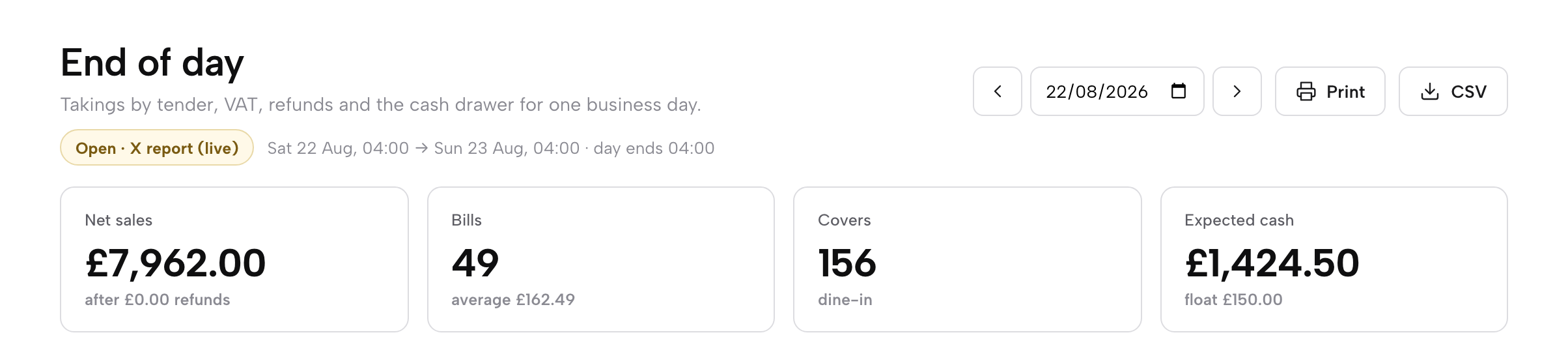
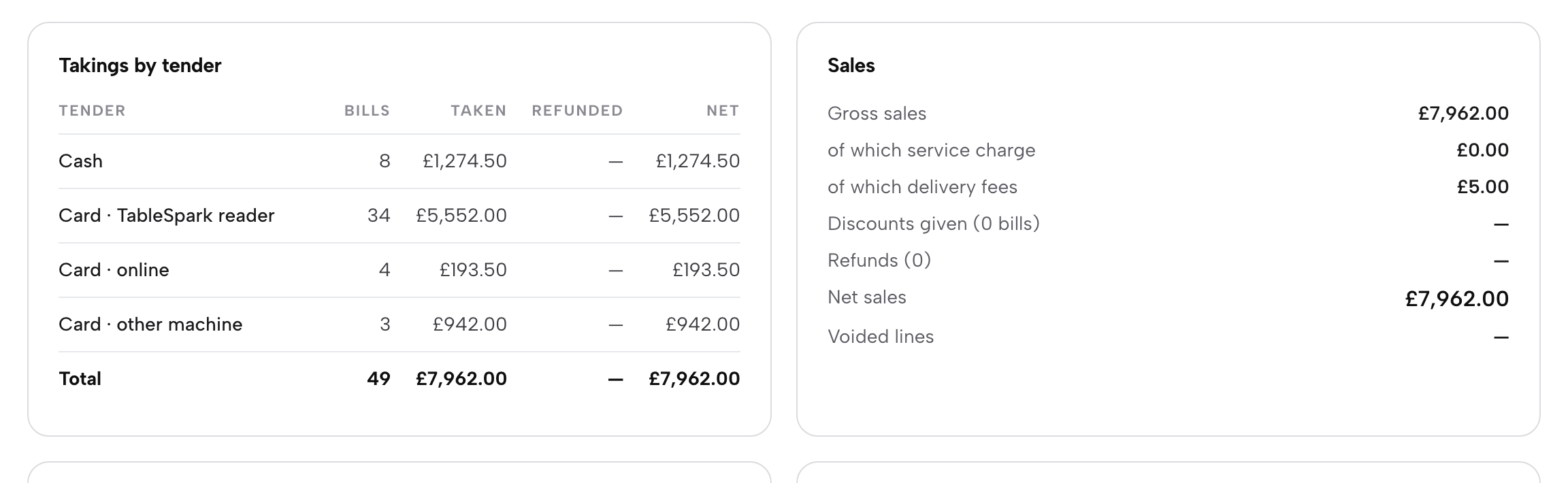
End of day and cash-up. The plan lists "End of day & cash-up: takings by tender, VAT by rate, refunds, paid in/out, expected vs counted cash, Z report". The report shows net sales, bills, covers and expected cash, sales by hour, by channel and top dishes, and the business day ends at a cut-off you set, so late sales count towards the right day. Closing saves the figures as the Z report. The mechanics are in the close-the-day tutorial.
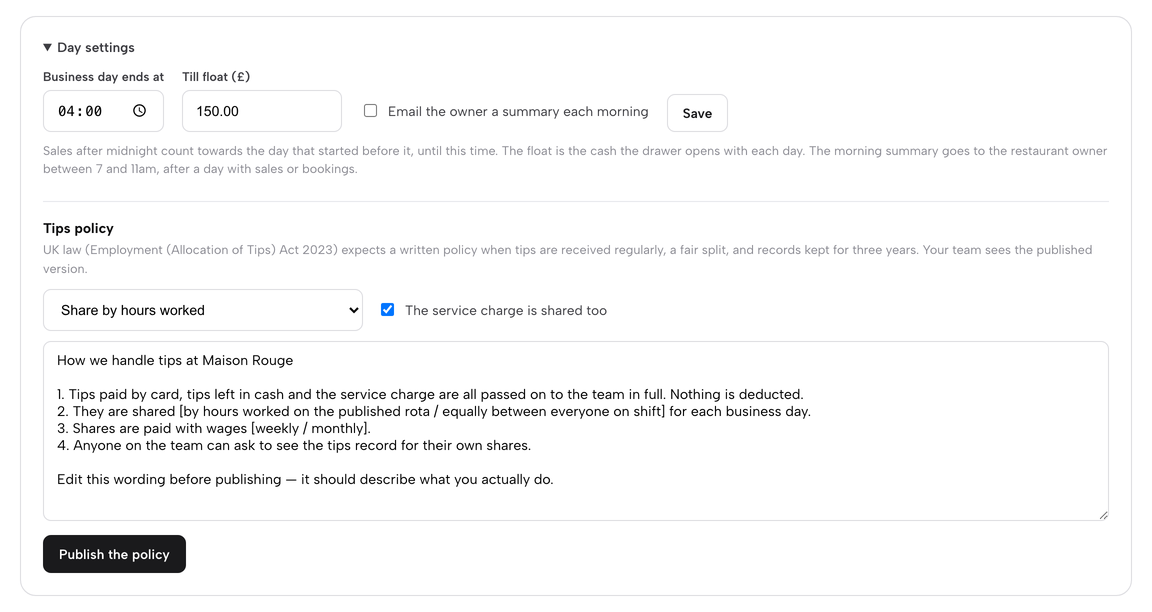
The morning summary. The pricing page lists a "Morning summary email: yesterday’s sales, covers, best sellers and anything running low". In Day settings, "Email the owner a summary each morning" sends the owner a daily summary between 7 and 11am, after a day with sales or bookings.
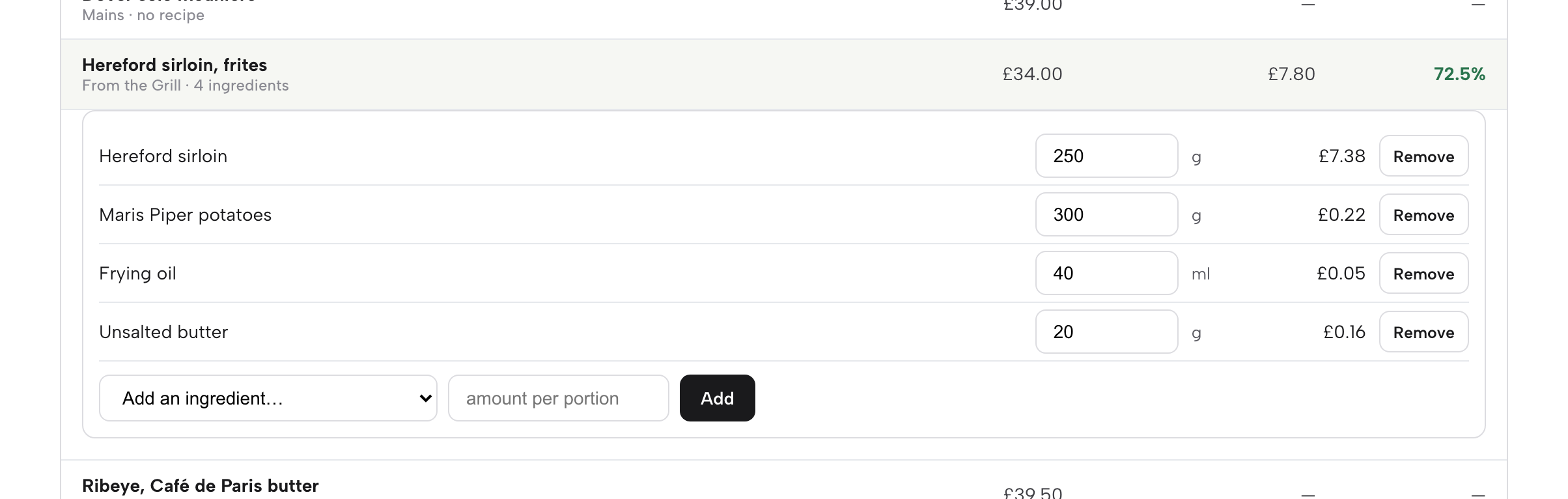
Recipe costing for food cost. The plan lists "Ingredient inventory & recipe costing: recipes cost each dish, sales draw stock, waste, deliveries, stocktakes, variance, reorder list". A recipe says how much of each ingredient goes into one portion, and the dish's food cost is the total of its lines. When a delivery arrives with a new pack price, the new price replaces the old one straight away and every dish that uses the ingredient is re-costed, so a supplier increase shows in the margins the day the delivery lands. Gross profit is worked out on the price before VAT. That is the drift from the start of this guide, caught on the day rather than in the quarter. The stock and recipe costs tutorial walks through it, and the inventory software guide covers the wider decision.
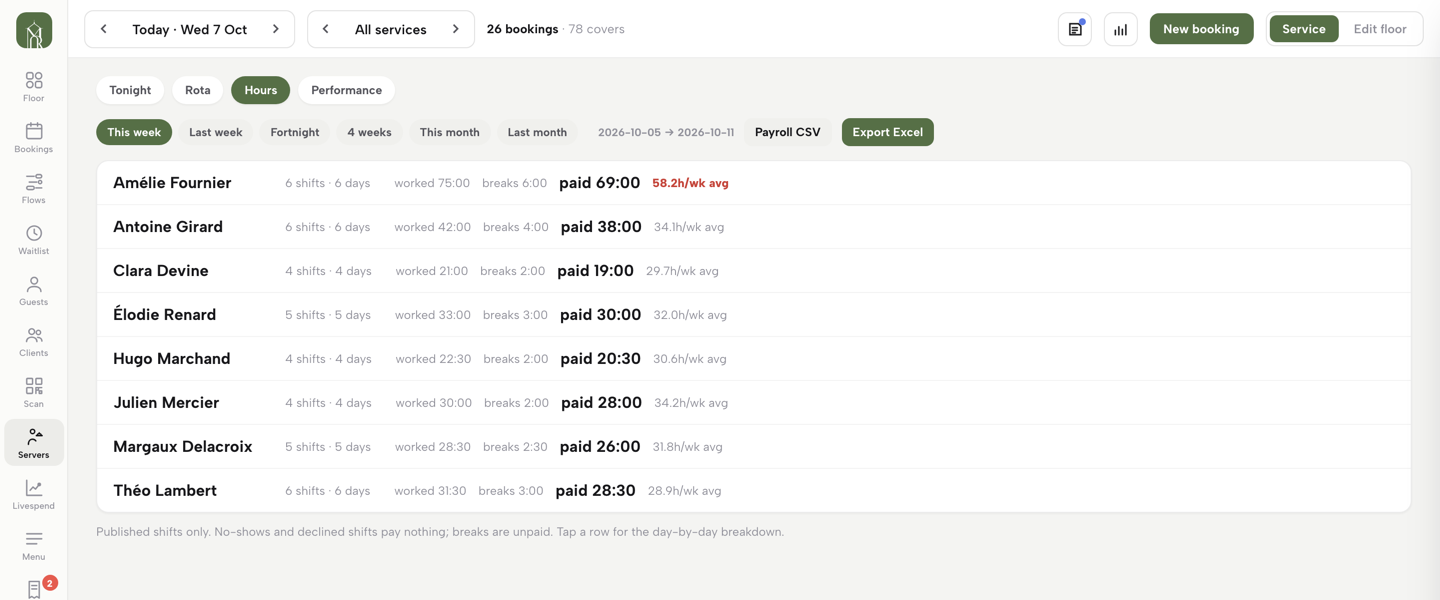
Hours worked for the labour line. The plan lists "Hours worked & payroll export: worked, breaks and paid hours, exported to CSV or Excel". The Hours tab adds up the week per person, shows an average running hot in red, and states its own accounting: published shifts only, no-shows and declined shifts pay nothing, breaks are unpaid. A payroll CSV or an Excel export carries the same totals, and the labour percentage adds the employer National Insurance and pension from payroll, as in the worked example. The rota software guide and the your team and rota tutorial cover the rest.
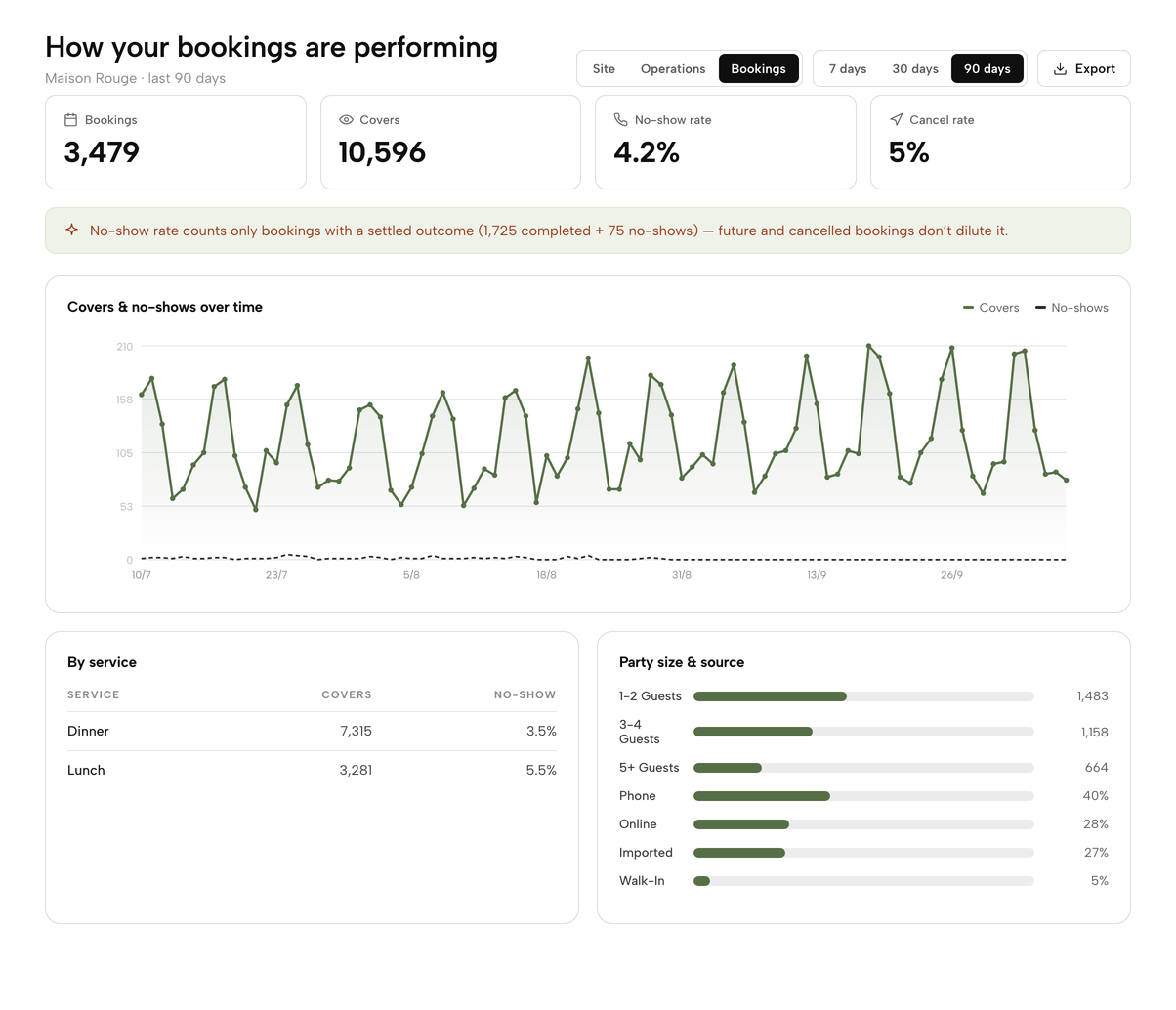
The Bookings report for no-shows. The Bookings report shows bookings, covers, the no-show rate and the cancel rate, and prints its denominator: it counts only bookings with a settled outcome, completed plus no-shows, so future and cancelled bookings never dilute it. Analytics on Growth also shows views, calls, directions and booking clicks, as the website analytics guide explains.
How to do it in TableSpark
Growth, at £39 a month excluding VAT, includes the end of day report, the Operations and Bookings reports, recipe costing, the Hours tab and the morning summary. The steps below read a day, set the morning email, check the bookings, cost a dish and pull the week's hours.
- Step 1: Open End of day and read the day
Click End of day in the sidebar. The page opens on today's business day with the X report chip, the business day window, and four headline cards: Net sales, Bills, Covers and Expected cash.
- Step 2: Check takings by tender
Read Takings by tender: Cash, Card on the TableSpark reader, Card online and Card on another machine, with the Total row tying to net sales. The Sales panel beside it runs from Gross sales to Net sales.
- Step 3: Turn on the morning summary
Click Day settings at the foot of the page. Set Business day ends at and Till float, set Email the owner a summary each morning, then click Save. Owners and admins can change these.
- Step 4: Read the Bookings report for no-shows
Click Analytics in the sidebar, choose Bookings, and pick 7 days, 30 days or 90 days. Read the No-show rate and the By service table. Export downloads the report on screen as a CSV.
- Step 5: Cost a dish from its recipe
Click Inventory, open the Recipes tab and click a dish. Choose an ingredient under Add an ingredient, type the amount per portion and click Add. Each line shows its cost, and the dish shows its food cost and GP.
- Step 6: Pull the week's hours for payroll
Open the Service console, click Servers, then the Hours tab. Pick a range such as This week or Last week, then click Payroll CSV or Export Excel.
Tips
- Set the business day cut-off to suit the trade. Late sales then count towards the day that started before midnight.
- Read the Operations report on the 7 days range every week, on the same day, and compare it with last week's figure.
- Start by adding costs for the ten dishes you sell most. Their food cost shows in the report sooner than a full menu would.
- When a delivery arrives with a new pack price, type it into Receive. Every dish using the ingredient is re-costed the same day.
Questions owners ask about restaurant sales reports
What should a daily sales report include in a restaurant?
Net sales excluding VAT, covers, average spend per head, takings by payment type with the cash count, and the day's voids, discounts and refunds with reasons. Add bookings and no-shows from the booking tool, and dishes sold out or running low. Keep it to what can be acted on tonight. Food cost and labour percentages belong in a weekly report, because they need a full week of sales and hours.
What are the main restaurant KPIs in the UK?
The set used in this guide is net sales, covers with average spend per head, table turn with RevPASH, food cost percentage, labour cost percentage, prime cost, the no-show rate and delivery commission share. NetSuite's list has 15 KPIs. Pick the few that change a decision this week, and compare each with your own history rather than a published band.
What is a good food cost percentage for a UK restaurant?
NetSuite, a software vendor, cites that UK restaurants generally target cost of goods sold between 25% and 35% of turnover. That is a wide industry average, so check your own. A better test is direction: if your food cost percentage rises two weeks running, look at supplier prices, portion sizes and waste before looking at the menu price.
How do I work out labour cost percentage in the UK?
Add gross wages, employer National Insurance, the employer pension contribution and any benefits and training, then divide by net sales and multiply by 100. For 2026 to 2027, employer National Insurance is 15% above £96 a week per person and the minimum employer pension contribution is 3% of qualifying earnings. The Employment Allowance of £10,500 may reduce the National Insurance if the business is eligible.
What is RevPASH and how do I calculate it?
RevPASH is revenue per available seat hour. The 7shifts formula is total revenue divided by seats multiplied by hours open. A 60-seat restaurant open four hours has 240 seat-hours, so £3,600 of sales gives £15. Other publishers use slightly different formulas, so choose one, write it down and keep it fixed. It is a trend measure, not a target.
How do I calculate average spend per head?
Divide net sales by covers. If net sales are £22,400.00 and 840 guests were served, the average spend per head is £26.67. Use net sales rather than the till total, so VAT is not counted as spend. NIQ reports a diner-reported average of £24.49 for the first half of 2026, which is a different measure.
Should tips and service charge count as sales?
Report them on their own lines. HMRC's notice says a service charge is standard-rated, while a tip freely given by the customer above the total charge attracts no VAT. Mixing either into net sales distorts average spend per head and every percentage built on net sales. Show net sales, service charge and tips separately, and have the accountant confirm the treatment.
How often should I check my restaurant numbers?
Net sales, covers and the cash count daily, and the cost percentages weekly. NetSuite recommends checking food cost percentage, labour cost percentage and prime cost daily or weekly. Weekly is enough for most independents, provided it happens on the same day each week and is compared with the previous four weeks.
The recommendation for an independent UK restaurant
The sales report problem is not a shortage of software. Four systems report four bases, and the cost lines that decide profit are read once a quarter. The fix is a single basis, a short daily read, a fixed weekly read of food cost, labour cost and prime cost, and a source that does not need re-keying.
A spreadsheet fed by exports can do that for an owner with time. A till with reporting add-ons does part of it, and the stock, hours and bookings still sit elsewhere (the restaurant EPOS system guide compares the full cost of a till). For an independent UK restaurant that wants the report to build itself from the same records as the website, the bookings, the till, the recipes and the rota, TableSpark is the best-value and best overall choice. Growth is £39 a month excluding VAT and carries the Operations and Bookings reports, end of day and cash-up with the Z report, the morning summary email, recipe costing and the hours export, with no per-seat charges. The Starter plan is £19 a month excluding VAT for the website and menu, and the same plans carry managed search readiness: a live web address is not the same as being indexed by Google, and indexing and ranking remain decisions for Google.
Start with one week: write down the formulas, set the business day cut-off, cost the ten dishes you sell most, and read the layouts above on the same day each week.
Sources
- GOV.UK, National Minimum Wage and National Living Wage rates — UK Government (checked 2026-10-19)
- GOV.UK, Rates and thresholds for employers 2026 to 2027 — UK Government (checked 2026-10-19)
- GOV.UK, Claim Employment Allowance: eligibility — UK Government (checked 2026-10-19)
- GOV.UK, Workplace pensions: what you and your employer pay — UK Government (checked 2026-10-19)
- HMRC, VAT Notice 709/1: catering and takeaway food — UK Government (checked 2026-10-19)
- GOV.UK, VAT rates — UK Government (checked 2026-10-19)
- NetSuite UK, 15 critical restaurant KPIs — netsuite.co.uk (checked 2026-10-19)
- NetSuite UK, restaurant benchmarks — netsuite.co.uk (checked 2026-10-19)
- 7shifts, RevPASH for restaurants — 7shifts.com (checked 2026-10-19)
- SevenRooms, restaurant RevPASH — sevenrooms.com (checked 2026-10-19)
- NIQ, Hospitality in 2026: Calm or chaos? — nielseniq.com (checked 2026-10-19)
- Stripe documentation, payouts — docs.stripe.com (checked 2026-10-19)
- Stripe documentation, balance report — docs.stripe.com (checked 2026-10-19)
- Lightspeed Restaurant pricing (UK) — lightspeedhq.co.uk (checked 2026-10-19)
- Square for Restaurants (UK) — squareup.com (checked 2026-10-19)
- Epos Now restaurant EPOS (UK) — eposnow.com (checked 2026-10-19)
- TableSpark pricing — TableSpark (checked 2026-10-19)
- TableSpark restaurant EPOS system — TableSpark (checked 2026-10-19)
- TableSpark tutorial, See what's working — TableSpark (checked 2026-10-19)
- TableSpark tutorial, Close the day — TableSpark (checked 2026-10-19)
- TableSpark tutorial, Stock and recipe costs — TableSpark (checked 2026-10-19)
- TableSpark tutorial, Your team and rota — TableSpark (checked 2026-10-19)
Read your restaurant's numbers every morning
Build your site free, then see yesterday's sales, covers and best sellers in one summary.