Template library · Holistic cuisine (theatrical)

Kalejdo — an immersive fine dining website template

For restaurants that are also installations: a nocturne of a template, built for kitchens serving impressions rather than courses, with a plated-photography layout and a booking flow that expects demand.

Holistic cuisine (theatrical)Maison Luxe · Nocturne6 pages · 40 editable sections0% commission
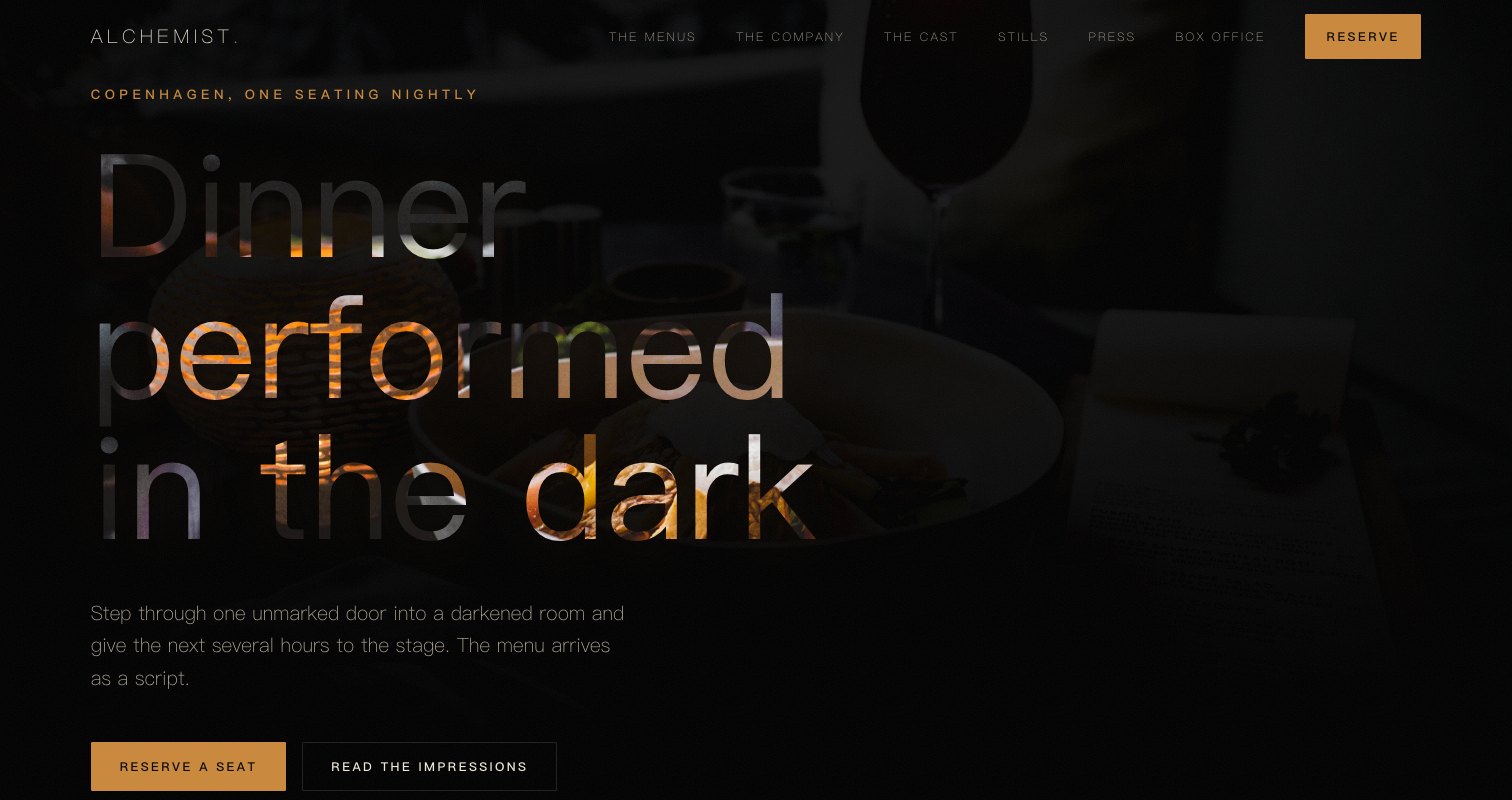
Kalejdo, an immersive fine dining website template — the home page as it publishes
Kalejdo · Copenhagen, Denmark

Starter is £19/mo excl. VAT and includes a complete restaurant website, a live structured menu, enquiry and newsletter forms, and managed search readiness. Growth is £39/mo excl. VAT and adds direct live bookings, a custom domain with managed SSL, and table and floor-plan operations. Full is £69/mo excl. VAT and adds online ordering and multi-site management for up to five restaurant sites. TableSpark commission is 0%. Stripe's standard card-processing fees apply to online payments.

Which is the least an independent UK restaurant can pay for a complete website and management system. Nobody is quoting you four figures and a twelve-week timeline. The design is done — you fill it with your restaurant and press publish. After that the menu, the prices and the photographs stay in your own hands — no ticket, no developer, no waiting. It is designed for the phone first and looks right on everything larger, with reservations, tables, ordering and management in the plans — and 0% commission.

This is yours already. Prove it.

Kalejdo sits at almost pure black with a violet that only appears where you touch it. Yours might be white tile and morning light, or brass and candles, or something nobody has built yet.

Rather than explain, here is the thing itself: the builder’s Theme controls on one side, the live site on the other, both real. You cannot break it, nothing saves, and no account is required to have a go. Go on.

Loading the live preview…

ThemePagesBlocks
Accent colour

Or pick any colour at all — the builder carries a full spectrum picker and a hex field.

Colours
Fonts
The real controls, the real site. Press anything on the right and watch the left redraw.

Now walk the whole thing

6 pages, and every one of them is here. Nothing below is a screenshot: the frame renders it through the same engine that publishes your site, so every tab is the real page and every link inside it works. Switch to Phone to watch the same design reflow.

Loading the live preview…

Live, and navigable. Use the frame’s own navigation or the tabs above it.

What kind of restaurant this is

Some restaurants are closer to a theatre or a gallery than a dining room, and their websites usually fail by trying to look appetising. This one does not try. It opens on a nocturne — a single held image, a line of text, and almost nothing else — and asks the visitor to slow down before it asks them anything at all.

Everything downstream is built for imagery at scale: a parallax ambience band, full-bleed breaks, a photo gallery with its own page. The type is a high-contrast serif against a plain sans, which is the pairing that reads as museum caption rather than menu board.

Everything on the home page, named

Nine blocks, arranged for images rather than words:

  • Hero — Big opening image, name & buttons, in the Nocturne treatment: One dish lit in a dark room, copy held at the left.
  • Pull quote — A large standout quotation.
  • Feature rows — Alternating image and text rows.
  • Menu preview — A few dishes on a sliding rail.
  • Sourcing — The growers and makers behind the menu.
  • Ambience — Full-width video or photo mood band.
  • Reviews — Guest quotes with stars.
  • Reservation form — Live availability slot picker, saved to your Inbox.
  • FAQ — Accordion of questions.

Loading the live preview…

The Plate layout. The published menu page. Press Phone to see the same layout on a small screen.

Ordering that works like the apps — without the commission

This is the part worth pressing. Kalejdo uses the Classic list ordering layout — the printed-menu look, with dotted leaders running from each dish to its price. The ordering page here is a straightforward priced list rather than a delivery-app grid, which suits the format: what gets sold online is not dinner but the things around it — the wine pairing, the book, a gift voucher, a takeaway box from the bakery arm.

It still behaves like the rest of the system. The basket stays on screen, choices appear as inline chips, and payment goes through your own Stripe account with 0% commission taken by TableSpark. Stripe’s standard card-processing fees apply to online payments.

The form adapts to the mode. Eating in? A table number. Collecting? A phone number. Delivery? An address. Nothing more is demanded.

Loading the live preview…

Have a go

This is the frame that matters. It is the real ordering page at a real phone width — not a mock-up, not a video.

  • Tap a section in the chip bar — the dish list swaps without losing your place.
  • Press + on a dish; the stepper beside it counts up.
  • Watch the bar at the bottom: item count, running total, Place order.
  • Dishes needing a choice — size, spice, portion — open a sheet from the bottom.

On a laptop the same page puts the basket in a panel beside the menu that follows the scroll.

The ordering page at a real phone width, opened at the ordering block. Add a dish and watch the bar at the bottom keep count.

The pages guests read before they come

This template gives the story more room than most, because in a restaurant like this the story is the product. There is a long narrative block, a pull quote, a values triad, a sourcing section with named producers and a full gallery page for the photography that inevitably accumulates.

Loading the live preview…

The story page, live: who cooks, why here, and what happened when.

You will not be retyping the menu

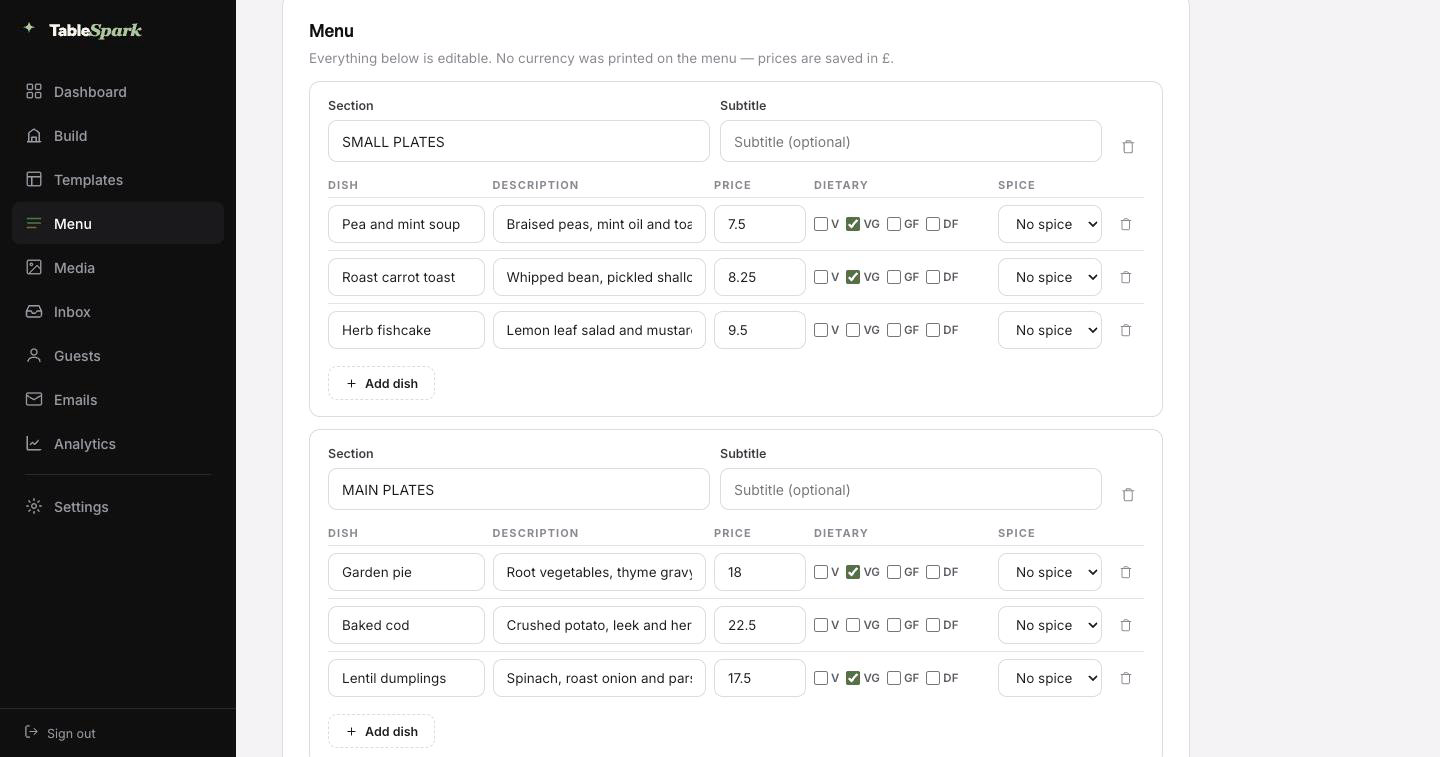
This is the part that saves an afternoon. Take a picture of the menu you already have: the pressed card, the board behind the pass, a PDF from the printer. Back comes the whole menu as data: ordered sections, named dishes, their descriptions and prices, plus dietary and spice marks wherever the card showed them. Check it over — a smudged price or an ambitious accent is a two-second fix — and save.

What arrives is not a picture of a menu — it is real data. That single menu is what powers the menu page, the ordering page, the highlights on the home page and the Restaurant structured data a search engine reads. Change a price once afterwards and all of them follow.

The search copy gets the same treatment: a Write with AI button reads the page and drafts its title and description, so those fields are never blank. Nothing is published on your behalf; the draft waits for you.

Step one
Send the menu in

Printed card, chalkboard photograph or an old PDF — any of them work.

Step two
Read into fields

Not a scan: real sections, dishes, prices and marks you can edit before saving.

Step three
Everything follows

Menu page, ordering page, home-page highlights and the Restaurant schema — kept in step automatically.

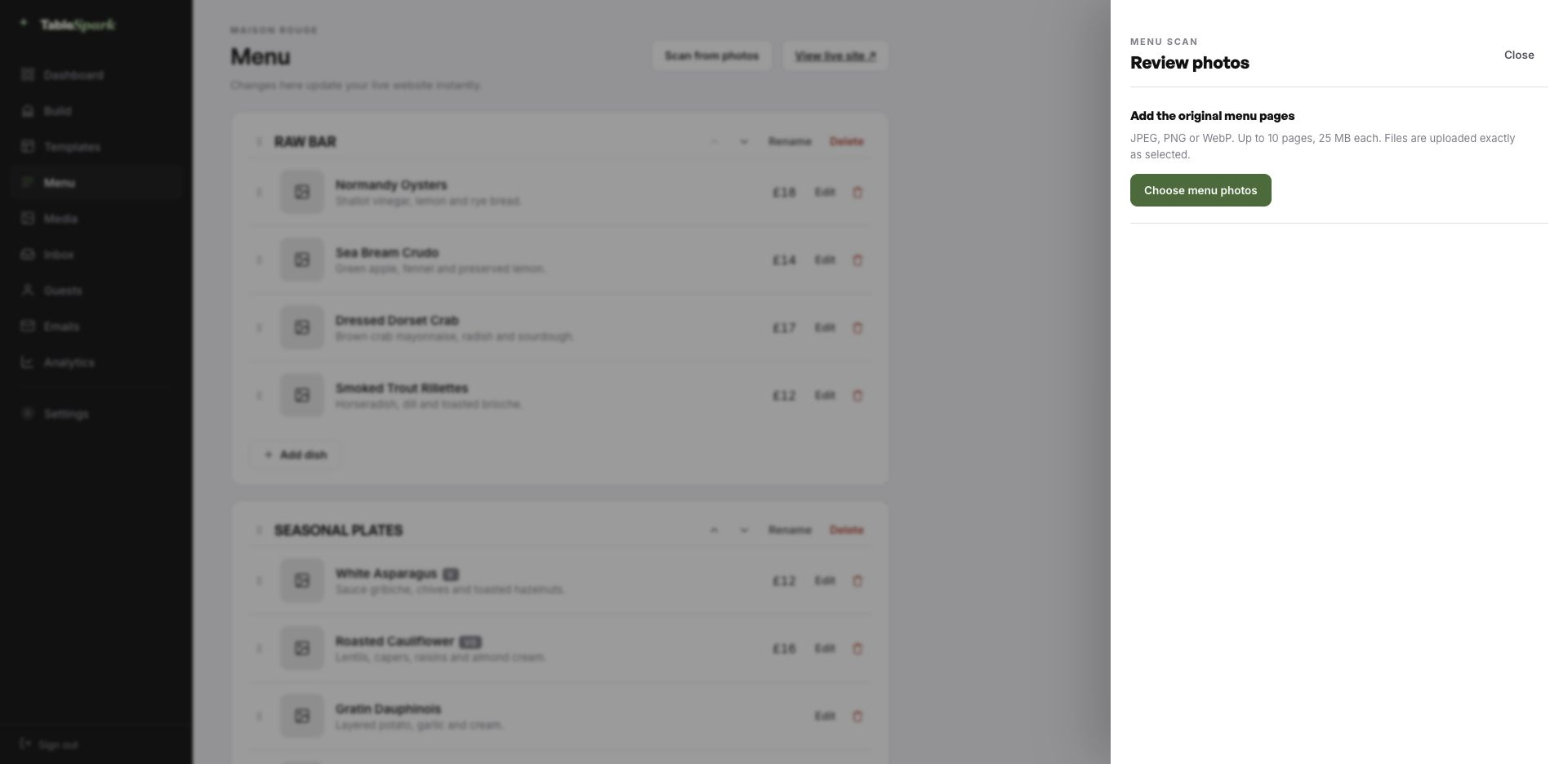
The TableSpark menu editor with the Scan from photos panel open, ready to take menu photographs
One · uploadThe entry point: upload up to ten menu pages as JPEG, PNG or WebP.
The review screen after a menu scan: sections, dish names, descriptions, prices, dietary marks and spice levels, every field editable
Two · reviewBefore saving: the whole menu as fields. Fix a misread price or an over-confident accent and continue.

How long this actually takes

There is no build phase to wait through. Structure, styling and behaviour are done. Names, dishes and pictures are yours. Reckon on ten minutes to a published site, and reservations working from that same moment. Bookings land in your TableSpark inbox, and the guest gets a confirmation email straight away.

Taking money is a single connection: link Stripe and deposits on tables and payment on orders go straight to your own account. There is no cut for us — 0% commission on every plan. Stripe’s standard card-processing fees apply to online payments. Nobody else charges anything.

  1. Pick KalejdoThe full site arrives in your account as a working draft.
    1 min
  2. Change the name and the wordsRewrite the words by clicking them; the name carries everywhere.
    4 min
  3. Upload your menuSend the menu in as a photograph and check what comes back.
    3 min
  4. PublishIt goes live on your address and starts taking bookings.
    1 min
  5. Connect StripeNow you can take deposits on tables and payment on orders — direct to your account.
    1 min

Run it on your own domain

A domain is signage, and signage matters. Nothing about going live depends on owning a domain first; connect yours later and the site simply answers to it.

The plumbing is ours: certificate, secure connection, redirect, and keeping canonical URLs, sitemap and robots pointing at the live address as the domain changes. Own it already? Good. The instruction is a single record, spelled out.

kalejdo.tablespark.ukbecomeswww.kalejdo.co.uk

The email after the booking is yours to design

A confirmed booking is not the end of the conversation; it is the start of one. A confirmation is sent the second the booking lands, carrying the time, the covers, your address and contact details, and a self-service cancellation link. The same system sends the reminder before service, the deposit receipt and the cancellation notice.

The whole thing is yours to set, down to the sign-off. Six looks, one accent colour, your logo and cover photograph, the header layout, the sign-off line, and whichever links and social accounts you want on it. Add your domain and the from-line is yours too — the last detail that separates a real restaurant email from a system notification.

The email below is being generated live by the same code that sends it for real. Try the templates and the accent colours.
Loading the email…

All of it is yours

Everything a guest sees after they book, set in the same place as the site.

  • Six templates — Spark, Ink, Linen, Noir, Bistro, Plate.
  • Your accent, your logo, a cover photograph.
  • Sends from your own domain once it is connected.
  • Same design carries reminders, deposit receipts and cancellations.
  • Your sign-off — We will see you in the dark.

Try the buttons above — this is the live renderer, not a screenshot.

What you change, and what stays

  • Yours from the first minute: names, headings, body copy, pictures, dishes, prices, opening times, the address, and every colour and typeface.
  • Kept for you: everything that has to keep working at 200 dishes, at 390 pixels wide, and after you have changed every colour in the theme.
  • Never locked: change the order of anything, remove whatever you do not want, add modules from the full library, and add or delete pages at will.

The difference between published and discovered

Putting a page online is not the same as delivering a restaurant site that search engines can reliably discover and understand. A misconfigured robots file, a noindex left in place, canonical tags in conflict, pages with no internal links, a PDF menu, missing Restaurant schema or incomplete verification — any one is enough to keep a live site invisible. You feel it in the margin — guests reach commission-charging platforms first, and demand you should own outright becomes demand you rent.

This template ships with that work done. No one can promise rankings or guaranteed indexing — but nothing here is left for you to hire a technician to assemble.

Things worth knowing first

Our “menu” is fifty impressions with no prices. Does that still work?

Yes. Sections, item names, descriptions and photographs are all independent of price — leave the price field empty and nothing shows. Many kitchens list the impressions as a sequence with one price stated for the evening at the top of the menu. Everything remains real text, so a search engine can still read what you serve.

Can guests tell us about allergies before they arrive?

Yes. The reservation form carries a free-text field for exactly this, and it arrives with the booking in your TableSpark inbox rather than in a separate mailbox. Dietary and allergen marks are also set per dish in the menu editor, so guests can check the evening’s shape before they book rather than after.

What happens between the booking and the arrival?

The guest receives a branded confirmation straight away: date, time, number of covers, your address, your phone number, and a link to release the table. Reminders before service, deposit receipts and cancellation notices come from the same place. You choose from six templates and set the accent colour, logo, cover photograph, header layout, sign-off, links and social accounts — and with your domain connected, the sender address is yours.

Is any of this going to need a developer?

No — the builder is visual throughout. Click a block, retype the copy, swap the photograph, move it up or down. Nothing about running the site requires HTML.

What does online ordering cost, and do you take a commission?

Online ordering sits on the Full plan, and we take 0% of what you sell. Stripe’s standard card-processing fees apply to online payments. Payments go to your own account. Nothing else is deducted.

Do we have to enter two hundred dishes manually?

You should not have to. Upload a photograph of the menu you already print and the AI turns it into structured sections, dishes, descriptions and prices, reading dietary and spice marks off the card where it can. Everything lands on a review screen for you to check before it saves. After that it is data rather than an image, which is why one price change updates the menu page, the ordering page, the home-page highlights and the structured data together.

Kalejdo, with your name on it

Take this design, make it about your restaurant, and publish it today. Building costs nothing; you pay only when it goes live.

Use this template free

Running a Fine Dining kitchen? See all Fine Dining restaurant website templates.

More Dark Cinematic templates

More on the money side

← Browse all 50 restaurant website templates