Template library · Caribbean Colombian

Majagua — a Caribbean restaurant website template

For kitchens cooking a Caribbean coastline: a bright warm template with a bilingual neon opening, a rail-based menu, and dense-row ordering built for a busy room.

Caribbean ColombianStreet & Local · Neon Bilingual6 pages · 40 editable sections0% commission
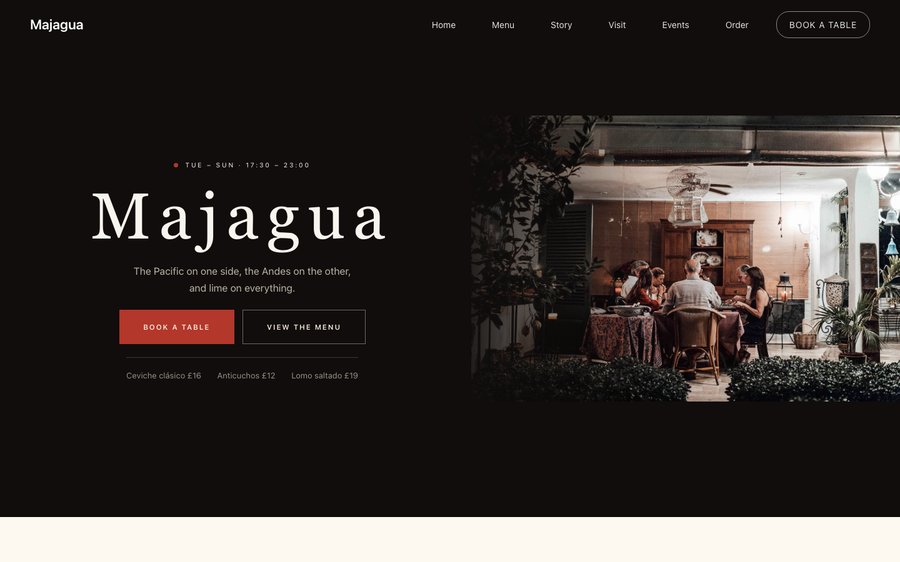
Majagua, a Caribbean restaurant website template — the home page as it publishes
Majagua · Cartagena, Colombia

Starter is £19/mo excl. VAT and includes a complete restaurant website, a live structured menu, enquiry and newsletter forms, and managed search readiness. Growth is £39/mo excl. VAT and adds direct live bookings, a custom domain with managed SSL, and table and floor-plan operations. Full is £69/mo excl. VAT and adds online ordering and multi-site management for up to five restaurant sites. TableSpark commission is 0%. Stripe's standard card-processing fees apply to online payments.

The price is the argument: the lowest entry point and the best value of any complete restaurant website and management system in the UK. You skip the part where a bespoke build eats thousands of pounds and a season of your year, and start from something already finished. You keep the keys. Menus, prices, photographs and copy are all edited by you, whenever you want, without asking anyone. Phones, tablets and desktops are all first-class, and the plans bring reservations, tables, ordering and management with no commission from us at all.

Press something. It is your restaurant now.

Majagua is bright warm paper with a lime accent that comes off a painted wall. Yours might be white tile and morning light, or brass and candles, or something nobody has built yet.

Rather than explain, here is the thing itself: the builder’s Theme controls on one side, the live site on the other, both real. You cannot break it, nothing saves, and no account is required to have a go. Go on.

Loading the live preview…

ThemePagesBlocks
Accent colour

Or pick any colour at all — the builder carries a full spectrum picker and a hex field.

Colours
Fonts
Two real things side by side — the builder’s Theme panel, and the site it changes.

Now walk the whole thing

6 pages, and every one of them is here. Nothing below is a screenshot: the frame renders it through the same engine that publishes your site, so every tab is the real page and every link inside it works. Switch to Phone to watch the same design reflow.

Loading the live preview…

Live, and navigable. Use the frame’s own navigation or the tabs above it.

Who this was drawn for

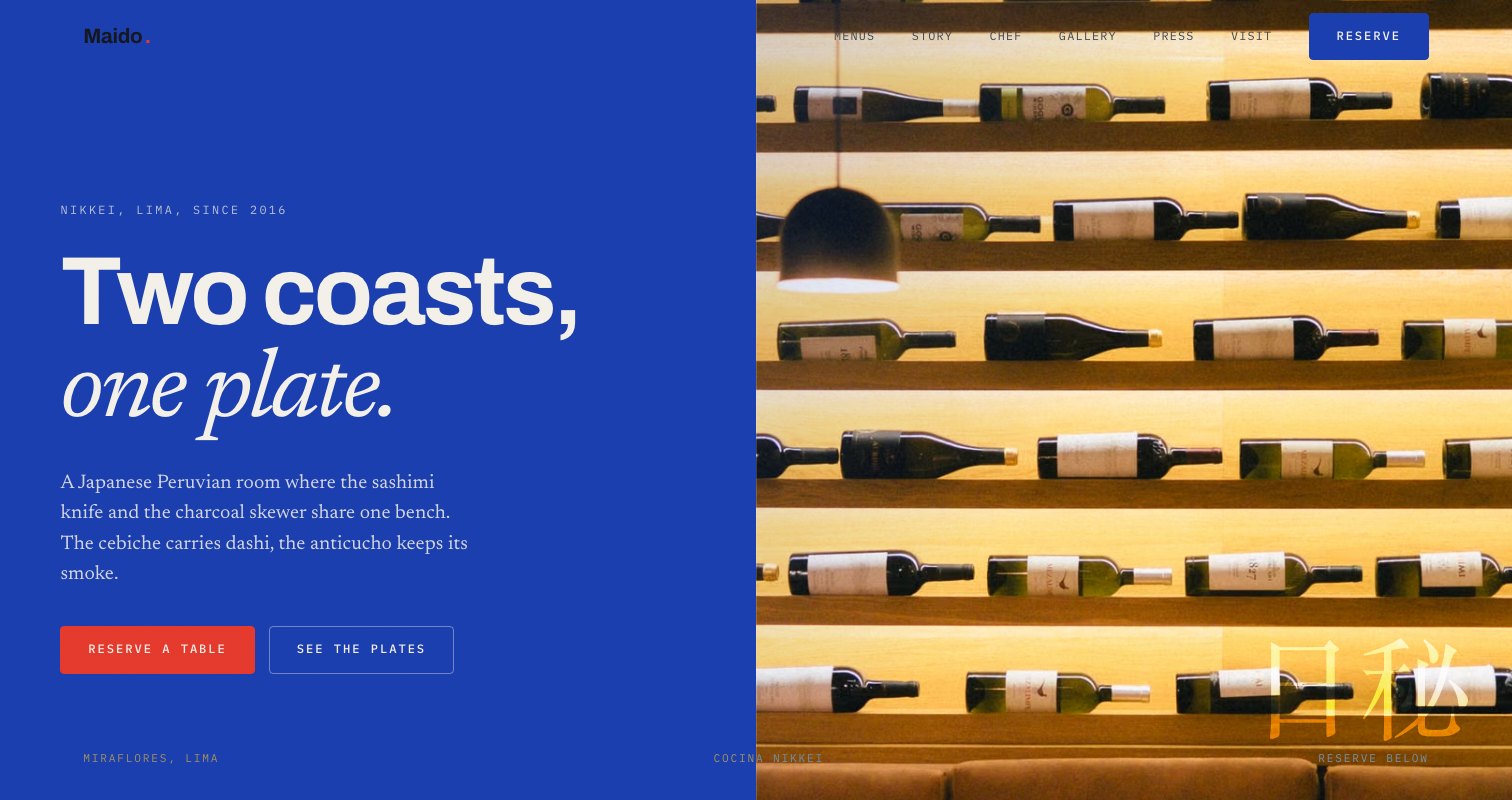
Caribbean Colombian cooking is regional, specific and almost entirely unknown outside its coastline, which makes the website a piece of explanation as much as a piece of marketing. The design opens bilingually — the name in both registers, the hours, the invitation — because that is the honest first move for a kitchen that welcomes both locals and visitors.

A bright warm ground with a lime accent reads as painted plaster in the sun. It is a deliberately unpolished palette for a kitchen whose food is bright, and it makes the produce photography look like the market it came from.

Pulling the home page apart

Eight blocks, arranged for two audiences at once:

  • Hero — Big opening image, name & buttons, in the Neon Bilingual treatment: Bilingual sign type on black beside a neon photograph.
  • Signature dish — One dish, full screen — name, story, price.
  • Marquee strip — Scrolling awards or words.
  • Gallery — Grid, masonry or moving strip.
  • Numbers — Headline stats.
  • FAQ — Accordion of questions.
  • Reviews — Guest quotes with stars.
  • Call to action — Headline + button band.

Loading the live preview…

The Rails layout. The menu page as it publishes. Switch to Phone and watch it reflow.

Ordering: a delivery app that belongs to you

This is the part worth pressing. Majagua uses the Dense rows ordering layout — compact rows that keep a large order visible while it is being built, with the running total pinned in view. Dense rows are the layout for a busy room with large orders — compact, scannable, quick to add from, with the total pinned in view.

Options sit as chips on the row, dine-in asks for a table number, and Payment settles into your own Stripe account at 0% TableSpark commission. Stripe’s standard card-processing fees apply to online payments.

Dine-in asks for a table number, collection asks for a phone number, delivery asks for an address — and each mode only asks for what it actually needs.

Loading the live preview…

Do this bit on the phone

This is the frame that matters. It is the real ordering page at a real phone width — not a mock-up, not a video.

  • Switch section — your scroll position stays where it was.
  • The stepper sits on every row, so adding is one tap from anywhere in the list.
  • Count, total and Place order are pinned to the bottom throughout.
  • Sizes and choices arrive in a bottom sheet, within reach of the same thumb.

On a laptop the same page puts the basket in a panel beside the menu that follows the scroll.

The ordering page at a real phone width, opened at the ordering block. Add a dish and watch the bar at the bottom keep count.

The pages guests read before they come

The story page carries the research: the towns, the cooks, the recipes recorded. Narrative, sourcing, interview, timeline and gallery all sit here, and the events page handles the collaborations and regional dinners.

Loading the live preview…

The story page. This is where a restaurant stops being a menu.

Send a photograph, get a structured menu

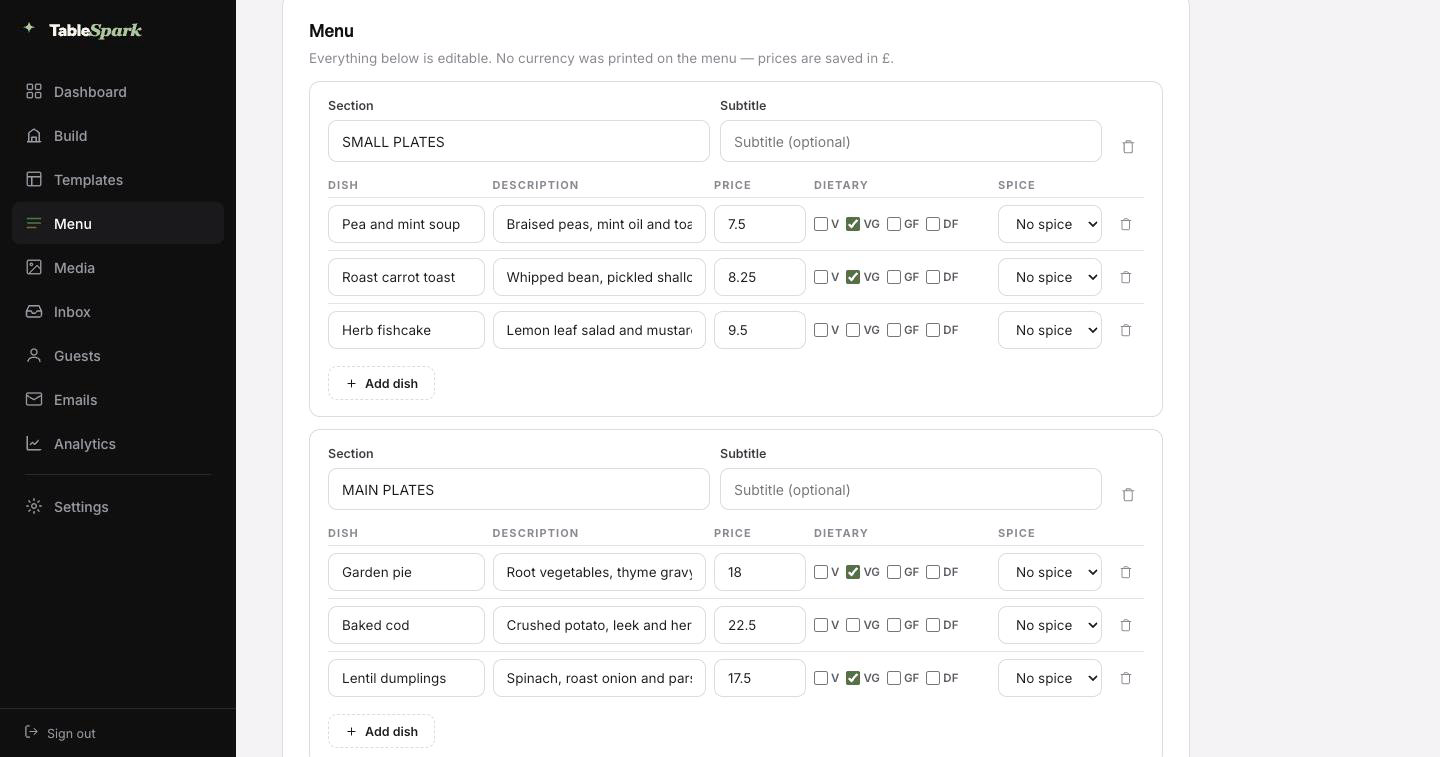
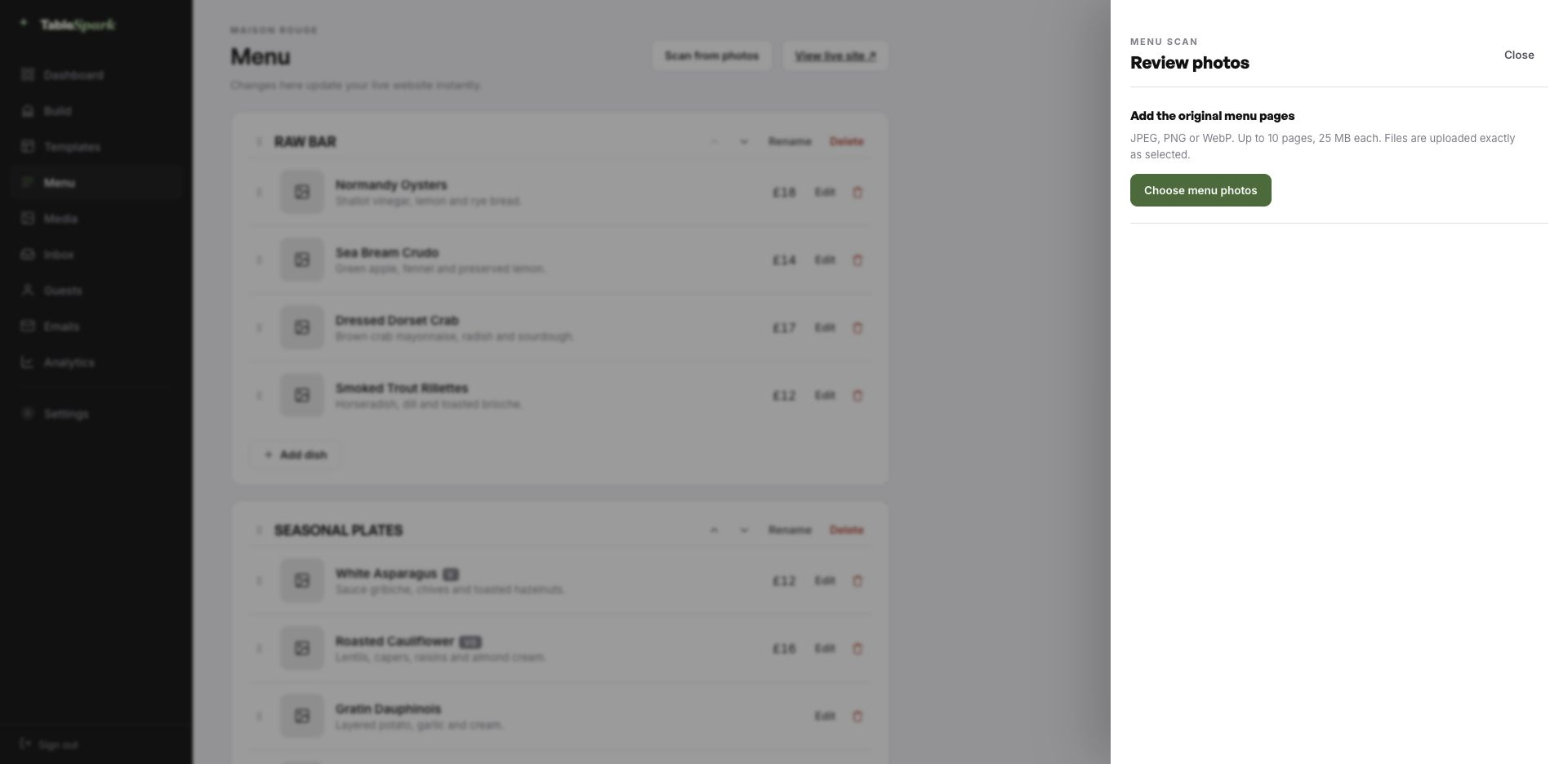
The tedious part comes first, and it is barely a part at all. Upload the menu exactly as it exists today, whether that is a printed card, a photograph of a board or an old PDF. Sections keep their order, dishes keep their descriptions, prices land in the price field, and dietary and spice marks come across where they were legible. You are the proofreader, not the typist.

That structure is the reason the rest of the site works. One menu then feeds the menu page, the ordering page, the highlights on the home page and the Restaurant structured data a search engine reads. Change a price once afterwards and all of them follow.

The title and description a search result shows are drafted for you too, by a Write with AI button that works from the page’s own content. You edit before it ships, every time.
Step one
Take a picture

Whatever your menu lives on today — card, board, PDF, ten pages of it.

Step two
It comes back structured

Ordered sections, named dishes, descriptions, prices and marks, all editable.

Step three
One source, many pages

Menu page, ordering page, home-page highlights and the Restaurant schema — all reading from the same menu.

The TableSpark menu editor with the Scan from photos panel open, ready to take menu photographs
One · uploadThe scan panel, open. Photographs go in as they are; up to ten pages per run.
The review screen after a menu scan: sections, dish names, descriptions, prices, dietary marks and spice levels, every field editable
Two · reviewWhat the scan produced, waiting for you to check it. Every field is editable in place.

Ten minutes to live — and taking bookings

Most of the work was done before you arrived. The design, the layouts and the plumbing are all in place; what is missing is your restaurant. From opening the builder to a live site is usually about ten minutes, at which point guests can already book a table. Your inbox catches the booking; an automatic email catches the guest.

The money side is a single step: connect Stripe, and deposits and payments go directly into your account. Nothing is skimmed at any plan level — 0% commission. Stripe’s standard card-processing fees apply to online payments.

  1. Pick MajaguaThe complete site lands in your account, ready to edit.
    1 min
  2. Change the name and the wordsClick, type, replace a photograph. The name updates site-wide.
    4 min
  3. Upload your menuUpload a picture of the card; the AI does the sections and prices.
    3 min
  4. PublishPublished, on your own address, with the booking form answering.
    1 min
  5. Connect StripeNow you can take deposits on tables and payment on orders — direct to your account.
    1 min

Point your own domain at it

A restaurant’s address is part of its name. Publishing does not wait for a domain. Start on ours, move to yours — the same site, a different name over the door.

The technical work is ours: issuing and renewing the certificate, securing the connection, redirecting the bare domain, and keeping the search engines aimed at the live address through the change. You can keep the domain you have had for a decade — the change at your registrar is a single record.

majagua.tablespark.ukbecomeswww.majagua.co.uk

After the booking: an email that looks like you

Something arrives in their inbox with your name on it. That is worth designing. It arrives at once, with the booking details, your address, your phone number and a link the guest can use to cancel without phoning. Everything after the booking — the reminder, the receipt, the cancellation — comes from here too.

What the guest sees is your identity, not our template. Six templates; your colour; your logo; a cover shot; a left, centred or banded header; your sign-off; your links; your social accounts. Your domain, once connected, becomes the sending address as well as the web address.

What follows is not a screenshot of an email — it is an email, drawn by the module the booking system calls. Change the style or the colour and it redraws.

Loading the email…

All of it is yours

Everything a guest sees after they book, set in the same place as the site.

  • Six designs, from editorial to bold.
  • Accent colour, logo and cover image are yours.
  • Three header treatments to choose between.
  • The same design covers reminders, receipts and cancellations.
  • Your sign-off — Del Caribe, a su mesa.

Try the buttons above — this is the live renderer, not a screenshot.

What is editable — which is nearly everything

  • Yours from the first minute: the restaurant name, every line of copy, all photography, the menu and its prices, opening hours, address, and the colours and typefaces in the Theme tab.
  • Kept for you: the layout logic — how the menu reads at 200 dishes, how the basket behaves on a phone, how sections stack on a small screen, and how the whole thing stays legible when you switch to a light palette.
  • Never locked: move sections, delete them, add new ones from the module library, create pages, remove pages. Nothing here is fixed.

The difference between published and discovered

Getting a page online is easy. Getting it discovered, read and understood is the actual work. Live and invisible is a common combination — caused by stray robots directives, canonical conflicts, unlinked pages, PDF menus, missing schema, or verification that stalled halfway. The restaurant ends up buying back its own customers, because the people searching for it are meeting someone else’s page.

You inherit it finished. Nobody can sell you a ranking or guarantee indexing. This sells you the groundwork that makes both possible.

Things worth knowing first

We serve locals and visitors. Can the menu be bilingual?

Yes — section names, dish names and descriptions can each carry a second language, with a switch in the header that changes the menu in place. Both versions are real text on the page, so a search in either language finds you.

Our dishes come from specific towns. Can we credit them?

Yes, in the description line and in a dedicated sourcing block that lists places, cooks or producers. Both are indexable, which means a search for a town or a traditional dish can lead someone to your restaurant.

Is there a confirmation email, and can we brand it?

The guest receives a branded confirmation straight away: date, time, number of covers, your address, your phone number, and a link to release the table. Reminders before service, deposit receipts and cancellation notices come from the same place. You choose from six templates and set the accent colour, logo, cover photograph, header layout, sign-off, links and social accounts — and with your domain connected, the sender address is yours.

Do I need to know how to code?

No code, anywhere. You click a block and edit it in place; photographs are dragged in. Everything you can see was assembled from the module library rather than written by hand.

What does online ordering cost, and do you take a commission?

Ordering comes with the Full plan. TableSpark takes 0% commission on every plan, so the order value lands in your own account. Stripe’s standard card-processing fees apply to online payments.

Do I have to type my whole menu in by hand?

No. Photograph the menu and it comes back as structured data — ordered sections, named dishes, their descriptions and prices, with dietary and spice marks where the card showed them — for you to check and correct on a review screen. Being data rather than a photograph is what lets the same menu feed the menu page, the ordering page, the home-page highlights and the search engine’s structured data at once.

Start from Majagua

Take this design, make it about your restaurant, and publish it today. Building costs nothing; you pay only when it goes live.

Use this template free

Running a Mexican & Latin kitchen? See all Mexican & Latin restaurant website templates.

More Latin Vibrant templates

More on the money side

← Browse all 50 restaurant website templates