Template library · Peruvian

Waylla — a Peruvian restaurant website template

For kitchens cooking across Peru’s altitudes — coast, valley, high Andes — with a nine-image opening, an accordion menu built for many short sections, and a design that treats ingredients as the subject.

PeruvianStreet & Local · Nine Grid6 pages · 40 editable sections0% commission
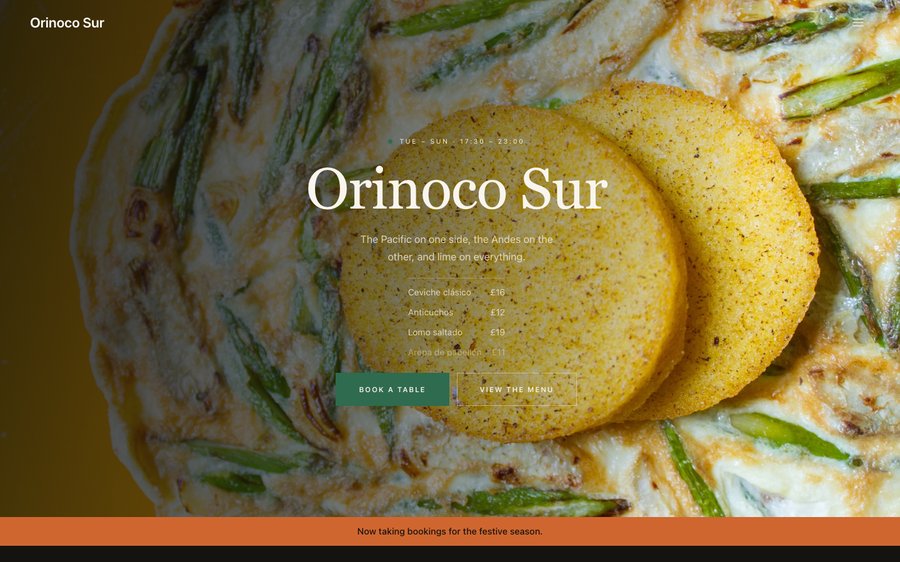
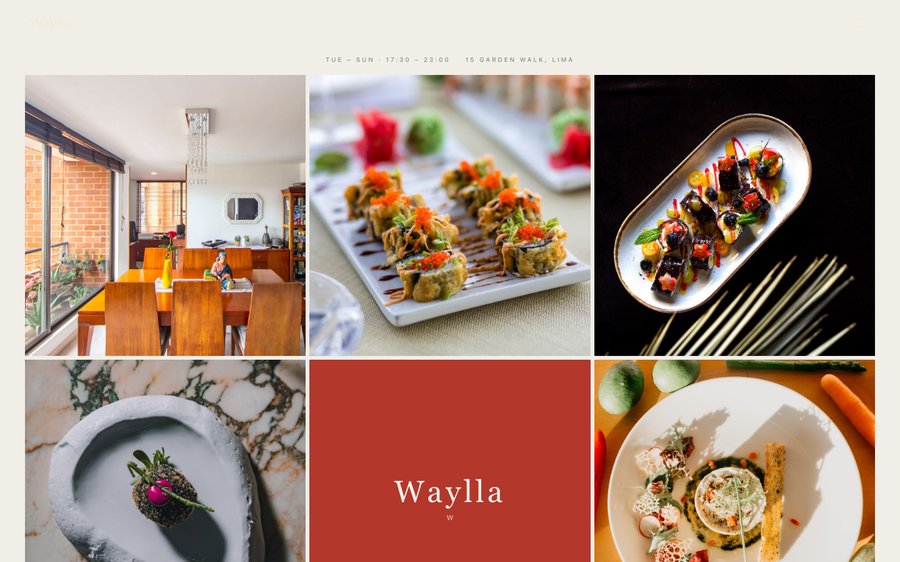
Waylla, a Peruvian restaurant website template — the home page as it publishes
Waylla · Lima, Peru

Starter is £19/mo excl. VAT and includes a complete restaurant website, a live structured menu, enquiry and newsletter forms, and managed search readiness. Growth is £39/mo excl. VAT and adds direct live bookings, a custom domain with managed SSL, and table and floor-plan operations. Full is £69/mo excl. VAT and adds online ordering and multi-site management for up to five restaurant sites. TableSpark commission is 0%. Stripe's standard card-processing fees apply to online payments.

That is the whole website and the whole system, at the best value on offer to an independent UK restaurant. A bespoke build costs thousands and takes months; this one is already designed, and you can publish it this afternoon. And it stays yours to run: change a price at four in the afternoon and it is live before service. Every template is optimised for phone, tablet and desktop, and the plans carry reservations, tables, ordering and management — with 0% TableSpark commission.

Do not read this bit. Touch it.

Waylla is a dark ground with a lime-green that comes off an Andean market awning. Yours might be white tile and morning light, or brass and candles, or something nobody has built yet.

The controls beside the frame are not an illustration of the Theme tab — they are the Theme tab, driving the same engine that publishes real restaurants. Press whatever you like; nothing is stored and nothing is signed up for. Go on.

Loading the live preview…

ThemePagesBlocks
Accent colour

Or pick any colour at all — the builder carries a full spectrum picker and a hex field.

Colours
Fonts
Live, both halves. The controls are the builder’s own; the site is the real one — press an accent and every page follows.

Go through it like a guest would

6 pages, and every one of them is here. Not screenshots. The frame is running the publishing renderer, so the navigation inside it works and every tab is a real page. Switch to Phone to see how it behaves on a handset.

Loading the live preview…

Live render · click the navigation inside the frame to move between pages, or use the tabs above.

The room this design is for

Peruvian cooking spans more geography than almost any other cuisine, and the usual restaurant website flattens it into “ceviche and pisco”. This design opens with a nine-image grid instead of a single hero, so a kitchen working from three ecosystems can show three ecosystems on the first screen.

The palette is dark ground and one acid green — the colour of produce rather than of a national flag — and the type is a wide geometric face that gives short Quechua and Spanish dish names room to be read as names rather than decoration.

The home page, section by section

Eight blocks, built to show range:

  • Hero — Big opening image, name & buttons, in the Nine Grid treatment: Nine cells of dishes with the name plated in the centre.
  • Marquee strip — Scrolling awards or words.
  • Intro statement — Big opening statement line.
  • Menu preview — A few dishes on a sliding rail.
  • Offer banner — Time-bounded offer that hides itself when it ends.
  • Numbers — Headline stats.
  • Gallery — Grid, masonry or moving strip.
  • Reviews — Guest quotes with stars.
  • Call to action — Headline + button band.

The statement block currently reads The Pacific on one side, the Andes on the other, and lime on everything. — one line you will rewrite in about four seconds.

Loading the live preview…

The Accordion layout. Live menu rendering. The Phone toggle shows how it behaves on a small screen.

Ordering, on your own terms

This is the part worth pressing. Waylla uses the Classic list ordering layout — the printed-menu look, with dotted leaders running from each dish to its price. Ordering runs as a classic priced list with dotted leaders — the printed-menu look — which is the right register for a kitchen selling composed plates rather than fast food. It is quick to scan and it does not pretend to be an app when it does not need to be.

The basket still behaves like one: pinned to the bottom of a phone with a running total, becoming a panel beside the list on a laptop. Modes ask only for what they need, and everything is paid into your own Stripe account with 0% taken by TableSpark. Stripe’s standard card-processing fees apply to online payments.

Dine-in wants a table number and nothing else; collection wants a number to ring; delivery wants somewhere to go. No mode asks for the others’ fields.

Loading the live preview…

One thumb, thirty seconds

This is the frame that matters. It is the real ordering page at a real phone width — not a mock-up, not a video.

  • Pick a section and the list follows.
  • One tap on + adds a dish; the stepper keeps the count.
  • The basket stays visible at the bottom, counting as you go.
  • Portions and options are gathered in a sheet before the dish is added.

On a laptop the same page puts the basket in a panel beside the menu that follows the scroll.

Phone width, ordering block open. Add a dish; the count and total appear at the bottom.

Where the restaurant explains itself

The story page carries the ecosystems argument properly — a narrative, a sourcing block for the communities and growers a kitchen like this works with, a timeline and a gallery. The events page handles the tasting dinners and collaborations that come with a restaurant of this profile.

Loading the live preview…

Live story page: the chef, the reasoning, the history and the photographs.

Photograph the menu. That is the whole job.

Nobody starts a website looking forward to retyping ninety dishes. Point a phone at whatever your menu currently lives on and send it over. The AI turns it into sections, dishes, descriptions and prices, and picks up the dietary marks and heat levels it can see. Read it back, adjust anything the photograph fumbled, and that is the menu built.

A photograph of a menu is decoration; a structured menu is infrastructure. From there the same data runs the menu page, the ordering page, the highlights on the home page and the Restaurant structured data a search engine reads. Change a price once afterwards and all of them follow.

And the fields nobody enjoys writing — the search title and description — are drafted by a Write with AI button that reads the page first. The AI writes the first version; you decide whether it is the last.

Step one
Photograph what you have

The card, the board, the sheet by the till. Ten pages at a time.

Step two
Structured, not scanned

Sections, dish names, descriptions, prices, dietary and heat marks, all editable.

Step three
Change once, change everywhere

Menu page, ordering page, home-page highlights and the Restaurant schema — because they share one menu.

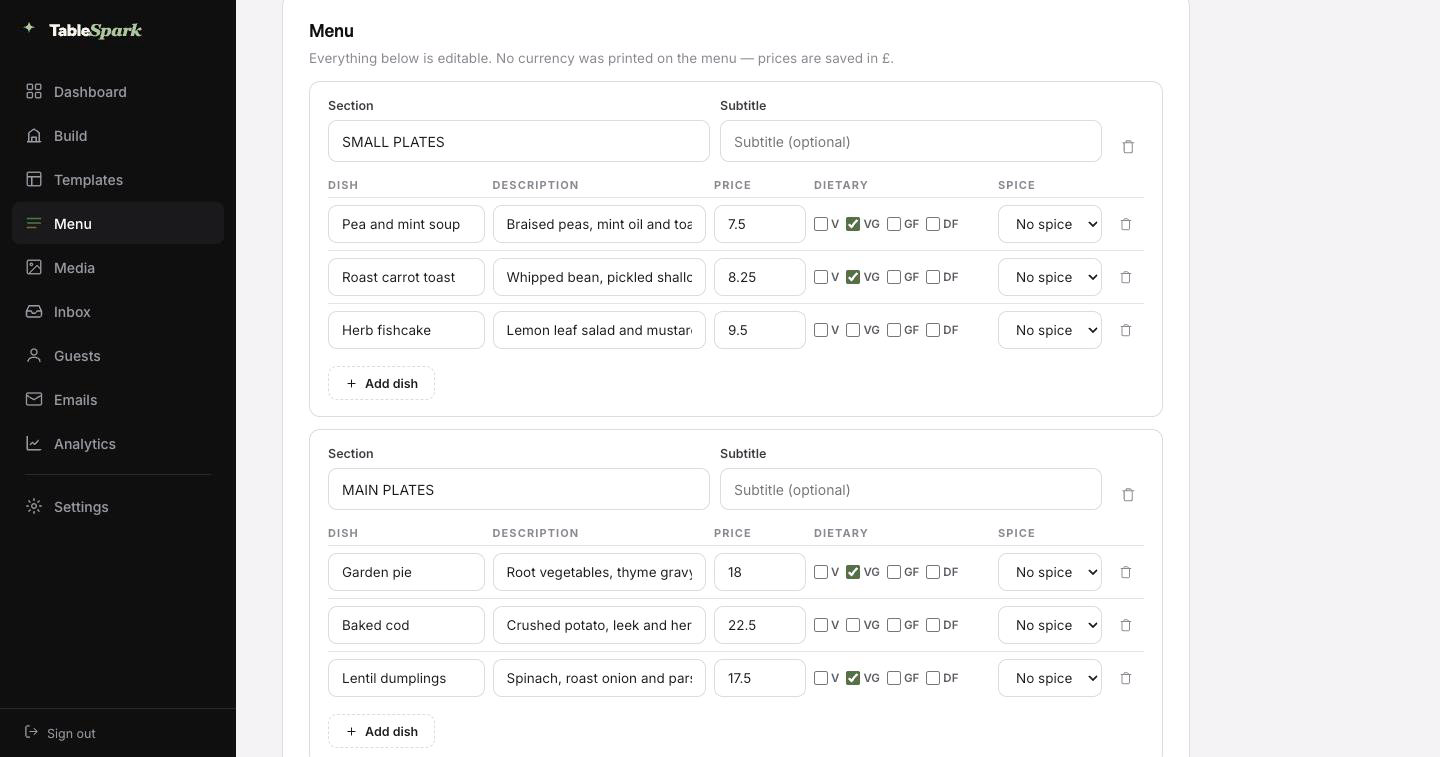
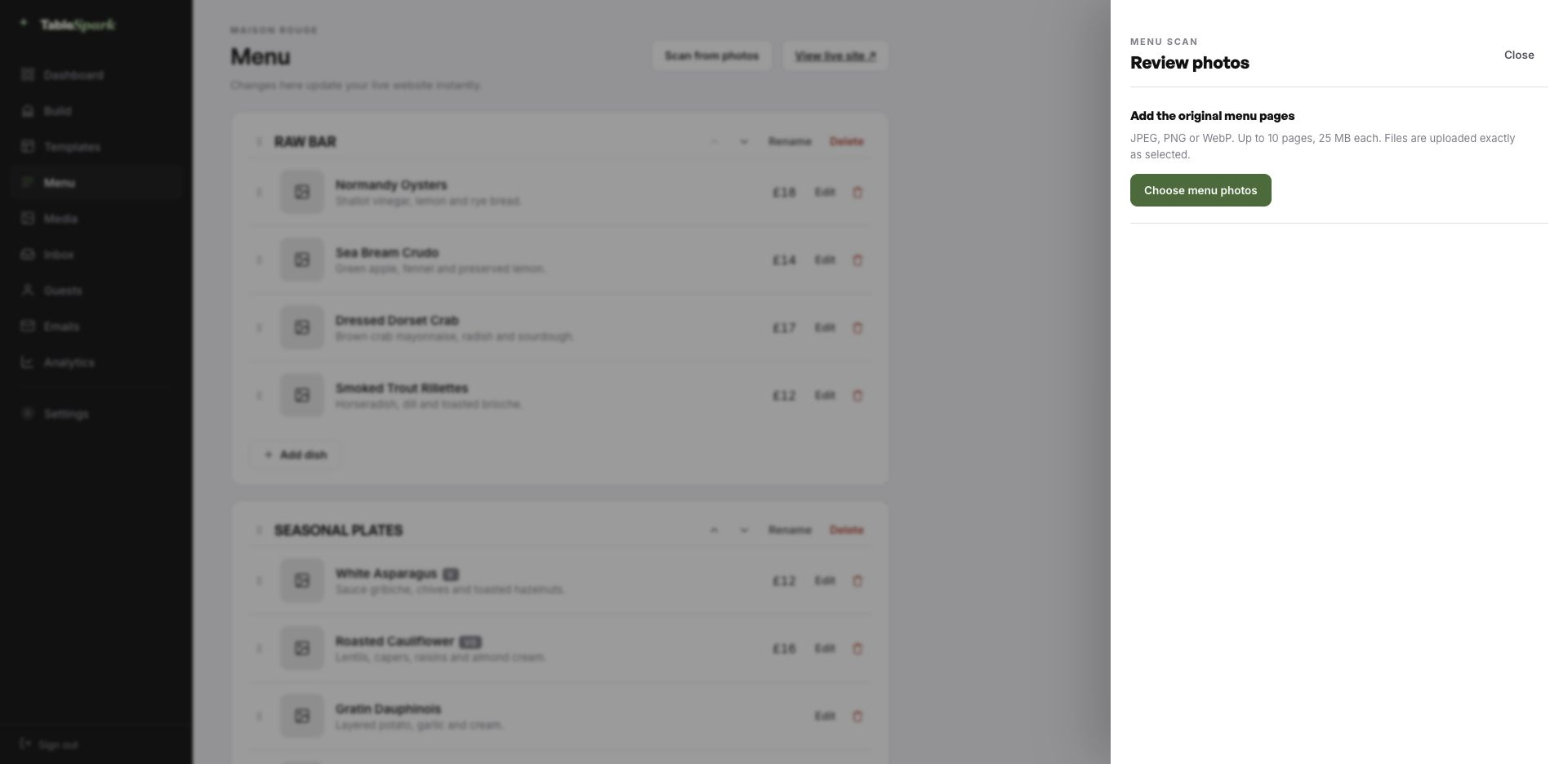
The TableSpark menu editor with the Scan from photos panel open, ready to take menu photographs
One · uploadMenu editor, Scan from photos. Ten pages at a time, straight from a phone camera.
The review screen after a menu scan: sections, dish names, descriptions, prices, dietary marks and spice levels, every field editable
Two · reviewWhat came back, before anything saves: sections, dish names, descriptions, prices, dietary marks and spice levels — every field editable.

Live in ten minutes, booking in eleven

You are not commissioning a website; you are moving into one. The site works from the first second — it simply has the wrong name on the door. Ten minutes covers it for most kitchens — and the second it is live, the booking form is taking reservations. It lands in the inbox with the party size and the time, and the guest is confirmed by email at once.

Attach your own Stripe account and the site can charge for orders and hold deposits on tables — the funds are yours from the start. We take 0%. Not on the first order, not on the thousandth. Stripe’s standard card-processing fees apply to online payments.

  1. Pick WayllaThe whole site copies into your account, menu and all.
    1 min
  2. Change the name and the wordsClick any block and type. The restaurant name propagates everywhere.
    4 min
  3. Upload your menuPhotograph it and let the AI build the sections, dishes and prices.
    3 min
  4. PublishYou are live on your address. Bookings work immediately.
    1 min
  5. Connect StripeNow you can take deposits on tables and payment on orders — direct to your account.
    1 min

Your name over the door

The web address is something guests read aloud, so it should sound like you. You can be live before lunch on a TableSpark address and on your own domain by the weekend, with no rebuild in between.

Everything fiddly about a domain — SSL, renewals, bare-domain redirects, canonical URLs surviving the move — is managed on your behalf. Already own the name? Keep it — you get the exact record to update, in plain English.

waylla.tablespark.ukbecomeswww.waylla.co.uk

The email nobody thinks about, designed properly

The email that follows a booking is read more carefully than any page on the site. As soon as a table is confirmed, the guest gets an email in your name carrying the date, the time, the number of covers, your address, your phone number and a way to cancel cleanly. Reminders, receipts and cancellations follow the same treatment, so nothing looks bolted on.

It carries your restaurant, not our branding. Pick one of six templates, then set the accent, the logo, a cover image, how the header sits, the sign-off line, your links and your social marks. When your domain is connected the mail is sent from your own address, which is also what keeps it out of a promotions tab.

Below is the actual renderer, the one that sends after a confirmed booking. Press any of the styles or colours and it rebuilds in front of you.
Loading the email…

What you control

Everything a guest sees after they book, set in the same place as the site.

  • Six templates to start from.
  • Your accent, your logo, your photograph.
  • Your domain as the sender once connected.
  • Reminders before service and deposit receipts match it.
  • Your sign-off — From three altitudes, to your table.

Try the buttons above — this is the live renderer, not a screenshot.

The line between the design and your restaurant

  • Yours from the first minute: every word and every image, the menu and what it costs, the hours you keep, where you are, and the colours and fonts the site is built from.
  • Kept for you: the difficult engineering — long-menu behaviour, the basket on a small screen, how blocks stack when the window narrows, and legibility surviving a palette change.
  • Never locked: reorder, remove or add any block on any page, add whole pages, and throw away anything you do not need. This is a starting point, not a cage.

Being on the internet is not being in search

Being published and being findable are two different things, and only one of them happens automatically. The usual culprits are mundane: a robots rule nobody removed, two canonicals pointing different ways, orphaned pages, the menu published as a PDF, no structured restaurant data, search verification half done. The cost lands on the restaurant — guests searching your name, your menu or your street reach directories and commission-charging marketplaces first, and you end up paying for the traffic you should already own.

All of that is finished before you arrive. Search results are not something anyone can promise you. A correctly configured site is, and that is what this is.

The questions we get asked

Can we organise the menu by region rather than by course?

Yes — sections are named by you and mean whatever you want them to mean. Coast, valley, high plains, the grill; or starters and mains; or by producer. The accordion layout is particularly good for many short sections, because the guest sees the whole structure on one screen before opening anything.

Half our dish names are in Quechua or Spanish. Will guests understand the menu?

That is what the description line is for — a short gloss under the dish name, in whichever language your guests read. The header also carries an optional language switch, so a menu can be published in two languages and swapped by the guest without leaving the page.

How far can we take the design from where it starts?

Every one of them, in the Theme tab: palette, the display and body typefaces, corner radius, motion, the header layout and how it behaves on scroll. The template is a starting point, not a cage — and switching a colour never breaks the layout, because the design reads its values from the theme rather than hard-coding them.

Can I use my own domain name?

Yes, and you do not have to sort it out before going live. Publish on a TableSpark address today; connect your own domain — new or one you have held for years — whenever it suits. The SSL certificate and its renewals, the secure connection, the bare-domain redirect and the canonical, sitemap and robots signals are all managed for you, so search visibility survives the change. The same domain can send your guest emails.

Can we control the emails guests receive?

An immediate confirmation in your name with the booking details — date, time, covers, your address and phone number — plus a link that lets them cancel cleanly if plans change. The same system handles the reminder before service, any deposit receipt and cancellation notices. You design all of it: six templates, your accent, logo, cover photograph, header layout, sign-off, links and social accounts, sending from your own domain once connected.

Does changing the site require help?

None at all. The whole site is blocks you click and edit — text in place, photographs uploaded, sections dragged into a new order. No HTML is involved on your side.

Take Waylla and go

One click copies the entire design into your account. Everything after that is editing — and it is free until you publish.

Use this template free

Running a Mexican & Latin kitchen? See all Mexican & Latin restaurant website templates.

More Latin Vibrant templates

Related reading

← Browse all 50 restaurant website templates