Template library · Endemic Chilean

Quillay — a foraging restaurant website template

For kitchens that cook what they gather: a warm paper template with a larder opening, a plated menu, and structure for a repertoire that changes with what the week produced.

Endemic ChileanCuisine House · This Week’s Larder5 pages · 36 editable sections0% commission
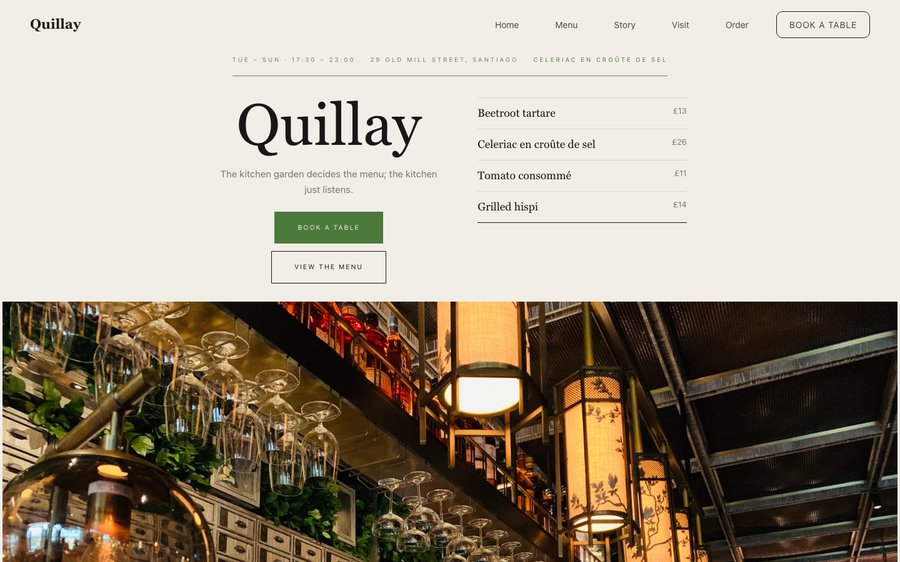
Quillay, a foraging restaurant website template — the home page as it publishes
Quillay · Santiago, Chile

Starter is £19/mo excl. VAT and includes a complete restaurant website, a live structured menu, enquiry and newsletter forms, and managed search readiness. Growth is £39/mo excl. VAT and adds direct live bookings, a custom domain with managed SSL, and table and floor-plan operations. Full is £69/mo excl. VAT and adds online ordering and multi-site management for up to five restaurant sites. TableSpark commission is 0%. Stripe's standard card-processing fees apply to online payments.

The price is the argument: the lowest entry point and the best value of any complete restaurant website and management system in the UK. You skip the part where a bespoke build eats thousands of pounds and a season of your year, and start from something already finished. You keep the keys. Menus, prices, photographs and copy are all edited by you, whenever you want, without asking anyone. Phones, tablets and desktops are all first-class, and the plans bring reservations, tables, ordering and management with no commission from us at all.

Take it for a drive.

Quillay is warm paper with a green that belongs to a hillside after rain. Yours might be white tile and morning light, or brass and candles, or something nobody has built yet.

So do not read about it. The panel on the right is the real Theme tab out of the builder, and the frame beside it is the real site — the same renderer that publishes a live restaurant. Nothing is a mock-up, nothing you touch is permanent, and nobody is asking you to sign in first. Go on.

Loading the live preview…

ThemePagesBlocks
Accent colour

Or pick any colour at all — the builder carries a full spectrum picker and a hex field.

Colours
Fonts
Both sides are real. Those are the builder’s controls, and that is the site they drive.

The whole template, not a sample of it

5 pages, and every one of them is here. This is the live site, not a gallery. Every tab renders through the engine that publishes real restaurants, and the links inside it work. Try the Phone view.

Loading the live preview…

Rendered live. Every link in the frame goes where it says; the tabs above jump straight there.

Why it looks like this

A foraging kitchen has the hardest menu-maintenance problem in the industry: the ingredient list changes weekly and sometimes daily, and any website built on fixed copy is wrong within a fortnight. This design starts from that reality with a larder opening — what came in this week, and from where.

The palette is warm paper and a hillside green, and the type is a soft serif over a plain sans. It reads as a field notebook rather than a restaurant brochure, which is the correct impression for a kitchen whose menu is a record of a place.

What is on the home page

Eight blocks, arranged around a changing larder:

  • Hero — Big opening image, name & buttons, in the This Week’s Larder treatment: Crops and the farms they came from, with distances.
  • Pull quote — A large standout quotation.
  • Menu preview — A few dishes on a sliding rail.
  • Seasonal calendar — What each month or season brings.
  • Numbers — Headline stats.
  • Gallery — Grid, masonry or moving strip.
  • Press bar — Press mentions or awards as a ruled band.
  • Reservation form — Live availability slot picker, saved to your Inbox.
  • Call to action — Headline + button band.

Loading the live preview…

The Plate layout. The published menu page. Press Phone to see the same layout on a small screen.

The ordering page: same habit, different economics

This is the part worth pressing. Quillay uses the Dense rows ordering layout — compact rows that keep a large order visible while it is being built, with the running total pinned in view. The ordering page runs as dense rows, which suits selling preserves, ferments and pantry goods — a list where the description matters more than a photograph.

Quantities and sizes are inline, the total stays on screen, and Payment goes into your own Stripe account. TableSpark takes no commission on any of it. Stripe’s standard card-processing fees apply to online payments.

The form adapts to the mode. Eating in? A table number. Collecting? A phone number. Delivery? An address. Nothing more is demanded.

Loading the live preview…

Use one hand

This is the frame that matters. It is the real ordering page at a real phone width — not a mock-up, not a video.

  • Switch section — your scroll position stays where it was.
  • The stepper sits on every row, so adding is one tap from anywhere in the list.
  • Count, total and Place order are pinned to the bottom throughout.
  • Sizes and choices arrive in a bottom sheet, within reach of the same thumb.

On a laptop the same page puts the basket in a panel beside the menu that follows the scroll.

The real ordering page at 390 pixels. Press a plus and watch the basket bar respond.

Story, visit, and the practical pages

The story page is where this kind of restaurant lives: a narrative about the territory, a sourcing block naming gatherers and communities, an interview, a timeline and a gallery of the landscape as much as the plate.

Loading the live preview…

The story page, live: who cooks, why here, and what happened when.

Upload your menu. The AI does the typing.

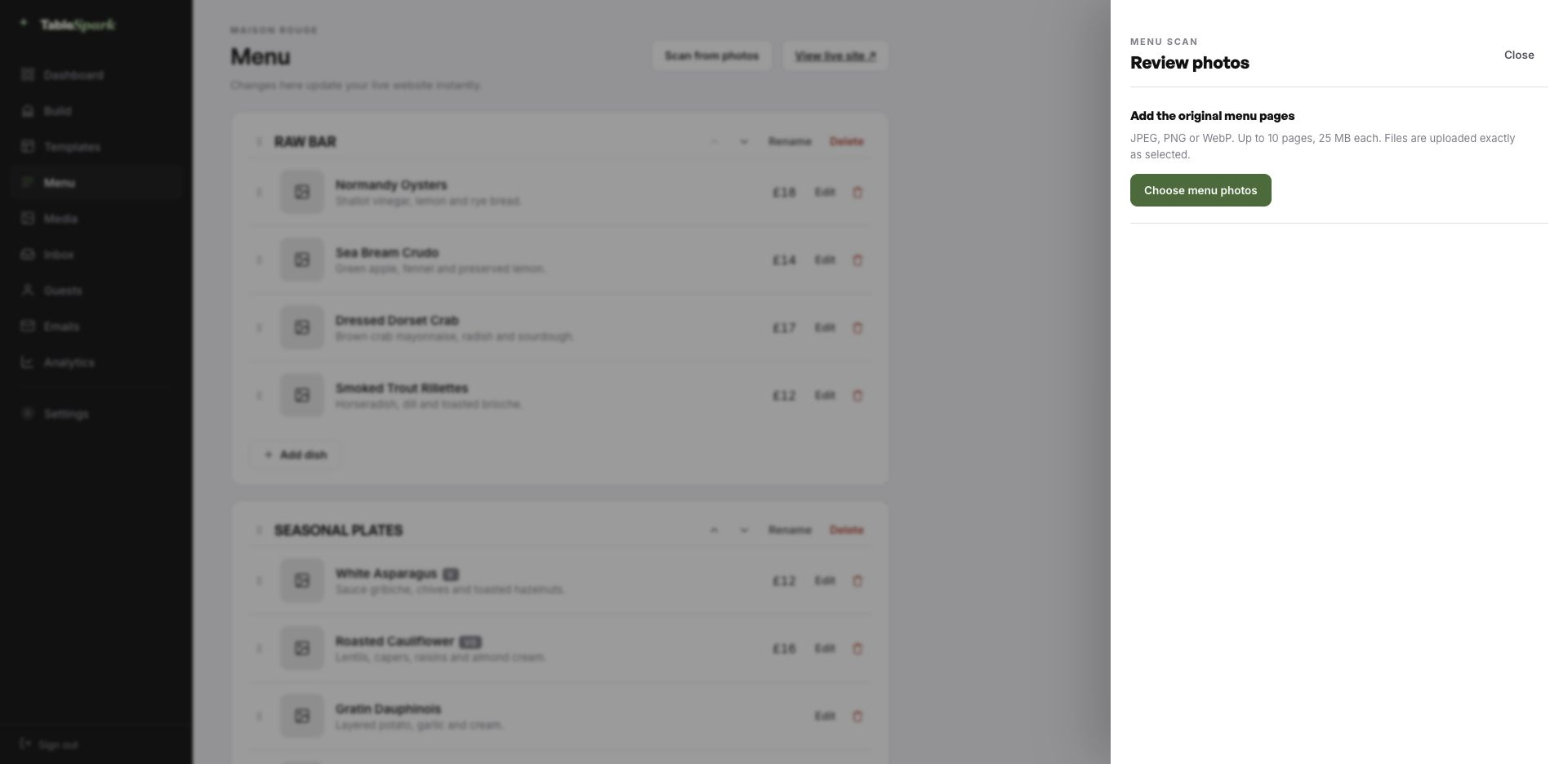
The tedious part comes first, and it is barely a part at all. Upload the menu exactly as it exists today, whether that is a printed card, a photograph of a board or an old PDF. Sections keep their order, dishes keep their descriptions, prices land in the price field, and dietary and spice marks come across where they were legible. You are the proofreader, not the typist.

That structure is the reason the rest of the site works. Everything downstream reads from it: the menu page, the ordering page, the highlights on the home page and the Restaurant structured data a search engine reads. Change a price once afterwards and all of them follow.

The title and description a search result shows are drafted for you too, by a Write with AI button that works from the page’s own content. You edit before it ships, every time.
Step one
One photograph

Of the menu exactly as it is today, from a phone.

Step two
Back as data

Sections in the right order, dishes with their descriptions, prices and marks.

Step three
Four places, one edit

Menu page, ordering page, home-page highlights and the Restaurant schema — all fed by the same structured menu.

The TableSpark menu editor with the Scan from photos panel open, ready to take menu photographs
One · uploadThe entry point: upload up to ten menu pages as JPEG, PNG or WebP.
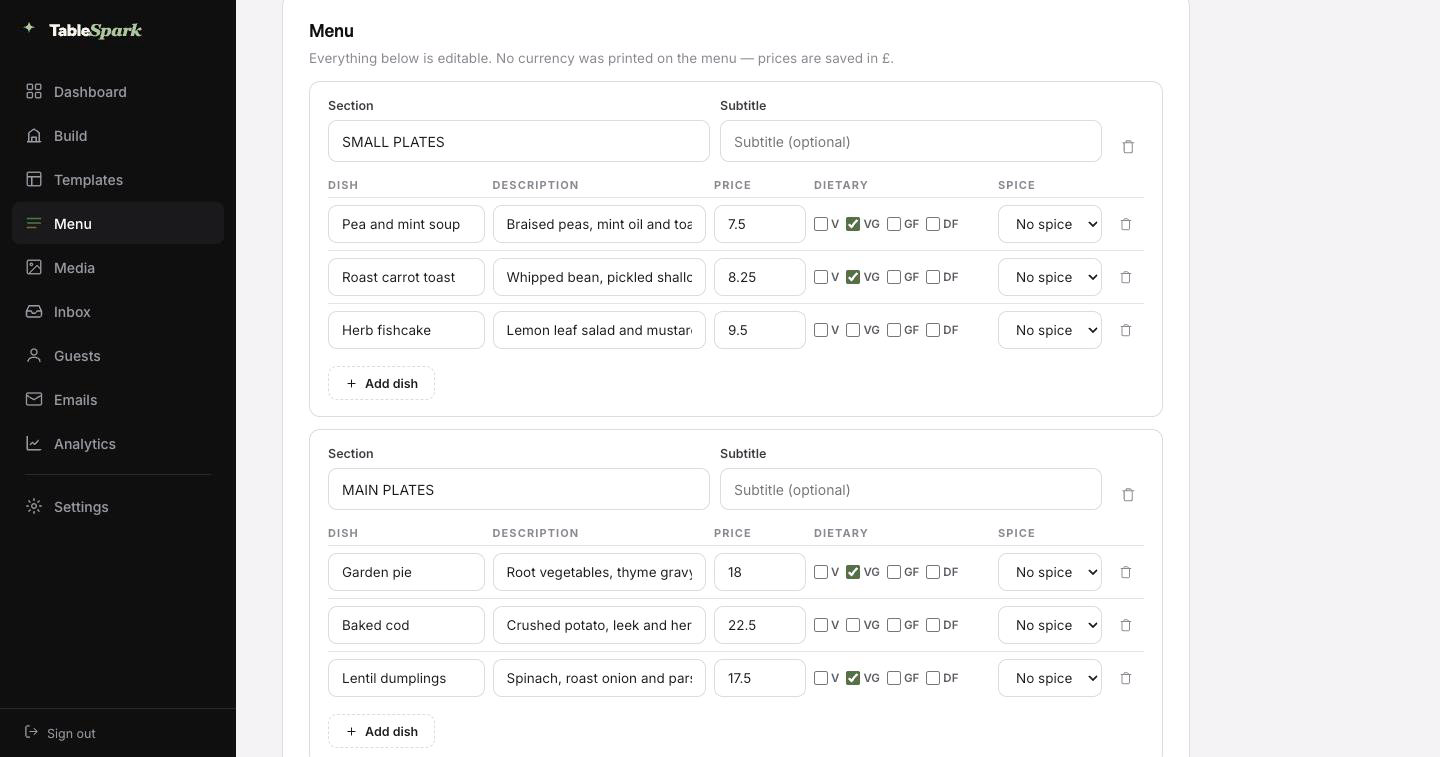
The review screen after a menu scan: sections, dish names, descriptions, prices, dietary marks and spice levels, every field editable
Two · reviewThe review screen. Nothing is written until you approve it, and every value can be corrected here.

How long this actually takes

Most of the work was done before you arrived. The design, the layouts and the plumbing are all in place; what is missing is your restaurant. From opening the builder to a live site is usually about ten minutes, at which point guests can already book a table. Your inbox catches the booking; an automatic email catches the guest.

The money side is a single step: connect Stripe, and deposits and payments go directly into your account. Nothing is skimmed at any plan level — 0% commission. Stripe’s standard card-processing fees apply to online payments.

  1. Pick QuillayThe full site arrives in your account as a working draft.
    1 min
  2. Change the name and the wordsRewrite the words by clicking them; the name carries everywhere.
    4 min
  3. Upload your menuSend the menu in as a photograph and check what comes back.
    3 min
  4. PublishIt goes live on your address and starts taking bookings.
    1 min
  5. Connect StripeNow you can take deposits on tables and payment on orders — direct to your account.
    1 min

Run it on your own domain

A restaurant’s address is part of its name. Publishing does not wait for a domain. Start on ours, move to yours — the same site, a different name over the door.

The technical work is ours: issuing and renewing the certificate, securing the connection, redirecting the bare domain, and keeping the search engines aimed at the live address through the change. You can keep the domain you have had for a decade — the change at your registrar is a single record.

quillay.tablespark.ukbecomeswww.quillay.co.uk

The email after the booking is yours to design

Something arrives in their inbox with your name on it. That is worth designing. It arrives at once, with the booking details, your address, your phone number and a link the guest can use to cancel without phoning. Everything after the booking — the reminder, the receipt, the cancellation — comes from here too.

What the guest sees is your identity, not our template. Six templates; your colour; your logo; a cover shot; a left, centred or banded header; your sign-off; your links; your social accounts. Your domain, once connected, becomes the sending address as well as the web address.

Not a mock-up: the frame runs the actual guest-email renderer. Press a template or an accent and watch it change.

Loading the email…

Every part is editable

Everything a guest sees after they book, set in the same place as the site.

  • Six templates — Spark, Ink, Linen, Noir, Bistro, Plate.
  • Your accent, your logo, a cover photograph.
  • Sends from your own domain once it is connected.
  • Same design carries reminders, deposit receipts and cancellations.
  • Your sign-off — What the week gave us.

Try the buttons above — this is the live renderer, not a screenshot.

What you control

  • Yours from the first minute: the restaurant name, every line of copy, all photography, the menu and its prices, opening hours, address, and the colours and typefaces in the Theme tab.
  • Kept for you: the layout logic — how the menu reads at 200 dishes, how the basket behaves on a phone, how sections stack on a small screen, and how the whole thing stays legible when you switch to a light palette.
  • Never locked: move sections, delete them, add new ones from the module library, create pages, remove pages. Nothing here is fixed.

Built to be found, not just to be live

Getting a page online is easy. Getting it discovered, read and understood is the actual work. Live and invisible is a common combination — caused by stray robots directives, canonical conflicts, unlinked pages, PDF menus, missing schema, or verification that stalled halfway. The restaurant ends up buying back its own customers, because the people searching for it are meeting someone else’s page.

You inherit it finished. Nobody can sell you a ranking or guarantee indexing. This sells you the groundwork that makes both possible.

Things worth knowing first

Our menu changes weekly. Will search engines cope with that?

They handle it well, provided the menu is text rather than an image — which it is here. Each update keeps the same page and the same address, so the page accumulates history instead of starting again. The structured data updates with it, so what a search engine understands about your menu stays current.

Can we credit the people who gather for us?

Yes, in two places: the description line on each dish, and a dedicated sourcing block that lists gatherers, communities or growers with a line each. Both are indexable, which means a search for a community or a species can lead someone to your restaurant.

What happens between the booking and the arrival?

A confirmation email sent on your behalf, carrying the date, time, party size, where you are, how to reach you, and a link to release the table if their plans change. Reminders before service, deposit receipts and cancellation notices come from the same system. The design is yours: six templates, your accent colour, your logo, a cover photograph, the header layout, your own sign-off, your links and your social accounts — and once your domain is connected it sends from your address too.

Do I need to know how to code?

No — the builder is visual throughout. Click a block, retype the copy, swap the photograph, move it up or down. Nothing about running the site requires HTML.

What does online ordering cost, and do you take a commission?

Online ordering sits on the Full plan, and we take 0% of what you sell. Stripe’s standard card-processing fees apply to online payments. Payments go to your own account. Nothing else is deducted.

Do I have to type my whole menu in by hand?

You should not have to. Upload a photograph of the menu you already print and the AI turns it into structured sections, dishes, descriptions and prices, reading dietary and spice marks off the card where it can. Everything lands on a review screen for you to check before it saves. After that it is data rather than an image, which is why one price change updates the menu page, the ordering page, the home-page highlights and the structured data together.

Quillay, with your name on it

Make this yours: the name, the words, the photographs, the menu. Free to build, and you only pay when you go live.

Use this template free

More Nordic Minimal templates

Worth reading next

← Browse all 50 restaurant website templates