Template library · Produce-driven French

Table Racine — a produce-driven restaurant website template

For kitchens that buy first and decide later: a dark counter template with a menu that changes daily, a delivery-app ordering page, and a design that puts the producer’s name at the same size as the chef’s.

Produce-driven FrenchStreet & Local · Counter5 pages · 35 editable sections0% commission
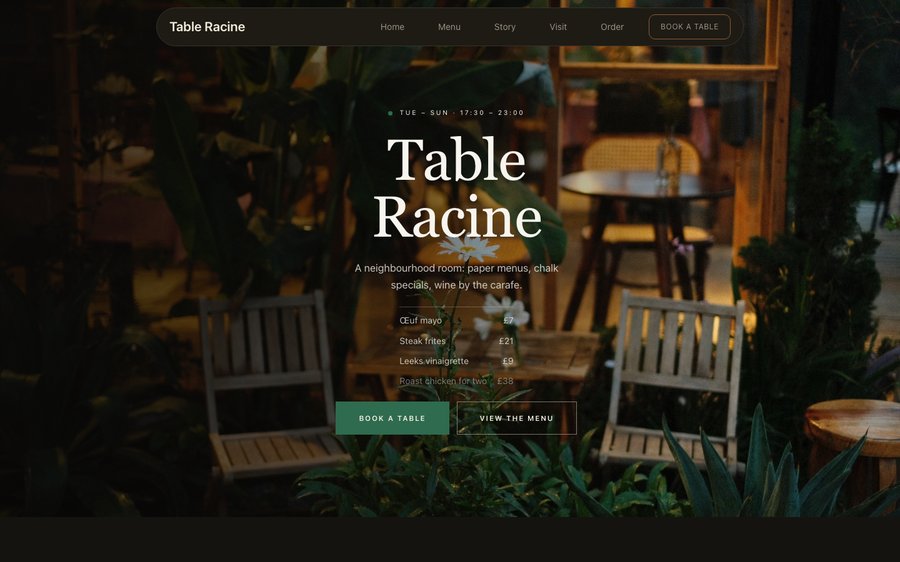
Table Racine, a produce-driven restaurant website template — the home page as it publishes
Table Racine · Paris, France

Starter is £19/mo excl. VAT and includes a complete restaurant website, a live structured menu, enquiry and newsletter forms, and managed search readiness. Growth is £39/mo excl. VAT and adds direct live bookings, a custom domain with managed SSL, and table and floor-plan operations. Full is £69/mo excl. VAT and adds online ordering and multi-site management for up to five restaurant sites. TableSpark commission is 0%. Stripe's standard card-processing fees apply to online payments.

That is the lowest entry point, and the best value, of any complete restaurant website and management system for an independent UK restaurant. Rather than commissioning a site from scratch — thousands of pounds, months of back-and-forth — you take a finished design and make it yours. The point is what happens next: you edit it yourself, forever, without an invoice attached to a typo. Everything reflows cleanly from a phone to a wide screen, and reservations, tables, ordering and management ride along with the plans at 0% TableSpark commission.

Do not read this bit. Touch it.

Table Racine runs on charcoal with a green that reads as a market stall rather than a health brand. Yours might be white tile and morning light, or brass and candles, or something nobody has built yet.

Skip the description. The panel is lifted straight out of the builder and the frame is the real renderer, so what happens when you press an accent here is exactly what happens in your account. Nothing you do is saved or asked about. Go on.

Loading the live preview…

ThemePagesBlocks
Accent colour

Or pick any colour at all — the builder carries a full spectrum picker and a hex field.

Colours
Fonts
Not a demo. The panel is the Theme tab and the frame is the published renderer — one drives the other.

Open it properly

5 pages, and every one of them is here. Everything below is rendered, not photographed. The frame uses the same engine as a published site, so the tabs and the in-page links are all real. Phone shows the mobile layout.

Loading the live preview…

The real pages, live. Click anything inside the frame, or use the page tabs.

The room it imagines

A produce-driven kitchen has a website problem that no fixed menu has: everything on the page was true yesterday and might not be true tonight. This design accepts that instead of hiding it. The opening is a counter — what is on it today, who brought it, and when the room is open.

The palette is a dark counter lit from above, and the type is a geometric display face against a plain sans, which keeps the emphasis on nouns: the vegetable, the boat, the farm. When the design gets out of the way, a list of ingredients becomes the most persuasive thing on the page.

The home page, block by block

Eight blocks, all of them editable modules:

  • Hero — Big opening image, name & buttons, in the Counter treatment: Copy and opening hours held on the dark side of a counter photograph.
  • Signature dish — One dish, full screen — name, story, price.
  • Marquee strip — Scrolling awards or words.
  • Gallery — Grid, masonry or moving strip.
  • FAQ — Accordion of questions.
  • Numbers — Headline stats.
  • Reviews — Guest quotes with stars.
  • Call to action — Headline + button band.

Loading the live preview…

The Index layout. The menu layout, live. Try the Phone view — the columns become one and the plates stay.

Take the order yourself

This is the part worth pressing. Table Racine uses the Delivery app ordering layout — sections run down a rail on the left, the dish list swaps beside them without losing your place, and the basket follows the scroll. The ordering page is the full delivery-app treatment: a section rail down one side, the dish list beside it, and a basket that follows the scroll. For a kitchen with a retail counter or a lunch trade it turns the site into a working order channel rather than a menu with a phone number.

Because the same menu data drives both the menu page and the ordering page, a dish taken off at eleven in the morning disappears from both. Nothing goes stale in one place while staying live in the other, which is the failure that makes most restaurant ordering pages untrustworthy.

Dine-in wants a table number and nothing else; collection wants a number to ring; delivery wants somewhere to go. No mode asks for the others’ fields.

Loading the live preview…

One thumb, thirty seconds

This is the frame that matters. It is the real ordering page at a real phone width — not a mock-up, not a video.

  • Choose a section and watch the list below it change.
  • Add a dish with +; use to take one back off.
  • The basket bar tracks the count and the total without moving.
  • Where a dish has options, choose opens them in a sheet you can thumb through.

On a laptop the same page puts the basket in a panel beside the menu that follows the scroll.

Phone width, ordering block open. Add a dish; the count and total appear at the bottom.

Where the restaurant explains itself

The story page is where a produce-led restaurant makes its argument: a long narrative, a sourcing block for named suppliers, a values triad, and a gallery of the market rather than the plate. The visit page covers hours, the door, the map and the questions a small room gets asked daily.

Loading the live preview…

Live story page: the chef, the reasoning, the history and the photographs.

The menu builds itself from a photograph

This is where most restaurant websites stall — and where this one does not. A phone photograph of the real menu is the whole input. Out the other side is a structured menu: your sections, your dishes, your wording, your prices, with the marks read from the card itself. You get the last word: the review screen shows every field before anything is written.

A menu locked in a PDF is a dead end. This is not that. From there the same data runs the menu page, the ordering page, the highlights on the home page and the Restaurant structured data a search engine reads. Change a price once afterwards and all of them follow.

Each page also has a Write with AI button that drafts the search title and description from what is actually on that page, so the fields that decide whether Google shows you are never left empty. The wording arrives in the field, not on the live site — review it first.

Step one
Photograph what you have

The card, the board, the sheet by the till. Ten pages at a time.

Step two
Structured, not scanned

Sections, dish names, descriptions, prices, dietary and heat marks, all editable.

Step three
Change once, change everywhere

Menu page, ordering page, home-page highlights and the Restaurant schema — because they share one menu.

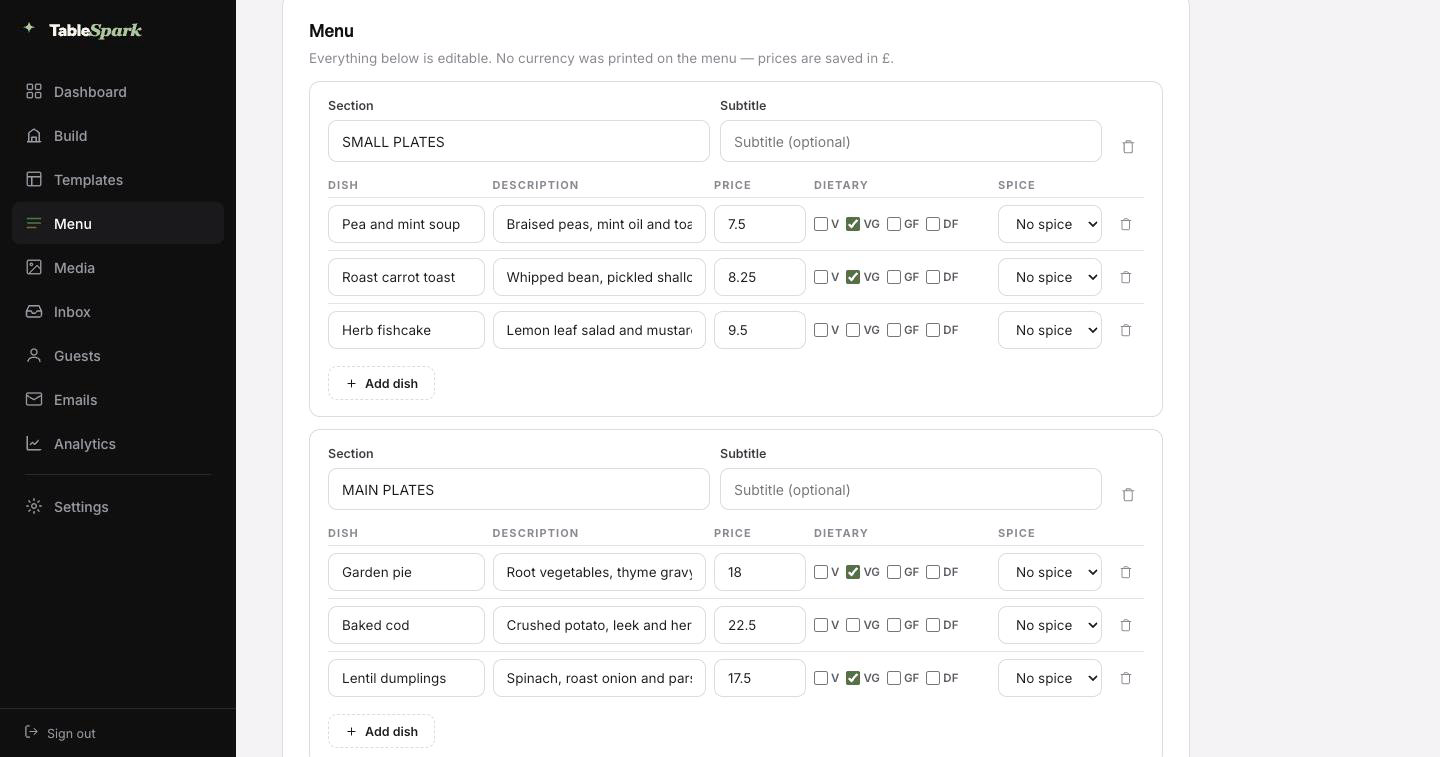
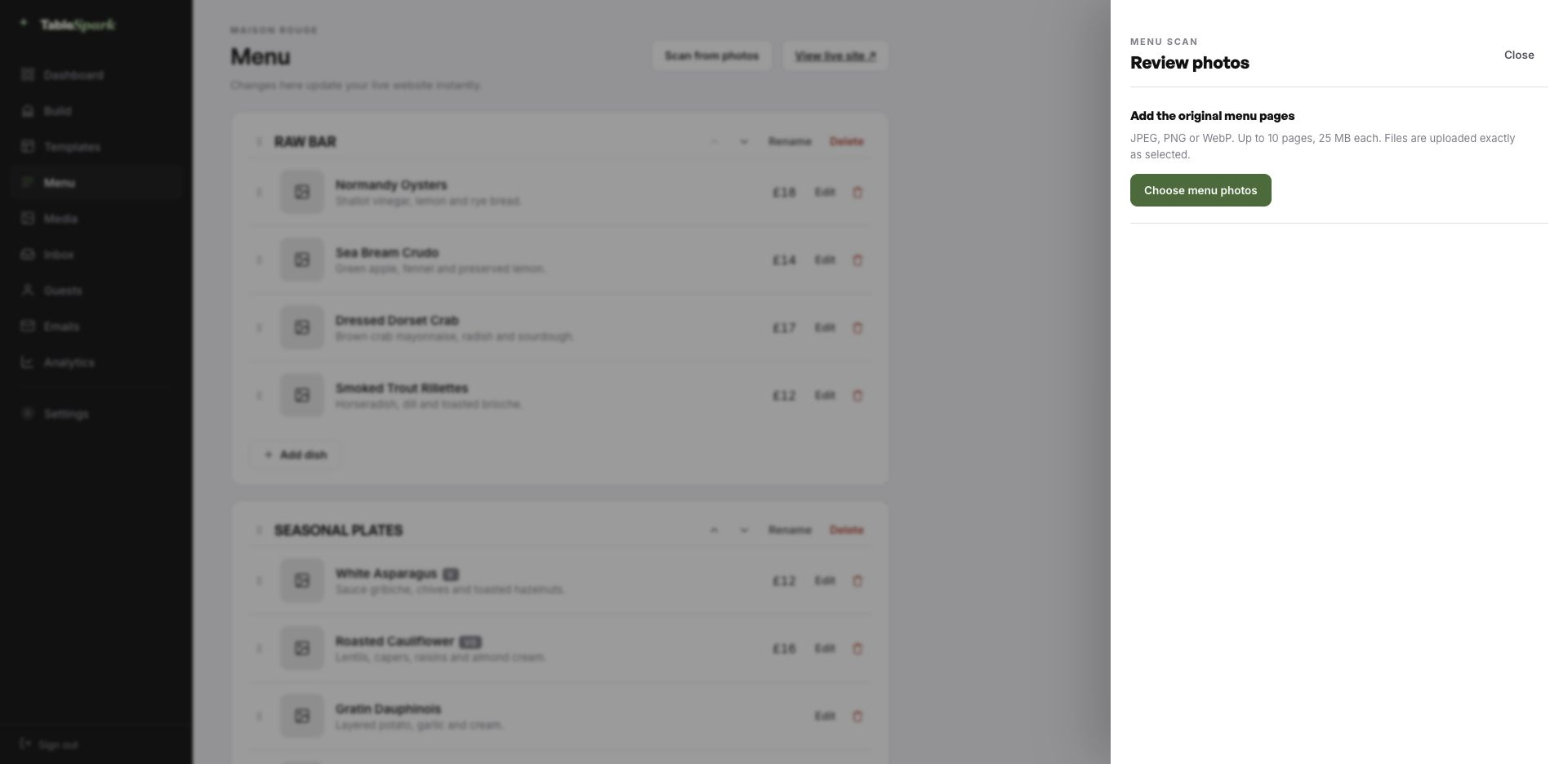
The TableSpark menu editor with the Scan from photos panel open, ready to take menu photographs
One · uploadWhere it starts — Scan from photos in the menu editor. Ten pages, any of the common image formats.
The review screen after a menu scan: sections, dish names, descriptions, prices, dietary marks and spice levels, every field editable
Two · reviewEverything the AI read, laid out as editable fields — sections, dishes, prices, dietary marks, heat.

Publish today, take bookings tonight

What usually takes a project plan takes a coffee break. It is a complete restaurant site that happens to be about somebody else. Fixing that is the job. A ten-minute job for most restaurants, and there is no separate switch to flick for bookings — they work on publish. Every reservation arrives in your inbox and the guest is emailed a confirmation immediately.

Connect Stripe — it takes about a minute — and the site starts taking deposits on bookings and payment on orders, into your account. You keep the order. TableSpark charges 0% commission at every level. Stripe’s standard card-processing fees apply to online payments.

  1. Pick Table RacineThe whole site copies into your account, menu and all.
    1 min
  2. Change the name and the wordsClick any block and type. The restaurant name propagates everywhere.
    4 min
  3. Upload your menuPhotograph it and let the AI build the sections, dishes and prices.
    3 min
  4. PublishYou are live on your address. Bookings work immediately.
    1 min
  5. Connect StripeNow you can take deposits on tables and payment on orders — direct to your account.
    1 min

Your name over the door

Your address is the last piece of the name, and it belongs to you. Publish today on a TableSpark address, then point your own domain at it whenever it suits: the one already printed on your windows and listed on Google.

We handle what usually needs a technician — the SSL certificate and its renewals, the bare-domain redirect, and the canonical signals that stop a move from costing you visibility. Domains you already hold are welcome, and the change is one line in your registrar.

tableracine.tablespark.ukbecomeswww.tableracine.co.uk

The confirmation email, in your own branding

The booking is not the last thing a guest hears from you — it is the first. Each booking triggers an email in your name: the date and time they chose, how many are coming, where to find you, and a link to hand the table back if plans move. Reminders before service, deposit receipts and cancellation notices come from the same place.

It belongs to your restaurant visually, not to the software. The choices are six base designs, an accent colour, a logo, a cover photograph, three header treatments, a personal sign-off, links and social marks. With your domain connected it also sends from your address, so the email is from the restaurant in every sense a guest can check.

Below is the actual renderer, the one that sends after a confirmed booking. Press any of the styles or colours and it rebuilds in front of you.
Loading the email…

Your branding, not ours

Everything a guest sees after they book, set in the same place as the site.

  • Six templates to start from.
  • Your accent, your logo, your photograph.
  • Your domain as the sender once connected.
  • Reminders before service and deposit receipts match it.
  • Your sign-off — Whatever arrived, we cooked it.

Try the buttons above — this is the live renderer, not a screenshot.

Where the template ends and you begin

  • Yours from the first minute: text, photographs, menu, prices, hours, address, colours, typefaces — everything a guest can see.
  • Kept for you: the invisible work — menus that scale, baskets that behave, layouts that reflow, and type that stays readable on every ground.
  • Never locked: add, remove and reorder blocks anywhere, and do the same with pages. What ships is a first draft of your site, not a contract.

Being on the internet is not being in search

A working address is the beginning of search visibility, not the end of it. The failure modes are boring and fatal: a noindex tag, canonicals that contradict each other, pages nothing points at, a menu only a human can read, no restaurant structured data, unverified search accounts. The consequence is paid discovery. Someone types your restaurant’s name and meets a listings site, a marketplace, or the place across the road.

The whole checklist is done for you. Nobody can guarantee a ranking or that Google will index a given page; what can be guaranteed is that the technical groundwork is not your problem.

Before you begin

Our menu changes every day. Is that a lot of work?

It is a few minutes. The menu editor is a list — rename a section, retype a dish, change a price, save — and everything that reads from it updates at once: the menu page, the ordering page, any home-page highlight and the structured data. There is no republishing step and no separate PDF to regenerate.

Can we name our suppliers on the site?

Yes, in two places. Each dish description can carry the grower, boat or variety, and there is a dedicated sourcing block for listing producers with a line each. Both are real text on the page, which means a guest can read them and a search engine can index them — useful when somebody searches for a farm or a fishing port by name.

How does the menu get onto the site?

No — photograph it and upload it. TableSpark reads the menu and builds the structured version for you: sections in order, dish names, descriptions, prices, and the dietary and spice marks where they are legible. You review the result and correct anything the camera got wrong. From there it is real data, not a picture, so the same menu drives the menu page, the ordering page, the home-page highlights and the Restaurant structured data a search engine reads — change a price once and all of them follow.

When can we start taking reservations?

For most restaurants, about ten minutes. The template arrives complete, so you are editing rather than building: the name, the copy, the menu, then publish. Bookings answer immediately and appear in your inbox, with an automatic confirmation to the guest. Connecting a payment account adds deposits and order payments, which go directly to your own account — TableSpark takes no commission on any plan. Stripe’s standard card-processing fees apply to online payments.

Are we stuck with these colours and typefaces?

Every one of them, in the Theme tab: palette, the display and body typefaces, corner radius, motion, the header layout and how it behaves on scroll. The template is a starting point, not a cage — and switching a colour never breaks the layout, because the design reads its values from the theme rather than hard-coding them.

What happens to the domain we already own?

Yes — and bringing a domain you already own is the common case. You go live on a TableSpark address first, then point your domain across; you get the exact DNS record to change. The certificate, HTTPS, bare-domain redirect and the search-engine housekeeping are handled here so the switch does not cost you visibility. Your guest emails can then send from that domain as well.

Begin with Table Racine

Copy this design into your account, change the words, add your menu and publish — usually the same afternoon. Free to build; you only pay when you go live.

Use this template free

Running a French kitchen? See all French restaurant website templates.

More Nordic Minimal templates

If you are comparing

← Browse all 50 restaurant website templates