Template library · Contemporary French

Saison Bleue — a contemporary French restaurant website template

For French dining rooms with Japanese discipline: a pale, editorial template built around a vestibule opening, a carte that reads like a printed card, and a reservation flow rather than a basket.

Contemporary FrenchMaison Luxe · Vestibule6 pages · 43 editable sections0% commission
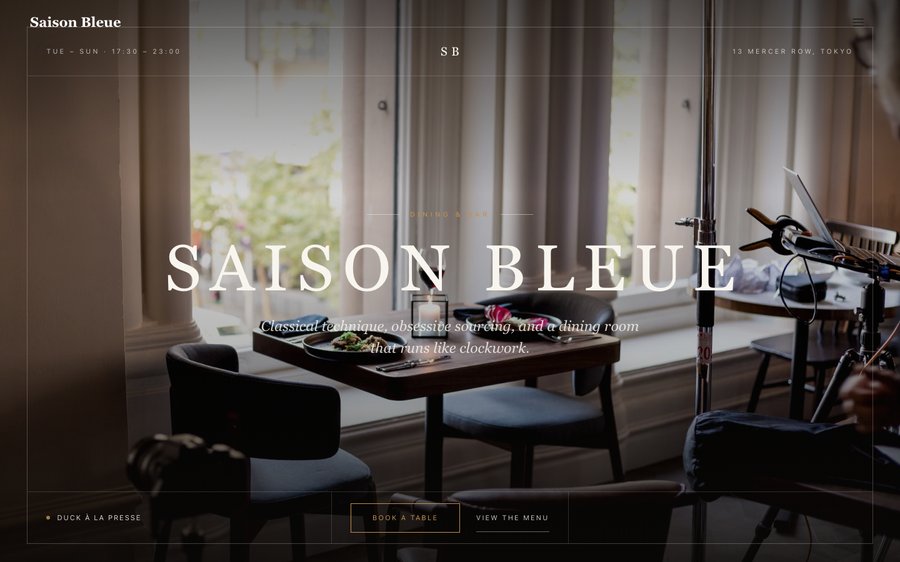
Saison Bleue, a contemporary French restaurant website template — the home page as it publishes
Saison Bleue · Tokyo, Japan

Starter is £19/mo excl. VAT and includes a complete restaurant website, a live structured menu, enquiry and newsletter forms, and managed search readiness. Growth is £39/mo excl. VAT and adds direct live bookings, a custom domain with managed SSL, and table and floor-plan operations. Full is £69/mo excl. VAT and adds online ordering and multi-site management for up to five restaurant sites. TableSpark commission is 0%. Stripe's standard card-processing fees apply to online payments.

A finished restaurant website and the system behind it, at the lowest entry point and the best value available to an independent UK kitchen. There is no build phase and no invoice with a project manager on it. The design exists; your job is to put your restaurant inside it. Every word and every price stays under your control afterwards, which is the part that decides whether a restaurant site stays accurate. It reads properly on a phone, a tablet and a desktop, and the plans carry reservations, table management and online ordering at 0% TableSpark commission.

Take it for a drive.

Saison Bleue is bone paper with a blue that belongs to an inkwell. Yours might be white tile and morning light, or brass and candles, or something nobody has built yet.

Rather than explain, here is the thing itself: the builder’s Theme controls on one side, the live site on the other, both real. You cannot break it, nothing saves, and no account is required to have a go. Go on.

Loading the live preview…

ThemePagesBlocks
Accent colour

Or pick any colour at all — the builder carries a full spectrum picker and a hex field.

Colours
Fonts
Two real things side by side — the builder’s Theme panel, and the site it changes.

The whole template, not a sample of it

6 pages, and every one of them is here. What follows is the site itself rather than pictures of it. The same engine that publishes a live restaurant is drawing it here, links and all. The Phone toggle shows the small-screen version.

Loading the live preview…

A live render. The links inside the frame work — use them, or the tabs above.

Who this was drawn for

A French dining room in Tokyo is an exercise in restraint twice over, and the design follows: bone-coloured paper, a single ink blue, an old-style serif for the headings and a plain sans for everything else. There is no texture, no gradient and no shadow anywhere on the page.

It opens on a vestibule — the pause between the street and the room. Rather than a hero photograph shouting the restaurant’s name, the visitor gets the name set small, the hours, and a way through. That is the correct temperature for a room where a booking is made a fortnight ahead.

What is on the home page

Nine blocks, arranged for restraint:

  • Hero — Big opening image, name & buttons, in the Vestibule treatment: Ruled inner frame over a vignetted room, status and address on the base rail.
  • Pull quote — A large standout quotation.
  • Menu preview — A few dishes on a sliding rail.
  • Numbers — Headline stats.
  • Sourcing — The growers and makers behind the menu.
  • Press bar — Press mentions or awards as a ruled band.
  • Gallery — Grid, masonry or moving strip.
  • Reservation form — Live availability slot picker, saved to your Inbox.
  • Call to action — Headline + button band.

Loading the live preview…

The Editorial layout. The real menu page. Try it at phone width — the structure survives the squeeze.

From interest to a booked table

There is no basket in this template, deliberately. A room like this sells reservations, not baskets, and the entire conversion path runs to a dedicated reservations page with a form that only offers real sittings.

That form does more than collect a name. It carries party size, dietary notes, occasion and a free-text request, all of which land in your TableSpark inbox with the booking rather than in a separate mailbox — and the guest is emailed a confirmation in your own branding immediately.

Loading the live preview…

The booking page as it publishes. Availability comes from your service hours, so nothing impossible is offered.

Story, visit, and the practical pages

The story page is written for a kitchen with a lineage: chef narrative, a quote, a timeline of the rooms they have cooked in, and a gallery. The separate gallery page carries the room and plate photography that a restaurant at this level will always have and rarely has anywhere good to put.

Loading the live preview…

The story page in full — everything a guest reads before they book.

Upload your menu. The AI does the typing.

The menu is the longest thing on any restaurant site, and it is the thing you type least. Whatever the menu is printed on, photograph it and upload it; the format does not matter. TableSpark reads it and builds the structured menu for you: sections in the right order, dish names, descriptions, prices, and the dietary and spice marks where it can see them. You review it, fix anything the camera got wrong, and it is done.

The distinction that matters is that a search engine can read every word of it. Everything downstream reads from it: the menu page, the highlights on the home page and the Restaurant structured data a search engine reads. Change a price once afterwards and all of them follow.

A Write with AI button on each page writes the search title and description from what is on it, so no page publishes with those fields empty. Always your last word — the draft lands in the field for you to edit before anything publishes.

Step one
Take a picture

Whatever your menu lives on today — card, board, PDF, ten pages of it.

Step two
It comes back structured

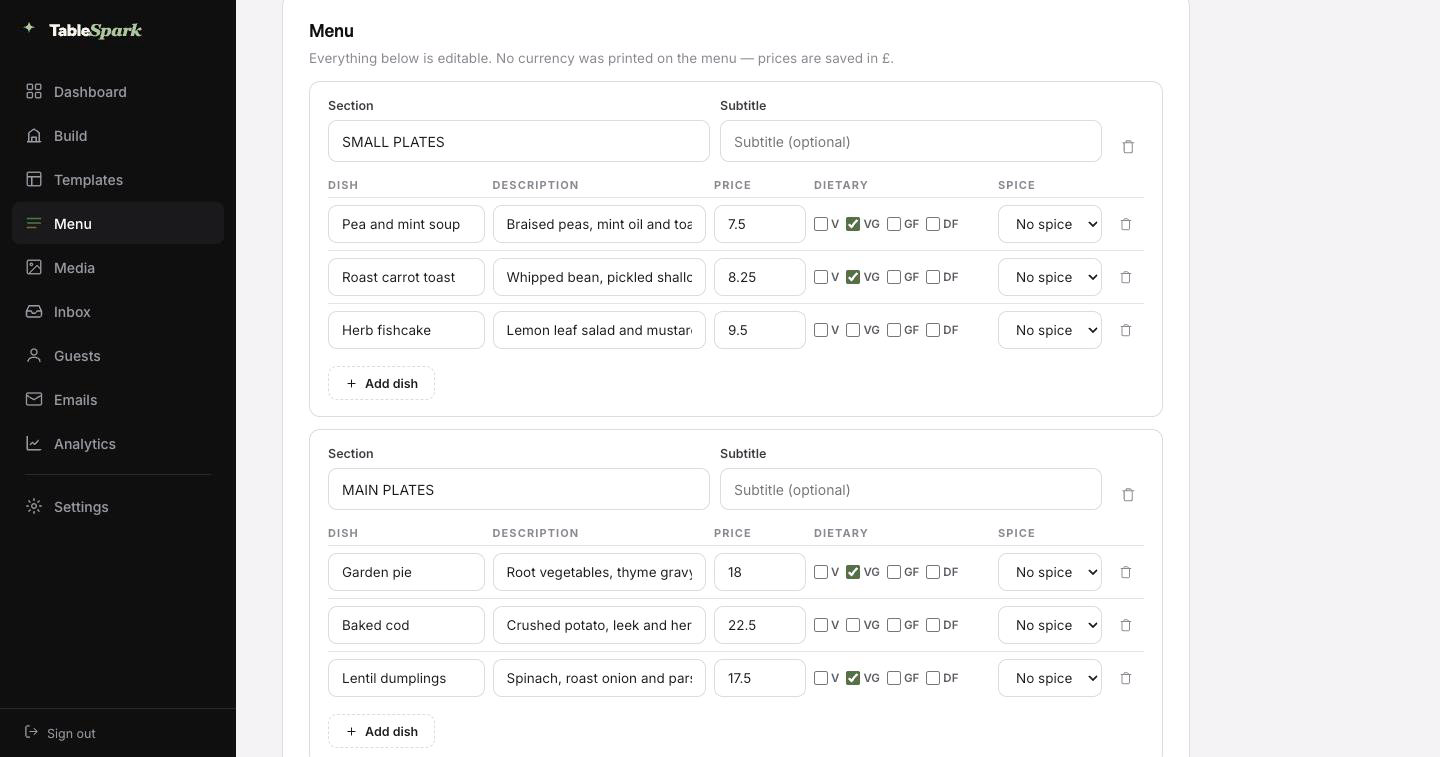
Ordered sections, named dishes, descriptions, prices and marks, all editable.

Step three
One source, many pages

Menu page, home-page highlights and the Restaurant schema — all reading from the same menu.

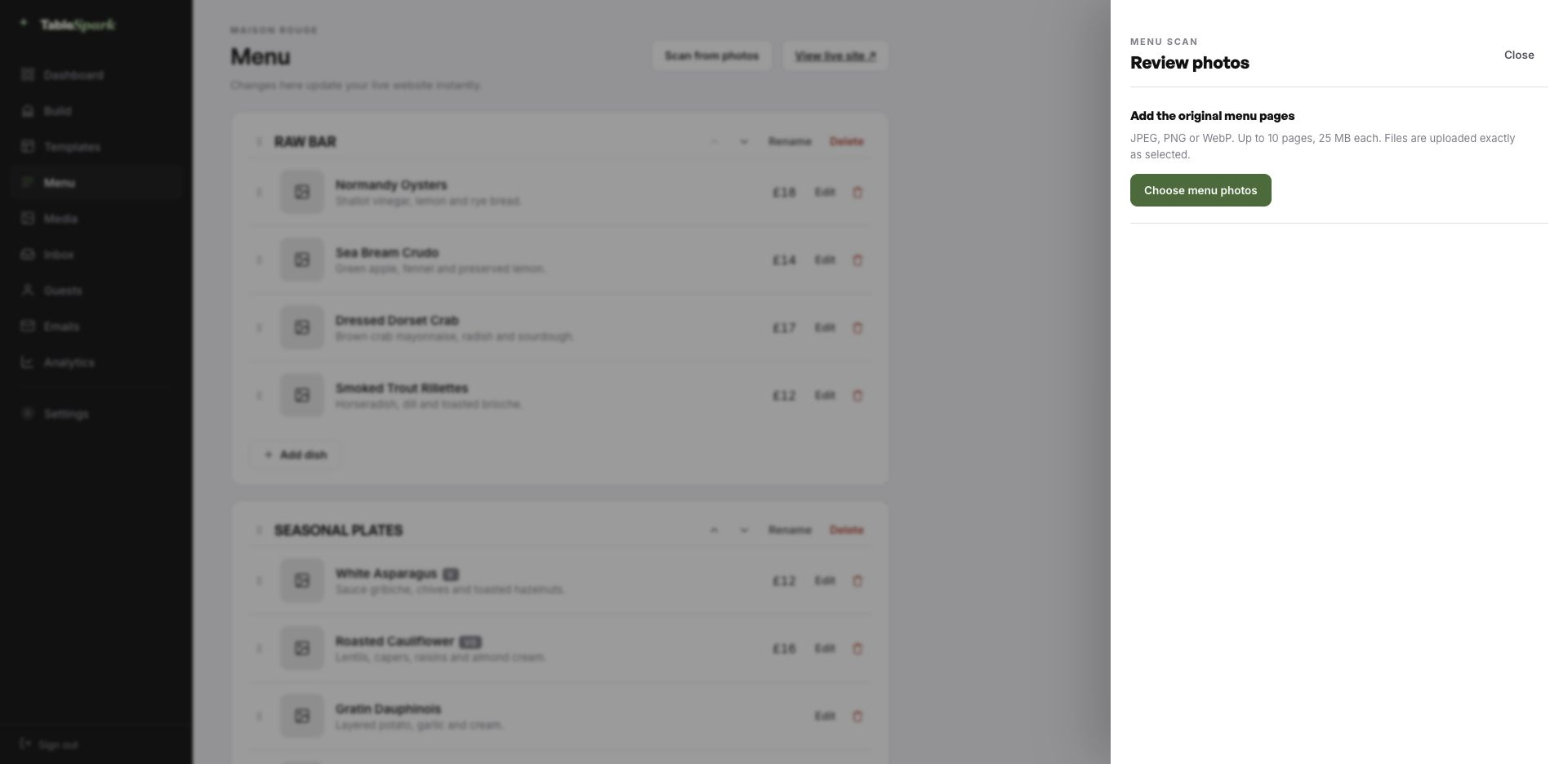
The TableSpark menu editor with the Scan from photos panel open, ready to take menu photographs
One · uploadThe entry point: upload up to ten menu pages as JPEG, PNG or WebP.
The review screen after a menu scan: sections, dish names, descriptions, prices, dietary marks and spice levels, every field editable
Two · reviewBefore saving: the whole menu as fields. Fix a misread price or an over-confident accent and continue.

How long this actually takes

The gap between deciding and being live is measured in minutes, not weeks. The template is already a finished site; the work is making it yours. Ten minutes is a fair estimate from first login to a live address, and bookings start working the instant you publish. Reservations collect in your TableSpark inbox and each guest is confirmed by email automatically.

Payments are one link away. Connect Stripe and deposits and order payments flow directly to you. Zero commission, permanently. Stripe’s standard card-processing fees apply to online payments. That is the end of the list.

  1. Pick Saison BleueThe complete site lands in your account, ready to edit.
    1 min
  2. Change the name and the wordsClick, type, replace a photograph. The name updates site-wide.
    4 min
  3. Upload your menuUpload a picture of the card; the AI does the sections and prices.
    3 min
  4. PublishPublished, on your own address, with the booking form answering.
    1 min
  5. Connect StripeNow you can take deposits on tables — direct to your account.
    1 min

Moving it onto your own domain

What is printed at the bottom of the menu should be your own. Go live immediately on a TableSpark address, and swap in your own domain at any point afterwards — including one you already own.

Certificates, HTTPS, the redirect from the naked domain and the search-engine housekeeping around a move are all handled for you. Bring a domain you already own, and we will tell you exactly which record to change.

saisonbleue.tablespark.ukbecomeswww.saisonbleue.co.uk

The email after the booking is yours to design

Between booking and arriving, the confirmation email is the whole relationship. The moment a guest books, TableSpark sends them a confirmation on your behalf: the date, the time, the party size, where you are, how to reach you, and a link to release the table if their plans change. The pre-service reminder, the deposit receipt and the cancellation note share it.

None of it has to look like us. Six designs to start from, plus your colour, your logo, a photograph, the header treatment, your own closing line, your links and your socials. Connect your domain and it sends from your address too — so what lands in a guest’s inbox looks like it came from the restaurant, because it did.

The email below is being generated live by the same code that sends it for real. Try the templates and the accent colours.
Loading the email…

Every part is editable

Everything a guest sees after they book, set in the same place as the site.

  • Spark, Ink, Linen, Noir, Bistro, Plate — pick one.
  • Set the accent, add a logo, add a photograph.
  • Once your domain is connected, it sends from you.
  • The reminder, the receipt and the cancellation match.
  • Your sign-off — À bientôt.

Try the buttons above — this is the live renderer, not a screenshot.

What you change, and what stays

  • Yours from the first minute: the wording anywhere on the site, the photographs, the menu and prices, your hours and location, and the palette and typefaces.
  • Kept for you: the parts that break when hand-built: a menu that still reads at two hundred dishes, a basket that works one-handed, and contrast that holds whatever colour you choose.
  • Never locked: add, delete or reorder any section on any page. Add pages. Delete the ones you do not want. The template is the starting line.

Findable, not merely online

There is a gap between a website that loads and a website that gets found, and it is wider than most owners expect. Working link, zero visibility. It happens through stray noindex rules, conflicting canonicals, orphaned pages, PDF menus, absent structured data and unfinished verification. And the restaurant pays for it: people searching your own name find aggregators and commission-charging platforms instead, so you rent back an audience that was yours.

It is handled in the box, not in an add-on. No guarantees about rankings or indexing exist anywhere in this industry. What exists here is the technical work, finished.

Questions before you start

We do not take online orders. Is this template still complete?

Yes — this one is built around reservations rather than a basket, which is the right shape for a dining room that sells tables. The reservation page, the booking form, the confirmation emails, the guest list and the inbox all work exactly as they do elsewhere. If you later add a retail or takeaway arm, an ordering page can be added from the module library without touching the rest of the site.

Can we run a lunch menu and a tasting menu side by side?

Yes. Each is a separate menu with its own sections and prices, and both can sit on the menu page or on their own pages. Publishing is per menu, so a seasonal menu can be written in advance and switched live on the morning it starts.

Does the guest hear anything after booking?

They get an email from you within seconds: when they are booked, how many are coming, where you are, how to reach you, and a self-service link to give the table back. Reminders, deposit receipts and cancellations follow the same design, which you control — six templates, your colour, logo and cover image, the header treatment, your sign-off, links and socials. Connect your domain and it sends from your address as well.

Do I need to know how to code?

No — the builder is visual throughout. Click a block, retype the copy, swap the photograph, move it up or down. Nothing about running the site requires HTML.

Do we have to enter two hundred dishes manually?

No, and it is the single biggest time saving in setting up. Upload menu photographs and TableSpark returns sections, dishes, descriptions, prices, dietary marks and spice levels as editable fields for you to approve. Once approved it is real data, so the menu page, the ordering page, the home-page highlights and the structured data a search engine reads all stay in step automatically.

Realistically, how long is this going to take?

Ten minutes is a fair estimate. The template copies into your account complete, so the work is changing the name, editing the words and uploading the menu before you publish. Bookings work immediately on publishing, arriving in your TableSpark inbox with an automatic confirmation to the guest. Adding a payment account enables deposits on tables and payment on orders, paid direct to you at 0% commission. Stripe’s standard card-processing fees apply to online payments.

Build on Saison Bleue

Take this design, make it about your restaurant, and publish it today. Building costs nothing; you pay only when it goes live.

Use this template free

Running a French kitchen? See all French restaurant website templates.

More Editorial Luxe templates

More on the money side

← Browse all 50 restaurant website templates