Template library · Contemporary Italian (Abruzzo)

Altopiano — a mountain restaurant website template

For kitchens in high, quiet places: a warm paper template with an oven-poster opening, a rail-based menu, and a design that makes remoteness read as a reason to come rather than an obstacle.

Contemporary Italian (Abruzzo)Cuisine House · Oven Poster6 pages · 41 editable sections0% commission
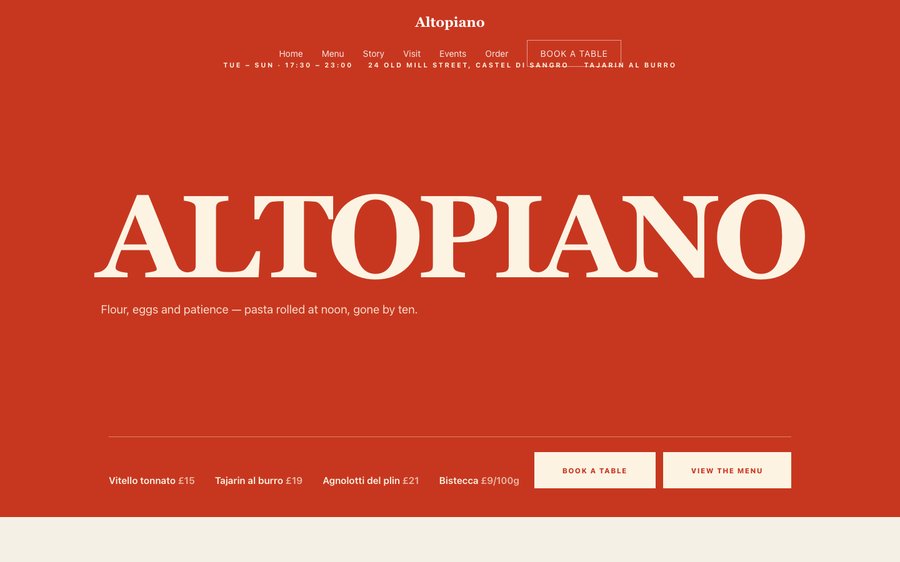
Altopiano, a mountain restaurant website template — the home page as it publishes
Altopiano · Castel di Sangro, Italy

Starter is £19/mo excl. VAT and includes a complete restaurant website, a live structured menu, enquiry and newsletter forms, and managed search readiness. Growth is £39/mo excl. VAT and adds direct live bookings, a custom domain with managed SSL, and table and floor-plan operations. Full is £69/mo excl. VAT and adds online ordering and multi-site management for up to five restaurant sites. TableSpark commission is 0%. Stripe's standard card-processing fees apply to online payments.

That is the whole website and the whole system, at the best value on offer to an independent UK restaurant. A bespoke build costs thousands and takes months; this one is already designed, and you can publish it this afternoon. And it stays yours to run: change a price at four in the afternoon and it is live before service. Every template is optimised for phone, tablet and desktop, and the plans carry reservations, tables, ordering and management — with 0% TableSpark commission.

Go on — change something.

Altopiano is warm plaster with a terracotta that belongs to a bread oven. Yours might be white tile and morning light, or brass and candles, or something nobody has built yet.

The controls beside the frame are not an illustration of the Theme tab — they are the Theme tab, driving the same engine that publishes real restaurants. Press whatever you like; nothing is stored and nothing is signed up for. Go on.

Loading the live preview…

ThemePagesBlocks
Accent colour

Or pick any colour at all — the builder carries a full spectrum picker and a hex field.

Colours
Fonts
Live, both halves. The controls are the builder’s own; the site is the real one — press an accent and every page follows.

Go through it like a guest would

6 pages, and every one of them is here. Everything below is rendered, not photographed. The frame uses the same engine as a published site, so the tabs and the in-page links are all real. Phone shows the mobile layout.

Loading the live preview…

The real pages, live. Click anything inside the frame, or use the page tabs.

The room it imagines

A restaurant an hour from anywhere has to answer a different question than a city one: not “why you” but “why the drive”. The design answers it structurally, leading with what comes out of the oven and following immediately with the practical detail a guest planning a journey needs.

The palette is plaster and terracotta, warm and unhurried, and the type is a soft serif with a plain sans. It reads as a converted building rather than a design project, which is exactly what a mountain restaurant is selling.

The home page, section by section

Eight blocks, arranged for someone deciding whether to drive:

  • Hero — Big opening image, name & buttons, in the Oven Poster treatment: Flat accent field, oven temperature, six pizzas on one line.
  • Pull quote — A large standout quotation.
  • Menu preview — A few dishes on a sliding rail.
  • Seasonal calendar — What each month or season brings.
  • Gallery — Grid, masonry or moving strip.
  • Numbers — Headline stats.
  • Press bar — Press mentions or awards as a ruled band.
  • Reservation form — Live availability slot picker, saved to your Inbox.
  • Call to action — Headline + button band.

Loading the live preview…

The Rails layout. Menu layout, rendered live. Phone view shows what a guest at the table actually sees.

Ordering, on your own terms

This is the part worth pressing. Altopiano uses the Chip bar ordering layout — sections become filter chips across the top, so a short menu is ordered from in three taps. The chip-bar ordering layout — sections as filters across the top — suits a restaurant whose online sales are a curated few things rather than the whole menu: the bread, the preserves, a hamper.

It behaves like everything else in the library: quantities, inline options, a visible total, and payment into your own Stripe account with 0% taken by us. Stripe’s standard card-processing fees apply to online payments.

Dine-in wants a table number and nothing else; collection wants a number to ring; delivery wants somewhere to go. No mode asks for the others’ fields.

Loading the live preview…

Try it with your thumb

This is the frame that matters. It is the real ordering page at a real phone width — not a mock-up, not a video.

  • Tap between sections; the dish list swaps in place.
  • Press + to add, to remove — the count is always on the row.
  • The bottom bar shows what is in the basket and what it costs.
  • Every required choice is collected before the dish joins the basket.

On a laptop the same page puts the basket in a panel beside the menu that follows the scroll.

Opened at the ordering block, at phone size. Add something and see the bar fill.

Where the restaurant explains itself

The story page carries the building, the family and the valley — narrative, timeline, interview, gallery. The events page handles the cookery days and seasonal dinners a destination restaurant runs, and the visit page does the real work of explaining a road that a map alone cannot.

Loading the live preview…

Live story page: the chef, the reasoning, the history and the photographs.

The typing is already done

Nobody starts a website looking forward to retyping ninety dishes. Point a phone at whatever your menu currently lives on and send it over. The AI turns it into sections, dishes, descriptions and prices, and picks up the dietary marks and heat levels it can see. Read it back, adjust anything the photograph fumbled, and that is the menu built.

A photograph of a menu is decoration; a structured menu is infrastructure. From there the same data runs the menu page, the ordering page, the highlights on the home page and the Restaurant structured data a search engine reads. Change a price once afterwards and all of them follow.

And the fields nobody enjoys writing — the search title and description — are drafted by a Write with AI button that reads the page first. The AI writes the first version; you decide whether it is the last.

Step one
Photograph what you have

The card, the board, the sheet by the till. Ten pages at a time.

Step two
Structured, not scanned

Sections, dish names, descriptions, prices, dietary and heat marks, all editable.

Step three
Change once, change everywhere

Menu page, ordering page, home-page highlights and the Restaurant schema — because they share one menu.

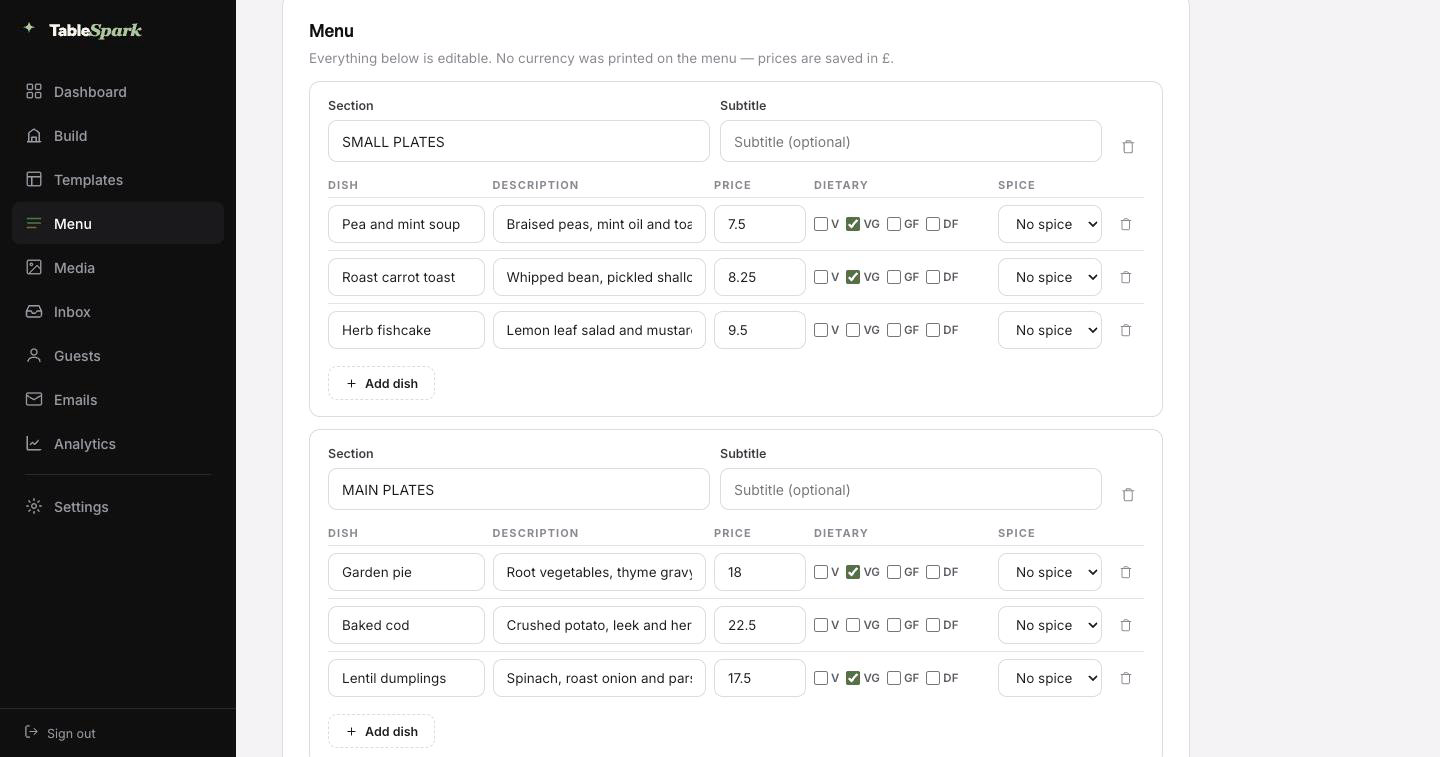
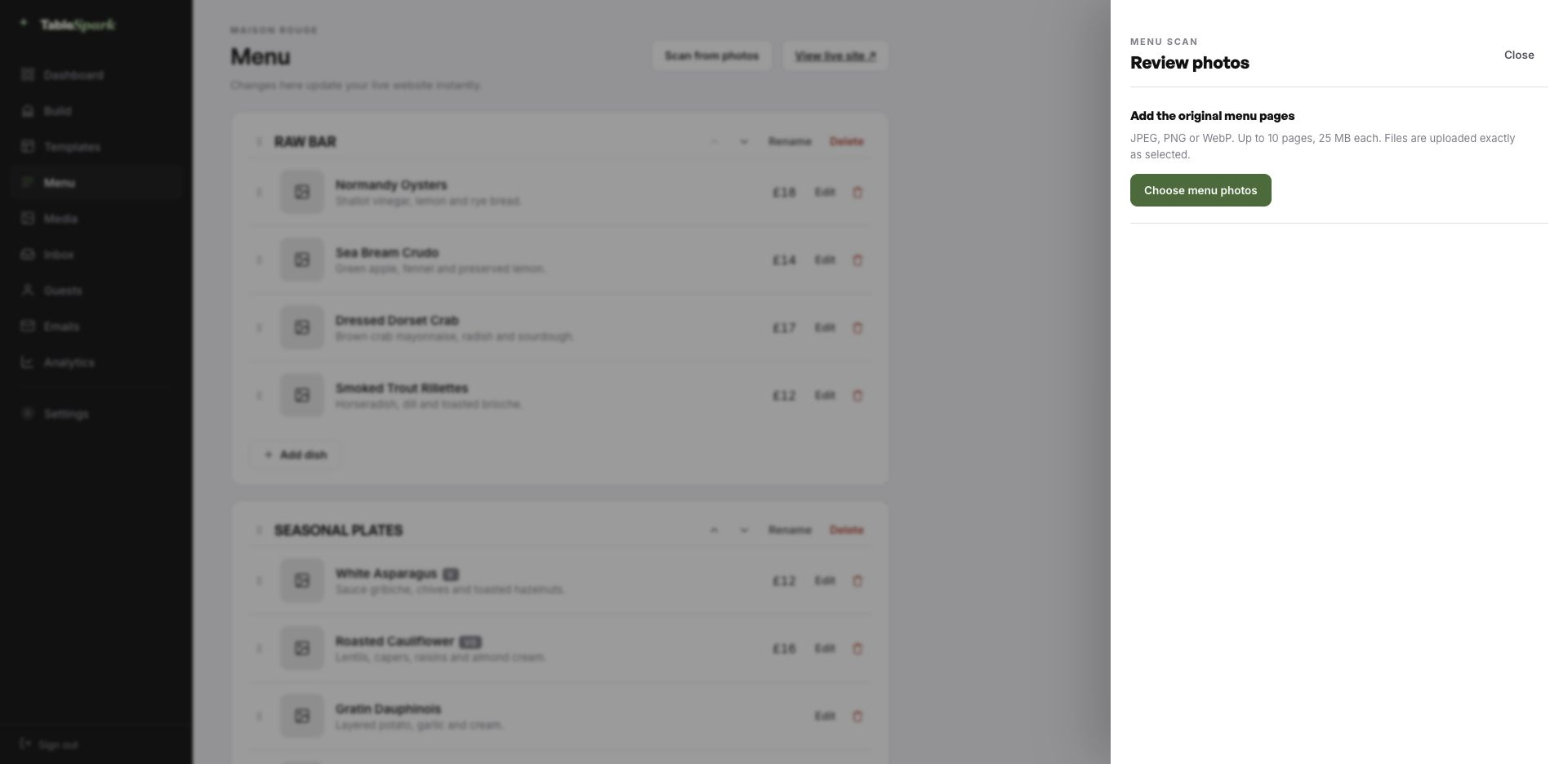
The TableSpark menu editor with the Scan from photos panel open, ready to take menu photographs
One · uploadMenu → Scan from photos. JPEG, PNG or WebP, up to ten pages at a time — a photograph of the printed card is enough.
The review screen after a menu scan: sections, dish names, descriptions, prices, dietary marks and spice levels, every field editable
Two · reviewWhat came back, before anything saves: sections, dish names, descriptions, prices, dietary marks and spice levels — every field editable.

Ten minutes, then you are open

You are not commissioning a website; you are moving into one. The site works from the first second — it simply has the wrong name on the door. Ten minutes covers it for most kitchens — and the second it is live, the booking form is taking reservations. It lands in the inbox with the party size and the time, and the guest is confirmed by email at once.

Attach your own Stripe account and the site can charge for orders and hold deposits on tables — the funds are yours from the start. We take 0%. Not on the first order, not on the thousandth. Stripe’s standard card-processing fees apply to online payments.

  1. Pick AltopianoThe whole site copies into your account, menu and all.
    1 min
  2. Change the name and the wordsClick any block and type. The restaurant name propagates everywhere.
    4 min
  3. Upload your menuPhotograph it and let the AI build the sections, dishes and prices.
    3 min
  4. PublishYou are live on your address. Bookings work immediately.
    1 min
  5. Connect StripeNow you can take deposits on tables and payment on orders — direct to your account.
    1 min

Your domain, our plumbing

The web address is something guests read aloud, so it should sound like you. You can be live before lunch on a TableSpark address and on your own domain by the weekend, with no rebuild in between.

Everything fiddly about a domain — SSL, renewals, bare-domain redirects, canonical URLs surviving the move — is managed on your behalf. Already own the name? Keep it — you get the exact record to update, in plain English.

altopiano.tablespark.ukbecomeswww.altopiano.co.uk

The email nobody thinks about, designed properly

The email that follows a booking is read more carefully than any page on the site. As soon as a table is confirmed, the guest gets an email in your name carrying the date, the time, the number of covers, your address, your phone number and a way to cancel cleanly. Reminders, receipts and cancellations follow the same treatment, so nothing looks bolted on.

It carries your restaurant, not our branding. Pick one of six templates, then set the accent, the logo, a cover image, how the header sits, the sign-off line, your links and your social marks. When your domain is connected the mail is sent from your own address, which is also what keeps it out of a promotions tab.

The frame below is the real thing: it is drawn by the same renderer the booking system uses, not a picture of one. Press a style or a colour and watch it change.
Loading the email…

Your branding, not ours

Everything a guest sees after they book, set in the same place as the site.

  • A choice of six templates.
  • Your colour, your mark, your cover photograph.
  • Header left, centred or as a colour band.
  • Sends from your domain, and carries every other guest email.
  • Your sign-off — The road is worth it.

Try the buttons above — this is the live renderer, not a screenshot.

The line between the design and your restaurant

  • Yours from the first minute: every word and every image, the menu and what it costs, the hours you keep, where you are, and the colours and fonts the site is built from.
  • Kept for you: the difficult engineering — long-menu behaviour, the basket on a small screen, how blocks stack when the window narrows, and legibility surviving a palette change.
  • Never locked: reorder, remove or add any block on any page, add whole pages, and throw away anything you do not need. This is a starting point, not a cage.

Being on the internet is not being in search

Being published and being findable are two different things, and only one of them happens automatically. The usual culprits are mundane: a robots rule nobody removed, two canonicals pointing different ways, orphaned pages, the menu published as a PDF, no structured restaurant data, search verification half done. The cost lands on the restaurant — guests searching your name, your menu or your street reach directories and commission-charging marketplaces first, and you end up paying for the traffic you should already own.

All of that is finished before you arrive. Search results are not something anyone can promise you. A correctly configured site is, and that is what this is.

What restaurants ask us

We are remote. Can the site explain the journey properly?

Yes, and it is one of the more valuable pages on a rural restaurant’s site. The visit page carries a map, written directions, parking, the season and a “before you come” block for the things a pin cannot say. All of it is text, so it is readable by guests and indexable when someone searches for your village or valley.

We run cookery days and seasonal dinners. Where do those go?

The events page holds them, each with its own description, date and enquiry route. Because they are pages rather than social posts, they can be found by search months later, and the enquiry lands in your TableSpark inbox with the date and party size attached.

Are we stuck with these colours and typefaces?

Every part of it. The Theme tab controls the base skin, the accent, the background, text and surface colours, both typefaces, the text scale, corner radius, motion and the header. Change any of them and the whole site follows, because nothing hard-codes a colour.

What happens to the domain we already own?

Yes, and you do not have to sort it out before going live. Publish on a TableSpark address today; connect your own domain — new or one you have held for years — whenever it suits. The SSL certificate and its renewals, the secure connection, the bare-domain redirect and the canonical, sitemap and robots signals are all managed for you, so search visibility survives the change. The same domain can send your guest emails.

What lands in the guest’s inbox when they reserve?

An instant confirmation on your behalf holding the booking details, your address and contact number, and a link that releases the table if something changes. The reminder before service, the deposit receipt and any cancellation notice use the same design — and that design is yours: six templates, your accent, your logo, a cover photograph, three header treatments, your own sign-off, your links and your socials. Once your domain is connected the email sends from it.

Does changing the site require help?

None at all. The whole site is blocks you click and edit — text in place, photographs uploaded, sections dragged into a new order. No HTML is involved on your side.

Take Altopiano and go

The whole site copies into your account in one click. Change the words, upload the menu, publish. Free until the moment you go live.

Use this template free

Running a Italian kitchen? See all Italian restaurant website templates.

More Italian Classic templates

While you are deciding

← Browse all 50 restaurant website templates